Spring Boot DevTools in 2026: Hot Reload, LiveReload and Developer Productivity
Spring Boot DevTools tutorial for Spring Boot 4.1: automatic restart internals, spring.devtools properties, LiveReload deprecation, classloader pitfalls and @RestartScope with Testcontainers.
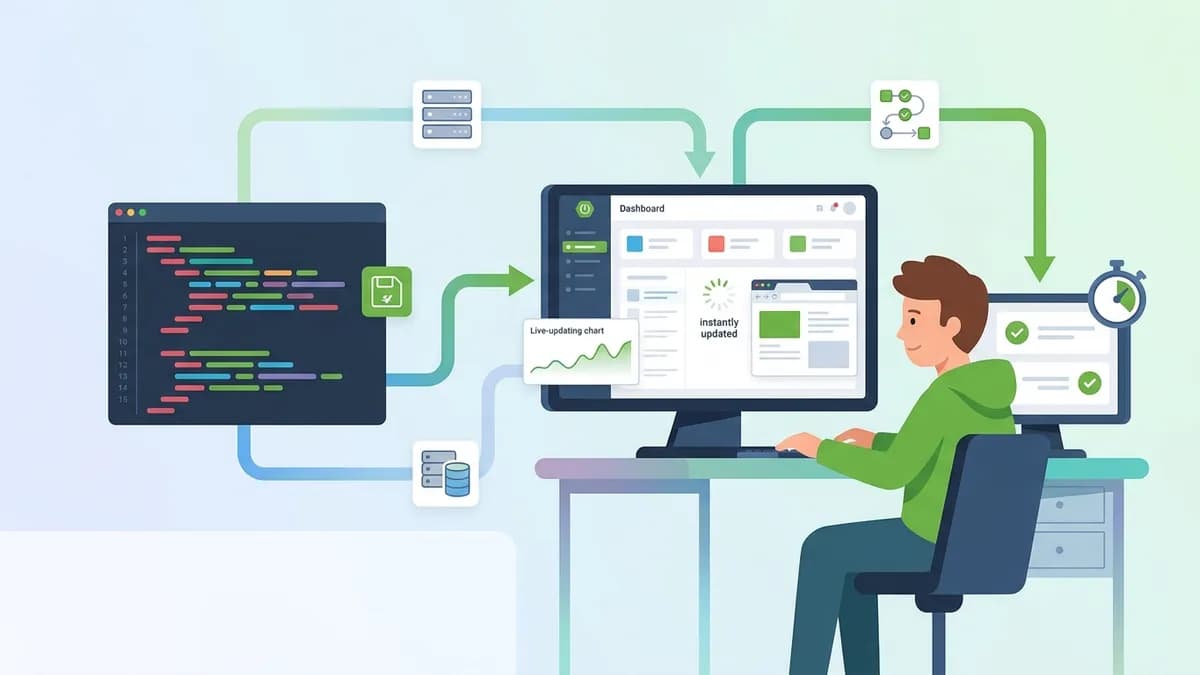
Spring Boot DevTools cuts the edit, rebuild and restart loop of a Java web application down to a second or two by restarting only the code that changed. The module ships with every Spring Boot release, and Spring Boot 4.1 (the current stable line, 4.1.2 at the time of writing) still treats automatic restart as the main productivity feature, while LiveReload is now deprecated.
Spring Boot DevTools splits the classpath into two classloaders: a base loader for third-party jars and a restart loader for project classes. When a compiled class changes, only the restart loader is thrown away and recreated, which makes a restart much faster than a cold start. DevTools also disables template caching and switches itself off in packaged java -jar applications.
Adding the spring-boot-devtools dependency
DevTools is a single artifact. The important detail is the scope: the dependency must never leak into other modules or into the production archive. Maven expresses this with optional, Gradle with the developmentOnly configuration provided by the Spring Boot plugin.
<!-- pom.xml -->
<dependencies>
    <!-- Version is managed by spring-boot-starter-parent 4.1.x -->
    <dependency>
        <groupId>org.springframework.boot</groupId>
        <artifactId>spring-boot-devtools</artifactId>
        <!-- optional: not propagated to modules that depend on this one -->
        <optional>true</optional>
    </dependency>
</dependencies>
The Gradle equivalent fits on one line:
dependencies {
    // developmentOnly: on the classpath for bootRun, absent from bootJar
    developmentOnly("org.springframework.boot:spring-boot-devtools")
}
Both the Maven and Gradle plugins exclude DevTools from the repackaged jar by default. On top of that, DevTools detects a "fully packaged" launch (java -jar or a custom launcher classloader) and disables itself, because the official DevTools reference treats any such launch as production. Forcing it with -Dspring.devtools.restart.enabled=true is possible and is exactly what a production deployment must avoid.
How the Spring Boot hot reload actually works
The phrase "Spring Boot hot reload" is slightly misleading. DevTools does not swap bytecode inside a running JVM: it performs a restart, but a cheap one.
| Mechanism | What changes without restart | Cost per change | Tooling |
|---|---|---|---|
| JVM HotSwap (debugger) | Method bodies only | Near zero | Any IDE debugger |
| DevTools restart | Any class, any bean, any config | Usually 1 to 3 seconds | spring-boot-devtools |
| Full restart | Everything | Full startup time | None |
| Reloading agents | Most class structure changes | Near zero | JRebel and similar |
The two-classloader design is what makes the restart fast. Jars from Maven Central rarely change during a session, so they stay loaded in the base classloader, along with the JIT work already done on them. Project classes from target/classes or build/classes live in the restart classloader. A change discards that loader, a new one is created, and the ApplicationContext is rebuilt from scratch.
Two consequences matter in practice:
- State is lost. In-memory caches, sessions stored in memory and scheduled task progress all disappear on each restart. That is by design: the context is rebuilt.
- Restart is triggered by the classpath, not by the editor. DevTools watches compiled output. Saving a
.javafile does nothing until the IDE or the build tool compiles it.
The second point explains most "DevTools does not work" reports. In IntelliJ IDEA, the project has to be built (Ctrl+F9 / Cmd+F9) or "Build project automatically" has to be enabled together with the advanced setting that allows auto-make while the application runs. The IntelliJ IDEA Spring Boot documentation covers the run configuration options ("On update action", "On frame deactivation") that trigger this compile step. Eclipse and Spring Tools compile on save, so restart happens without extra configuration.
Tuning automatic restart with spring.devtools properties
DevTools is configurable through spring.devtools.* properties. The defaults in Spring Boot 4.1.2 are worth knowing because they explain several surprising behaviors: the file watcher polls every 1 second and waits for a 400 ms quiet period before restarting, so that a multi-file compile produces a single restart instead of five.
The configuration below adapts DevTools to a project that compiles slowly (large multi-module build, network drive, Docker volume) and serves static assets from a frontend build folder.
# src/main/resources/application-dev.properties
# Watch less often and wait longer before restarting: avoids double restarts on slow compiles
spring.devtools.restart.poll-interval=2s
spring.devtools.restart.quiet-period=1s

# Keep the default exclusions (static/**, templates/**...) and add one more folder
spring.devtools.restart.additional-exclude=generated/**

# Watch a folder outside the classpath (shared contract files, for example)
spring.devtools.restart.additional-paths=../shared-contracts/src/main/resources

# Restart only when this file is touched, not on every compile
spring.devtools.restart.trigger-file=.reloadtrigger

# Keep the condition evaluation delta report short on each restart
spring.devtools.restart.log-condition-evaluation-delta=false
A few rules govern these properties:
spring.devtools.restart.excludereplaces the default list (META-INF/maven/**,META-INF/resources/**,resources/**,static/**,public/**,templates/**, test classes and build info files).additional-excludeadds to it, which is almost always the intent.- Excluded resources do not restart the application, but they are still served fresh because DevTools disables caches such as
spring.thymeleaf.cacheand setsspring.web.resources.cache.periodto 0. - The trigger file must sit on the classpath (
src/main/resources/.reloadtrigger). IntelliJ IDEA Ultimate and Spring Tools both know how to update it after a build. spring.devtools.restart.enabled=falseinapplication.propertiesstops file watching but still initializes the restart classloader. To disable DevTools completely, the system property must be set inmainbeforeSpringApplication.run.
For settings that apply to every project on a machine, DevTools reads a global file from $HOME/.config/spring-boot/, named spring-boot-devtools.properties (or .yaml / .yml). This is the right place for a personal trigger file setting that should not be committed to a team repository. Profiles are not supported in that file.
Ready to ace your Spring Boot interviews?
Practice with our interactive simulators, flashcards, and technical tests.
Spring Boot LiveReload: deprecated in 4.1
LiveReload refreshes the browser automatically when a resource changes. DevTools embeds a LiveReload-compatible server on port 35729, and a browser extension connects to it. In Spring Boot 4.1 the server is off by default and must be turned on explicitly:
# application-dev.properties
# Deprecated since Spring Boot 4.1.0, no replacement planned
spring.devtools.livereload.enabled=true
spring.devtools.livereload.port=35729
The Spring Boot 4.1 release notes state it plainly: "Given its decrease in popularity and support, the LiveReload feature in Devtools is deprecated with no replacement." The browser extensions are barely maintained, and most frontends in 2026 are built with Vite or another dev server that already provides hot module replacement.
Existing Thymeleaf projects can keep spring.devtools.livereload.enabled=true for now, but a deprecated property in Spring Boot is a candidate for removal in a later major version. For server-rendered templates, the cache settings applied by DevTools already make a manual browser refresh show the latest template without restarting the application.
Restart classloader pitfalls and the ClassCastException
The most common DevTools bug looks absurd: com.example.Order cannot be cast to com.example.Order. The two class names are identical because the two classes come from two different classloaders. One Order was loaded by the restart classloader, the other by the base classloader (or by a previous restart classloader that should have been discarded).
It typically happens in three situations:
- A library deserializes objects with a standard
ObjectInputStream, which resolves classes through the wrong loader. Session replication and some caches do this. - A project module is consumed as a jar (a
commonlibrary in a multi-module build) and ends up in the base classloader while the classes that reference it are in the restart loader. - A static field holds an instance created before the last restart.
For case 2, DevTools reads a META-INF/spring-devtools.properties file from the classpath. Its keys move jars between the two classloaders using regular expressions:
# src/main/resources/META-INF/spring-devtools.properties
# Load the team's shared domain jar in the restart classloader, so it restarts with the app
restart.include.shared-domain=/orders-shared-domain-[\\w\\d.-]+\\.jar

# Keep a heavy internal SDK in the base classloader, it never changes during development
restart.exclude.payments-sdk=/payments-sdk-[\\w\\d.-]+\\.jar
Keys only need to be unique: the restart.include. or restart.exclude. prefix is what counts. For case 1, the fix is to deserialize with Spring's ConfigurableObjectInputStream and pass Thread.currentThread().getContextClassLoader(), which points to the current restart loader.
When restarts are still too slow or the classloader issues cannot be fixed, the documented fallback is a reloading agent such as JRebel, which redefines classes in place rather than restarting the context.
DevTools with Testcontainers and @RestartScope
Since Spring Boot 3.1, a project can start its databases and brokers through Testcontainers at development time, with a launcher class in src/test/java. This combines badly with naive restarts: each restart would destroy and recreate the PostgreSQL container, which costs several seconds and wipes the data.
@RestartScope, which lives in the DevTools module, solves exactly this. A bean annotated with it survives DevTools restarts. The setup below follows the Spring Boot development-time services guide, with the package names of Testcontainers 2 used by Spring Boot 4.
package com.example.orders;

import org.springframework.boot.devtools.restart.RestartScope;
import org.springframework.boot.test.context.TestConfiguration;
import org.springframework.boot.testcontainers.service.connection.ServiceConnection;
import org.springframework.context.annotation.Bean;
import org.testcontainers.postgresql.PostgreSQLContainer;

@TestConfiguration(proxyBeanMethods = false)
public class DevContainersConfiguration {

    @Bean
    @RestartScope        // the container is kept across DevTools restarts
    @ServiceConnection   // datasource URL, user and password wired automatically
    PostgreSQLContainer postgres() {
        return new PostgreSQLContainer("postgres:17-alpine");
    }
}
The launcher reuses the real main method and adds the configuration:
package com.example.orders;

import org.springframework.boot.SpringApplication;

public class TestOrdersApplication {

    public static void main(String[] args) {
        // Starts OrdersApplication with the containers declared above
        SpringApplication.from(OrdersApplication::main)
                .with(DevContainersConfiguration.class)
                .run(args);
    }
}
The application starts with ./mvnw spring-boot:test-run or ./gradlew bootTestRun. One Gradle detail breaks this setup silently: with developmentOnly, DevTools is not on the classpath of bootTestRun, so code changes are ignored. The dependency must move to testAndDevelopmentOnly("org.springframework.boot:spring-boot-devtools"). The integration test side of this setup is covered in the Testcontainers Spring Boot guide.
Remote DevTools and why production stays off-limits
DevTools can also push changes to an application running elsewhere, for example in a container on a shared development server. The remote server side activates only when spring.devtools.remote.secret is set and when DevTools is explicitly packaged in the archive (excludeDevtools=false on the Maven plugin). The client is org.springframework.boot.devtools.RemoteSpringApplication, launched from the IDE with the remote URL as argument.
The documentation is unambiguous on the boundaries: remote DevTools must only run over a trusted network or HTTPS, never in production, and it does not support Spring WebFlux applications. An endpoint that accepts class files and restarts the application is a remote code execution channel by construction. In most 2026 setups, running the application locally against Testcontainers or Docker Compose services gives a faster loop with none of that exposure.
Spring Boot DevTools interview questions
DevTools appears in Spring Boot interviews as a proxy for a deeper topic: classloading and the application context lifecycle. The questions that come up most often, with the answer a confirmed developer is expected to give:
- "Is DevTools hot swapping or restarting?" Restarting. It discards the restart classloader and rebuilds the
ApplicationContext; the JVM and the base classloader stay alive. Answering "hot swap" is the classic junior mistake. - "Why is DevTools safe to leave in the pom?" Three layers:
optionalordevelopmentOnlyscope, exclusion from the repackaged jar, and automatic deactivation onjava -jar. A strong answer mentions that forcingspring.devtools.restart.enabled=truebypasses the third layer. - "Where does
X cannot be cast to Xcome from?" Two classloaders loading the same class, fixed withMETA-INF/spring-devtools.propertiesor the context classloader. - "What happens to an in-memory cache on restart?" It is lost, unless the bean is in
@RestartScope.
These questions overlap with configuration topics, so the Spring Boot DevTools interview questions module pairs well with the profiles and environment module, since a dev profile is where most of the properties above belong. The full question bank is on the Spring Boot technology page.
Spring Boot DevTools setup checklist for 2026
- Declare
spring-boot-devtoolsasoptional(Maven) ordevelopmentOnly(Gradle); switch totestAndDevelopmentOnlywhen running a Testcontainers launcher withbootTestRun. - Make sure the IDE compiles on save or on frame deactivation: DevTools watches compiled classes, not source files.
- Use
spring.devtools.restart.additional-excluderather thanexclude, to keep the default static and template exclusions. - Set a trigger file in the global
~/.config/spring-boot/spring-boot-devtools.propertieswhen constant restarts during refactoring get in the way. - Treat LiveReload as deprecated since Spring Boot 4.1.0 and rely on the frontend dev server or a manual refresh instead.
- Annotate development containers with
@RestartScopeso PostgreSQL or Kafka survive each restart. - Diagnose
X cannot be cast to Xas a classloader split and fix it withrestart.includeentries.
Start practicing!
Test your knowledge with our interview simulators and technical tests.
Can you spot the bug in Spring Boot?
One real snippet, one hidden bug, one attempt a day. No account needed to try.

Written by
Anthony Fillion-MailletFounder of SharpSkill
Full-stack developer for over 10 years. Runs SharpSkill and answers for everything published here.
Updated on November 12, 2026
Tags
Share
Related articles
Testcontainers Spring Boot: Painless Integration Testing
Complete guide to configuring Testcontainers with Spring Boot 3.4. PostgreSQL, Redis, Kafka in Docker containers for reliable, reproducible integration tests.

Freelance Java Spring Boot developer jobs in 2026: where to find contracts, day rates, how to prepare
Where to find freelance Spring Boot contracts in 2026, current day rates across Europe, and how to prepare for technical interviews.

Java Spring Boot Developer Jobs in 2026: Where to Look, Salary Ranges, How to Prepare
Java Spring Boot developer jobs remain in high demand in 2026. This guide covers where postings appear, what salary ranges to expect, and how to prepare for technical interviews.