Flutter Impeller in 2026: Rendering Engine Architecture, Performance Gains, and Interview Questions
Flutter Impeller replaces Skia with AOT-compiled shaders, eliminating runtime jank. This guide covers architecture, platform support, performance benchmarks, and common interview questions.

Flutter Impeller replaces the Skia rendering engine with a new architecture built for modern graphics APIs. As of Flutter 3.47, Impeller runs by default on iOS, Android (API 29+), macOS, Linux, and Windows, delivering consistent frame rates by eliminating runtime shader compilation.
Impeller is a frequent topic in 2026 Flutter interviews. Expect questions about why shader jank existed, how AOT compilation solves it, and the performance differences across platforms. The ability to explain Impeller's architecture demonstrates understanding of Flutter's internals beyond widget trees.
How Impeller eliminates shader jank
Shader jank plagued Flutter apps built with Skia. When the GPU encountered a new visual effect, Skia compiled the required shader at runtime. This compilation blocked rendering, causing dropped frames during animations and transitions. Users noticed the stutter most on first launch or when navigating to new screens.
Impeller takes a different approach: all shaders are compiled ahead-of-time during the build process. The compilation pipeline transforms GLSL 4.60 source into SPIRV, then converts it to backend-specific formats (Metal for iOS/macOS, Vulkan or OpenGL ES for Android). By the time the app runs, every shader exists as an optimized binary blob.
The Impeller architecture documentation describes five design principles:
- Predictable performance: All shader compilation happens offline. Pipeline state objects are built upfront.
- Instrumentability: Graphics resources carry tags and labels for profiling without runtime cost.
- Portability: Shaders are authored once in GLSL and converted per backend.
- Modern API usage: Impeller uses Metal and Vulkan capabilities natively.
- Concurrency: Single-frame workloads distribute across multiple threads.
// No code changes required to use Impeller - it's automatic
// The rendering engine selection happens at the Flutter framework level
import 'package:flutter/material.dart';
void main() {
// Impeller handles all rendering behind the scenes
// Frame rates remain consistent from the first animation
runApp(const MyApp());
}
class MyApp extends StatelessWidget {
const MyApp({super.key});
Widget build(BuildContext context) {
// Complex animations that previously caused shader jank
// now render smoothly on first appearance
return MaterialApp(
home: AnimatedContainer(
duration: const Duration(milliseconds: 300),
decoration: BoxDecoration(
gradient: LinearGradient(
colors: [Colors.blue, Colors.purple],
),
boxShadow: [
BoxShadow(blurRadius: 20, spreadRadius: 5),
],
),
child: const Center(child: Text('No jank')),
),
);
}
}The shader precompilation eliminates the unpredictable pauses that made Flutter apps feel less polished than native counterparts.
Platform support and default behavior in Flutter 3.47
Impeller's rollout happened gradually across platforms. The current status as of Flutter 3.47:
| Platform | Impeller Status | Fallback Available |
|---|---|---|
| iOS | Default and only option | No (Skia removed) |
| Android API 29+ | Default | Yes (OpenGL) |
| Android API < 29 | OpenGL fallback | N/A |
| macOS | Default | Yes |
| Windows | Default | Yes |
| Linux | Default | Yes |
| Web | Skia (Impeller planned) | N/A |
On iOS, Impeller became the exclusive renderer in Flutter 3.16. There is no Skia fallback. The Flutter team removed Skia support entirely for iOS because Impeller reached stability and maintaining two rendering backends added complexity without benefit.
Android presents more variation due to device fragmentation. Devices running API 29 (Android 10) or higher use Impeller by default with Vulkan. Older devices fall back to OpenGL through the legacy Skia path. The Flutter performance documentation explains this behavior.
Performance benchmarks: what the numbers show
Benchmarks from 2026 demonstrate measurable improvements across key metrics:
Frame rasterization: Impeller reduces average frame rasterization time by approximately 50% in complex scenes. This improvement comes from the elimination of runtime shader compilation and better utilization of modern GPU APIs.
120fps consistency: High-refresh-rate displays benefit significantly. Apps maintain steady 120fps on flagship devices, whereas Skia-based builds often dropped frames during initial animations.
Startup time: Flutter apps with Impeller average cold start times around 250ms. The engine skips shader compiler initialization entirely.
Memory usage: Impeller uses approximately 100MB less memory than Skia while maintaining higher performance. Benchmarks show a memory delta of around 25MB on iOS and 14MB on Android.
These numbers vary by device and scene complexity. Heavily animated screens with gradients, shadows, and blur effects show the largest improvements because those effects required the most runtime shader compilation under Skia.
Flutter DevTools includes Impeller-specific tracing. The performance overlay shows rasterization times, and you can export traces for detailed analysis. GPU frame capture tools like Xcode Instruments (iOS/macOS) and RenderDoc (Android/Windows/Linux) work with Impeller's labeled resources.
Disabling Impeller for debugging
Sometimes debugging requires comparing behavior between Impeller and Skia. The Flutter CLI provides flags for this:
# Run with Skia instead of Impeller (Android/macOS/Windows/Linux)
flutter run --no-enable-impeller
For production builds where you need to disable Impeller, each platform has its own configuration:
<!-- AndroidManifest.xml -->
<!-- Disable Impeller in production Android builds -->
<application>
  <meta-data
      android:name="io.flutter.embedding.android.EnableImpeller"
      android:value="false" />
</application><!-- Info.plist (macOS) -->
<!-- Disable Impeller in production macOS builds -->
<key>FLTEnableImpeller</key>
<false />// Disable Impeller in production Windows builds
project.set_impeller_switch(flutter::ImpellerSwitch::Disabled);Disabling Impeller should be temporary. If Impeller causes rendering issues, file a bug with the [Impeller] prefix on the Flutter GitHub repository. Include device information, screenshots, and performance traces.
Ready to ace your Flutter interviews?
Practice with our interactive simulators, flashcards, and technical tests.
Impeller architecture for technical interviews
Interviewers testing Flutter knowledge in 2026 frequently ask about Impeller's internals. The architecture consists of several key components:
Compiler subsystem: Transforms GLSL 4.60 shaders through a multi-stage pipeline. GLSL becomes SPIRV, then converts to Metal Shading Language or SPIR-V for Vulkan. The compiler generates C++ translation units with struct definitions, eliminating runtime reflection.
Renderer layer: Provides backend-agnostic abstractions for memory allocation, pipeline state, and command encoding. The renderer exposes the same API regardless of whether Metal, Vulkan, or OpenGL runs underneath.
Entity system: Handles 2D rendering with pass optimization. Complex scenes get broken into render passes that the GPU can execute efficiently.
Display List integration: Bridges Flutter's widget layer to Impeller through the DisplayListDispatcher interface. This is where Flutter framework calls translate to rendering commands.
// CustomPainter example showing rendering operations
// Impeller handles these operations with precompiled shaders
class GradientPainter extends CustomPainter {
void paint(Canvas canvas, Size size) {
// Gradient shader - precompiled, no runtime compilation
final paint = Paint()
..shader = const LinearGradient(
colors: [Color(0xFF1E88E5), Color(0xFF7C4DFF)],
).createShader(Rect.fromLTWH(0, 0, size.width, size.height));
// Blur effect - also precompiled
final blurPaint = Paint()
..maskFilter = const MaskFilter.blur(BlurStyle.normal, 10);
// Path operations execute against prebuilt pipeline state
final path = Path()
..addRRect(RRect.fromRectAndRadius(
Rect.fromLTWH(20, 20, size.width - 40, size.height - 40),
const Radius.circular(16),
));
canvas.drawPath(path, blurPaint);
canvas.drawPath(path, paint);
}
bool shouldRepaint(covariant CustomPainter oldDelegate) => false;
}A strong interview answer explains the compilation pipeline, why AOT compilation matters for frame consistency, and how the architecture differs from Skia's JIT approach.
Common interview questions about Impeller
These questions appear regularly in Flutter technical interviews. Each tests understanding of rendering fundamentals.
Q: Why did Flutter need a new rendering engine?
Skia compiled shaders at runtime. When a new visual effect appeared, the GPU stalled while compiling the required shader. This caused unpredictable frame drops, especially during first-run scenarios. Users perceived Flutter apps as janky compared to native apps where shader compilation happens during app installation.
Q: What is shader jank and how does Impeller solve it?
Shader jank is the visible stutter when the GPU pauses to compile a shader. Impeller solves it by compiling all shaders ahead-of-time during the app build process. By runtime, every shader exists as precompiled binary code. The GPU never waits for compilation.
Q: On which platforms is Impeller the default?
As of Flutter 3.47: iOS (exclusive, no Skia), Android API 29+ (with Vulkan), macOS, Windows, and Linux. Web still uses Skia.
Q: Can you disable Impeller? When would you need to?
Yes, through CLI flags (--no-enable-impeller) or platform-specific configuration. Disabling might be necessary to debug rendering differences, isolate bugs, or support older Android devices that lack Vulkan.
Q: What graphics APIs does Impeller use?
Metal on iOS and macOS, Vulkan on Android (API 29+), and OpenGL ES as a fallback on older Android. Windows and Linux use Vulkan where available.
Avoid saying Impeller "makes things faster." Interviewers want specifics: precompiled shaders, eliminated runtime compilation, lower worst-case frame times, consistent 120fps on high-refresh displays. Quantify when possible.
Troubleshooting Impeller rendering issues
While Impeller is stable, edge cases exist. The Flutter team actively addresses reported issues.
Visual artifacts: Some complex path operations or unusual blend modes may render differently than Skia. Compare behavior with --no-enable-impeller to confirm Impeller is the cause.
Performance regressions on specific devices: Vulkan driver quality varies across Android devices. Some older Vulkan implementations perform worse than OpenGL. Report these with device model and GPU information.
Custom shaders: If your app uses custom GLSL shaders through FragmentProgram, verify they compile correctly under Impeller. The shader compilation pipeline differs from Skia's.
When filing bugs, include:
- Device model and GPU (e.g., "Pixel 8 Pro with Tensor G3")
- Flutter version (
flutter --version) - Screenshots or screen recordings
- Performance traces from DevTools
The Flutter Impeller documentation provides additional guidance on debugging and reporting issues.
What Flutter developers should know about Impeller in 2026
Impeller represents a fundamental shift in how Flutter renders graphics. The key takeaways:
- Shader compilation happens at build time, not runtime. Frame consistency improves dramatically.
- iOS uses Impeller exclusively. Skia is no longer available on that platform.
- Android API 29+ defaults to Impeller with Vulkan. Older devices use OpenGL through Skia.
- macOS, Windows, and Linux run Impeller by default as of Flutter 3.47.
- Memory usage decreases while performance increases, benefiting mid-range devices.
- DevTools and platform-specific GPU profilers work with Impeller's instrumented resources.
- Interview preparation should include Impeller architecture, the shader compilation pipeline, and platform-specific behavior.
For deeper study, review the Flutter performance guide and practice explaining shader jank to someone unfamiliar with GPU rendering. The animations module covers related interview topics.
Start practicing!
Test your knowledge with our interview simulators and technical tests.
Can you spot the bug in Flutter?
One real snippet, one hidden bug, one attempt a day. No account needed to try.

Written by
Anthony Fillion-MailletFounder of SharpSkill
Full-stack developer for over 10 years. Runs SharpSkill and answers for everything published here.
Updated on September 18, 2026
Share
Related articles
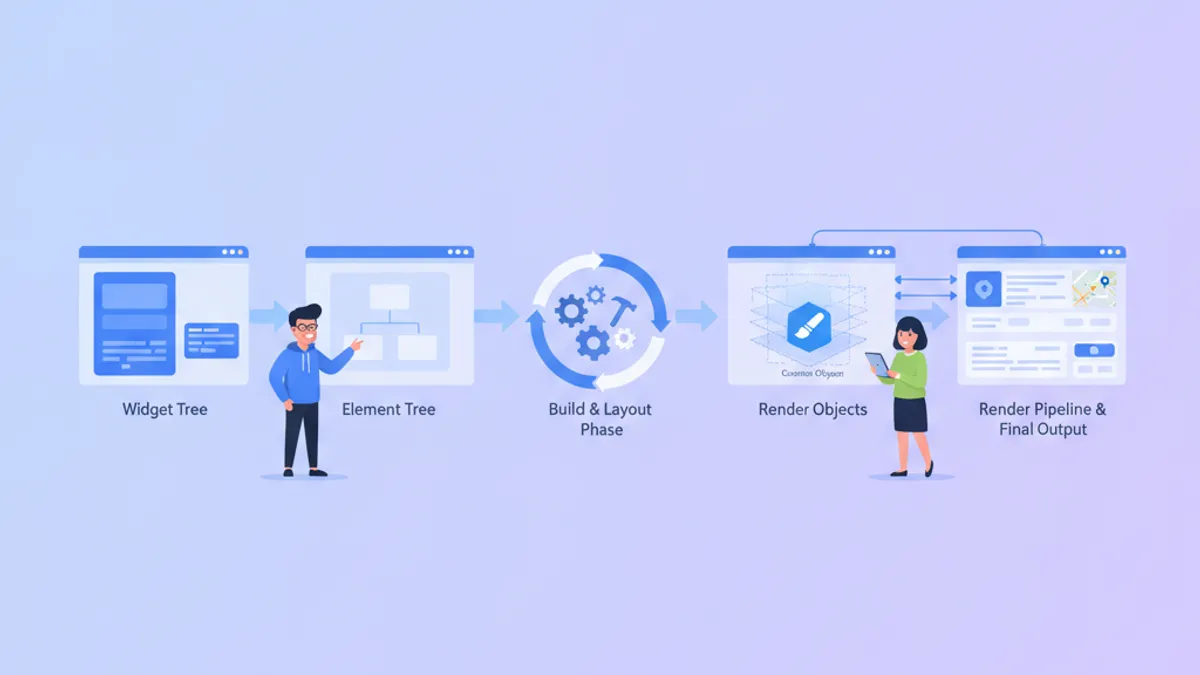
Flutter Custom Render Objects in 2026: Custom Painting and Interview Questions
Master Flutter's rendering pipeline with custom RenderObjects, learn when to choose CustomPainter vs RenderBox, and prepare for senior-level interview questions on the Element-RenderObject lifecycle.
Flutter vs React Native in 2026: Architecture, Performance, and When to Choose Each
A detailed comparison of Flutter 3.44 and React Native 0.86 covering rendering architecture, performance benchmarks, developer experience, and hiring considerations for cross-platform mobile development in 2026.

Flutter Navigation 2.0 and GoRouter in 2026: Deep Linking and Interview Questions
Master Flutter navigation with GoRouter 17.5: declarative routing, deep linking, ShellRoute, route guards, and common interview questions with practical examples.