Django Signals vs Celery Tasks in 2026: When to Use What
Learn when to use Django signals versus Celery tasks. Covers synchronous vs asynchronous event handling, performance implications, and interview questions for Django developers.
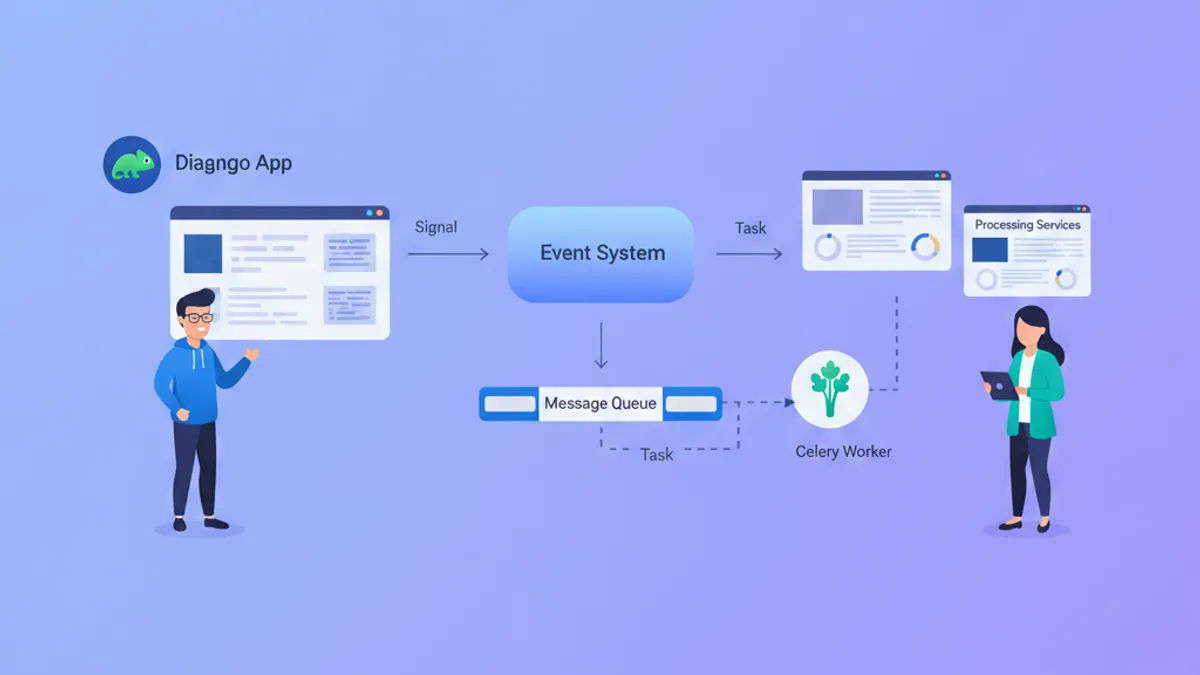
Django signals and Celery tasks both handle events in Django applications, but they solve different problems. Signals execute synchronously within the request-response cycle, while Celery offloads work to background workers. Choosing the wrong tool leads to slow responses, race conditions, or unnecessarily complex architecture.
Use Django signals for lightweight, synchronous side effects that must complete before the response. Use Celery for anything that takes more than 100ms, involves external services, or can fail independently of the main request.
How Django Signals Work Under the Hood
Django signals implement the observer pattern. When a model saves, deletes, or when a request starts or ends, Django dispatches a signal. Any function connected to that signal executes immediately, in the same database transaction and the same thread.
# signals.py
from django.db.models.signals import post_save
from django.dispatch import receiver
from django.core.cache import cache
from .models import Product

@receiver(post_save, sender=Product)
def invalidate_product_cache(sender, instance, **kwargs):
    # Runs synchronously after Product.save() commits
    cache_key = f"product:{instance.id}"
    cache.delete(cache_key)
    # Also invalidate the category listing
    cache.delete(f"category:{instance.category_id}:products")
The signal receiver runs inside the same database transaction. If the transaction rolls back, the signal handler's effects remain. This matters for cache invalidation: the cache gets cleared, but the database change never persists. The result is a cache miss that reloads stale data.
Django 5.2 introduced transaction.on_commit() to address this. Wrapping signal logic in on_commit ensures execution only after a successful commit:
# signals.py
from django.db import transaction
from django.db.models.signals import post_save
from django.dispatch import receiver
from .models import Product
from .tasks import reindex_product

@receiver(post_save, sender=Product)
def handle_product_saved(sender, instance, **kwargs):
    # Defer until transaction commits successfully
    transaction.on_commit(
        lambda: reindex_product.delay(instance.id)
    )
This pattern bridges signals and Celery: the signal fires synchronously, but the actual work happens asynchronously after the transaction commits.
Celery Task Execution Model
Celery runs tasks in separate worker processes. A Django view enqueues a task by serializing its arguments to a message broker (Redis or RabbitMQ). A worker picks up the message and executes the task independently of the original HTTP request.
# tasks.py
from celery import shared_task
from django.core.mail import send_mail
from .models import Order

@shared_task(bind=True, max_retries=3, default_retry_delay=60)
def send_order_confirmation(self, order_id: int):
    """Send confirmation email after order placement."""
    try:
        order = Order.objects.select_related('user').get(id=order_id)
        send_mail(
            subject=f"Order #{order.id} Confirmed",
            message=f"Your order for {order.total} has been placed.",
            from_email="orders@example.com",
            recipient_list=[order.user.email],
        )
    except Order.DoesNotExist:
        # Order was deleted before task ran, skip silently
        return
    except Exception as exc:
        # Retry on transient failures (SMTP timeout, etc.)
        raise self.retry(exc=exc)
The task runs in a different process, potentially on a different machine. It has no access to the original request context. If the order gets deleted between enqueue and execution, the task must handle that gracefully.
Celery 5.4 (current stable as of September 2026) added improved task typing and better Django integration through django-celery-results for storing task outcomes in the database.
Performance Characteristics Compared
Signals add latency to the request. Every connected receiver executes before the response returns. With three receivers averaging 50ms each, the request takes 150ms longer.
Celery adds minimal latency (typically 1-5ms to enqueue), but introduces eventual consistency. The email sends "eventually," not before the response.
| Factor | Django Signals | Celery Tasks |
|---|---|---|
| Execution | Synchronous, same process | Asynchronous, worker process |
| Latency impact | Adds to request time | ~1-5ms enqueue overhead |
| Failure handling | Breaks the request | Retries independently |
| Transaction scope | Inside transaction | Outside transaction |
| External service calls | Blocks response | Runs in background |
| Complexity | Minimal setup | Requires broker + workers |
When Signals Are the Right Choice
Signals fit scenarios where the side effect must complete before continuing and where failure should abort the operation.
Cache invalidation works well with signals. When a Product updates, its cached representation must invalidate immediately. A stale cache for even a few seconds causes incorrect prices or inventory counts to display.
# signals.py
from django.db.models.signals import post_save, post_delete
from django.dispatch import receiver
from django.core.cache import cache
from .models import Product

@receiver([post_save, post_delete], sender=Product)
def clear_product_cache(sender, instance, **kwargs):
    cache.delete(f"product:{instance.id}")
    cache.delete(f"product:{instance.slug}")
    # Clear any list caches that might include this product
    cache.delete_pattern(f"products:category:{instance.category_id}:*")
Audit logging where the log must exist before the response returns also fits signals. If an admin deletes a user, the audit log should record that deletion atomically with the delete operation.
Denormalization of fields across related models benefits from signals. When an Order's status changes to "shipped," updating a denormalized last_shipped_at field on the Customer happens immediately.
For more on Django middleware and signals working together, see Django 5.2: Custom Middleware and Signal Handling.
Ready to ace your Django interviews?
Practice with our interactive simulators, flashcards, and technical tests.
When Celery Tasks Are the Right Choice
Celery fits scenarios involving external services, long-running computations, or operations that can fail and retry independently.
Email sending should never block requests. SMTP servers have unpredictable latency, timeout occasionally, and rate-limit senders. A Celery task retries failed emails without affecting user experience.
PDF generation for invoices or reports takes seconds. Generating synchronously makes the UI feel broken. Enqueue the task, return a "processing" status, and let the user download when ready.
Third-party API calls belong in Celery. Calling Stripe, Twilio, or any external service synchronously couples your response time to theirs. When their API slows down, your application slows down.
# tasks.py
from celery import shared_task
import stripe
from .models import Subscription

@shared_task(bind=True, max_retries=5, retry_backoff=True)
def sync_stripe_subscription(self, subscription_id: int):
    """Sync local subscription with Stripe's state."""
    try:
        sub = Subscription.objects.get(id=subscription_id)
        stripe_sub = stripe.Subscription.retrieve(sub.stripe_id)
        sub.status = stripe_sub.status
        sub.current_period_end = stripe_sub.current_period_end
        sub.save(update_fields=['status', 'current_period_end'])
    except stripe.error.RateLimitError as exc:
        # Stripe rate limited us, retry with exponential backoff
        raise self.retry(exc=exc)
    except Subscription.DoesNotExist:
        return  # Subscription deleted locally, nothing to sync
The retry_backoff=True parameter in Celery 5.x enables exponential backoff: first retry after 1 second, then 2, then 4, up to the max. This prevents hammering a rate-limited API.
For a deeper look at Celery with Django, see Django and Celery: Asynchronous Task Processing.
The Hybrid Pattern: Signals Triggering Tasks
The most robust architecture uses signals for immediate, lightweight coordination and Celery for the actual heavy lifting.
# signals.py
from django.db import transaction
from django.db.models.signals import post_save
from django.dispatch import receiver
from .models import Order
from .tasks import (
    send_order_confirmation,
    notify_warehouse,
    update_analytics,
)

@receiver(post_save, sender=Order)
def on_order_created(sender, instance, created, **kwargs):
    if not created:
        return  # Only handle new orders

    # Enqueue all async work after transaction commits
    transaction.on_commit(lambda: (
        send_order_confirmation.delay(instance.id),
        notify_warehouse.delay(instance.id),
        update_analytics.delay('order_created', instance.id),
    ))
This pattern ensures:
- The order exists in the database before tasks run (transaction committed)
- No async work happens if the transaction rolls back
- The HTTP response returns immediately
- Each task can fail and retry independently
Interview Questions on Django Signals vs Celery
Technical interviews for Django positions frequently explore this distinction. Here are questions that separate experienced candidates from those who memorized documentation.
Q: A signal handler sends an email. The database transaction rolls back. What happens?
The email sends anyway. Signal handlers execute during the transaction, not after commit. The email goes out, but the database change that triggered it never persists. To fix this, wrap the email call in transaction.on_commit(), or better, enqueue a Celery task inside on_commit().
Q: How do you prevent a signal from firing during bulk operations?
Django's bulk_create(), bulk_update(), and QuerySet.update() do not trigger signals. This is intentional for performance. If signal behavior is needed, iterate and save individually (accepting the performance cost) or manually dispatch the signal after the bulk operation.
Q: A Celery task references request.user. Why does it fail?
Celery tasks run in a separate process with no access to the HTTP request context. Pass the user ID as a task argument and fetch the User object inside the task. Never pass Django model instances directly as task arguments, as they may become stale or fail to serialize.
Q: How do you test signal handlers in isolation?
Disconnect the signal, call the handler function directly with mock arguments, then reconnect. Django's Signal.disconnect() and Signal.connect() methods allow this. The factory_boy library's @factory.django.mute_signals decorator also helps by temporarily silencing signals during test setup.
# tests.py
from django.test import TestCase
from django.db.models.signals import post_save
from unittest.mock import patch, MagicMock
from .models import Product
from .signals import invalidate_product_cache

class SignalTests(TestCase):
    def test_cache_invalidation_called(self):
        # Disconnect to prevent automatic firing
        post_save.disconnect(invalidate_product_cache, sender=Product)

        try:
            product = Product.objects.create(name="Test", price=100)

            with patch('myapp.signals.cache') as mock_cache:
                # Call handler directly
                invalidate_product_cache(
                    sender=Product,
                    instance=product,
                    created=True
                )
                mock_cache.delete.assert_called()
        finally:
            # Reconnect for other tests
            post_save.connect(invalidate_product_cache, sender=Product)
For more Django interview preparation, explore the Django Signals interview questions module.
Common Anti-Patterns to Avoid
Circular signal chains occur when Signal A triggers a save on Model B, whose signal triggers a save on Model A. The recursion continues until the stack overflows or a recursion guard stops it. Design signals to be terminal: they observe and react, but do not trigger further observable changes.
Heavy computation in signals blocks every request that triggers the signal. A signal that resizes images, generates thumbnails, or calls external APIs should instead enqueue a Celery task.
Silent signal failures hide bugs. By default, Django catches exceptions in signal handlers and logs them, allowing the request to continue. This masks errors. Consider whether a failing handler should abort the operation or truly be best-effort.
# settings.py
# Make signal handler exceptions propagate (fail fast in development)
DEBUG = True  # In dev, exceptions will propagate naturally

# In production, use Sentry or similar to capture signal errors
import sentry_sdk
sentry_sdk.init(dsn="...")
Start practicing!
Test your knowledge with our interview simulators and technical tests.
Decision Framework for Django Event Handling
Selecting between signals and Celery becomes straightforward with a systematic approach:
- Use signals when: the operation must complete before the response, takes under 50ms, involves only local database or cache operations, and failure should abort the main operation
- Use Celery when: the operation can happen eventually, involves external services, takes more than 100ms, benefits from retry logic, or should not block the user
- Use signals triggering Celery when: immediate acknowledgment is needed but the actual work is async, or when multiple async tasks should fire from one database event
- Avoid signals entirely when: the logic is complex enough to warrant explicit service calls, when debugging signal chains becomes difficult, or when the same effect can be achieved with a simple method call
Django 6.0's background tasks feature (see Django 6.0: Background Tasks) provides a middle ground: built-in async task support without Celery's operational overhead. For greenfield projects starting in late 2026, evaluate whether Django's native background tasks meet the requirements before adding Celery.
Can you spot the bug in Django?
One real snippet, one hidden bug, one attempt a day. No account needed to try.

Written by
Anthony Fillion-MailletFounder of SharpSkill
Full-stack developer for over 10 years. Runs SharpSkill and answers for everything published here.
Updated on September 2, 2026
Tags
Share
Related articles
Django and Celery: Asynchronous Task Processing and Interview Questions 2026
Master Django and Celery asynchronous task processing with practical code examples, worker configuration, and real interview questions for 2026.

Django Async Views and ASGI in 2026: Performance and Interview Questions
A deep dive into Django async views and ASGI in 2026: how they work under the hood, which server to deploy, the async ORM and SynchronousOnlyOperation trap, plus interview questions.
Django 5.2: Custom Middleware and Signal Handling for Technical Interviews
Master Django 5.2 custom middleware and signal handling with practical examples. Covers middleware lifecycle, async middleware, pre_save/post_save signals, and common interview patterns.