Django and Celery: Asynchronous Task Processing and Interview Questions 2026
Master Django and Celery asynchronous task processing with practical code examples, worker configuration, and real interview questions for 2026.
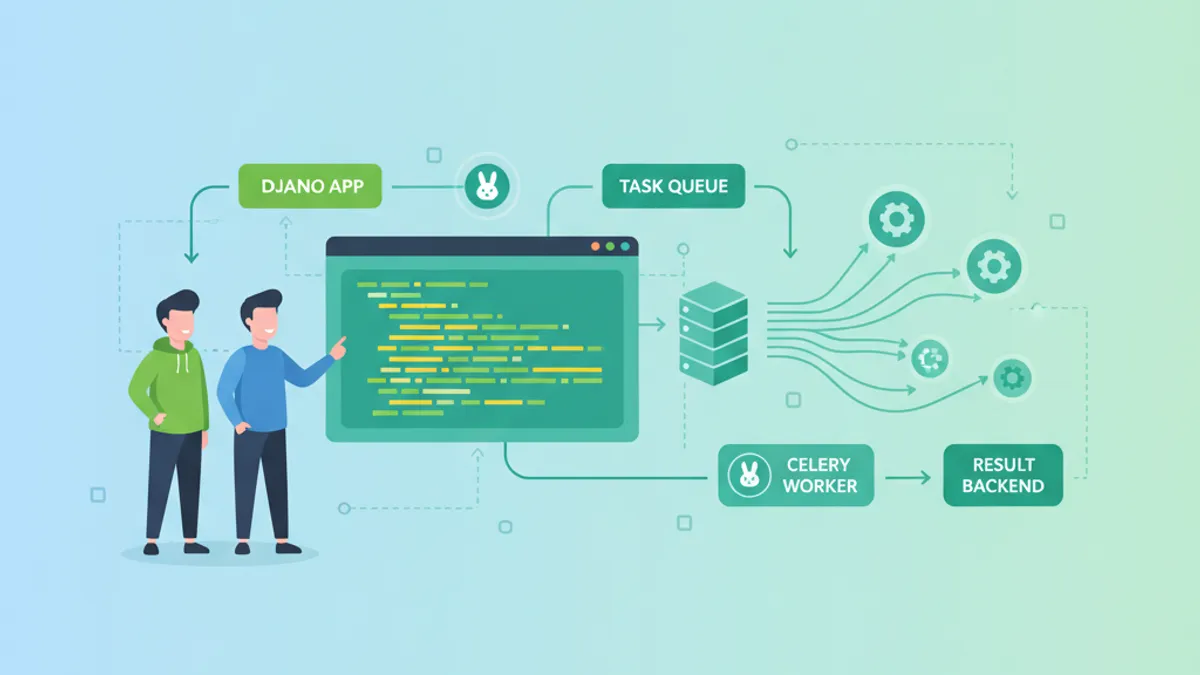
Django and Celery form the backbone of asynchronous task processing in Python web applications. With Celery 5.6 and Django 6.0 both shipping major updates in 2026, understanding distributed task queues remains a critical skill for backend interviews and production systems alike.
Celery decouples time-consuming operations from the request-response cycle. A Django view dispatches a task to a message broker (Redis or RabbitMQ), and a separate worker process executes it asynchronously. This pattern handles email sending, report generation, image processing, and any workload that would otherwise block the user.
How Celery Integrates with Django
Celery operates as an independent process that shares the Django project's codebase. The integration relies on three components: the Django application (producer), a message broker (Redis or RabbitMQ), and one or more Celery workers (consumers). When a Django view calls .delay() or .apply_async(), the task is serialized and pushed to the broker queue. A worker picks it up and executes the function in its own process.
The setup starts with a celery.py module in the Django project root:
# myproject/celery.py
import os
from celery import Celery

os.environ.setdefault('DJANGO_SETTINGS_MODULE', 'myproject.settings')

app = Celery('myproject')
app.config_from_object('django.conf:settings', namespace='CELERY')
app.autodiscover_tasks()
The autodiscover_tasks() call scans every installed Django app for a tasks.py module, registering all decorated functions as Celery tasks automatically.
In settings.py, the broker and result backend are configured:
# myproject/settings.py
CELERY_BROKER_URL = 'redis://localhost:6379/0'
CELERY_RESULT_BACKEND = 'redis://localhost:6379/1'
CELERY_ACCEPT_CONTENT = ['json']
CELERY_TASK_SERIALIZER = 'json'
CELERY_RESULT_SERIALIZER = 'json'
CELERY_TIMEZONE = 'UTC'
Redis serves double duty as both broker and result backend in most Django deployments. RabbitMQ remains the better choice for applications requiring quorum queues or advanced routing, a feature fully supported since Celery 5.5.
Writing and Dispatching Celery Tasks
A Celery task is a regular Python function decorated with @shared_task. The shared_task decorator avoids hardcoding the Celery app instance, making the task reusable across Django apps.
# orders/tasks.py
from celery import shared_task
from django.core.mail import send_mail
from orders.models import Order

@shared_task(bind=True, max_retries=3, default_retry_delay=60)
def send_order_confirmation(self, order_id: int) -> str:
    """Send confirmation email for a completed order."""
    try:
        order = Order.objects.select_related('user').get(id=order_id)
        send_mail(
            subject=f'Order #{order.id} Confirmed',
            message=f'Your order totaling {order.total} has been confirmed.',
            from_email='noreply@example.com',
            recipient_list=[order.user.email],
        )
        return f'Email sent for order {order_id}'
    except Order.DoesNotExist:
        return f'Order {order_id} not found'
    except Exception as exc:
        # Retry on transient failures (SMTP timeout, etc.)
        raise self.retry(exc=exc)
Three critical patterns appear here. First, bind=True gives the task access to self, enabling retries. Second, the function receives an order_id integer rather than an ORM object — model instances cannot be reliably serialized across process boundaries. Third, self.retry(exc=exc) re-queues the task with exponential backoff on transient failures.
Dispatching from a Django view:
# orders/views.py
from orders.tasks import send_order_confirmation

def complete_order(request, order_id):
    # ... process payment, update order status ...
    send_order_confirmation.delay(order_id)
    return redirect('order_success', order_id=order_id)
The .delay() call returns immediately. The user sees the success page while the email task runs in the background.
Task Routing and Queue Management
Production systems should never push all tasks into a single default queue. A slow report-generation task can starve fast notification tasks if they share the same worker pool. Celery solves this with task routing.
# myproject/settings.py
CELERY_TASK_ROUTES = {
    'orders.tasks.send_order_confirmation': {'queue': 'notifications'},
    'reports.tasks.generate_monthly_report': {'queue': 'reports'},
    'images.tasks.resize_upload': {'queue': 'media'},
}
Workers are then started per queue:
# Start notification worker (fast tasks, high concurrency)
celery -A myproject worker -Q notifications -c 8 --loglevel=info

# Start report worker (slow tasks, limited concurrency)
celery -A myproject worker -Q reports -c 2 --loglevel=info

# Start media worker (CPU-bound, prefork pool)
celery -A myproject worker -Q media -c 4 -P prefork --loglevel=info
This separation prevents resource contention. Notification workers handle high throughput with 8 concurrent threads, while report workers run only 2 concurrent tasks to avoid memory exhaustion from large dataset queries.
Ready to ace your Django interviews?
Practice with our interactive simulators, flashcards, and technical tests.
Periodic Tasks with Celery Beat
Celery Beat is the built-in scheduler for recurring tasks. It runs as a separate process that pushes tasks to the broker at configured intervals.
# myproject/settings.py
from celery.schedules import crontab

CELERY_BEAT_SCHEDULE = {
    'cleanup-expired-sessions': {
        'task': 'accounts.tasks.cleanup_expired_sessions',
        'schedule': crontab(hour=3, minute=0),  # Daily at 3 AM UTC
    },
    'sync-inventory': {
        'task': 'inventory.tasks.sync_external_inventory',
        'schedule': 300.0,  # Every 5 minutes
    },
    'generate-weekly-digest': {
        'task': 'notifications.tasks.send_weekly_digest',
        'schedule': crontab(hour=9, minute=0, day_of_week='monday'),
    },
}
Beat is started alongside the worker:
celery -A myproject beat --loglevel=infoA common production pitfall: running multiple Beat instances causes duplicate task execution. Only one Beat process should run per deployment. Tools like django-celery-beat store schedules in the database, enabling runtime modifications through the Django admin.
Monitoring and Observability with Flower
Flower provides a real-time web dashboard for monitoring Celery workers, tasks, and queues. It exposes task success rates, execution times, queue depths, and worker status.
# Install and run Flower
pip install flower
celery -A myproject flower --port=5555
In production, Flower metrics should feed into an alerting system. A growing queue depth with stale tasks indicates worker capacity issues. High retry rates on specific tasks point to external service instability.
Celery 5.6 also introduced structured logging improvements that integrate with JSON log aggregators like Datadog or ELK stacks, providing 30% better debugging efficiency according to the release notes.
Django 6.0 Built-in Tasks vs. Celery
Django 6.0 shipped a native background tasks framework, raising the question of whether Celery is still necessary. The answer depends on the use case.
Django's built-in tasks framework handles simple background operations — sending emails, clearing caches, lightweight data processing — without requiring a separate broker infrastructure. The task runner is built into Django itself.
Celery remains essential for:
- Distributed processing across multiple machines
- Priority queues and task routing
- Rate limiting and advanced retry policies
- Periodic scheduling (Celery Beat)
- Result tracking with configurable backends
- Canvas workflows (chains, groups, chords) for complex task orchestration
For applications that only need fire-and-forget background work, Django 6.0's built-in solution reduces operational complexity. For anything involving distributed workers, scheduling, or task composition, Celery 5.6 is the proven choice.
Interview Questions: Django and Celery
Technical interviews for backend roles frequently test Celery knowledge. Below are questions drawn from real Django interview scenarios at companies ranging from startups to FAANG.
Q: Why should tasks receive primary keys instead of model instances?
Django model instances carry database connections, querysets, and lazy-loaded relations that cannot survive serialization. Passing an order_id instead of an Order object ensures the task fetches fresh data from the database, avoiding stale state and serialization errors.
Q: How does self.retry() differ from re-dispatching the task manually?
self.retry() preserves the retry count, applies the configured max_retries limit, and uses exponential backoff by default. Manually calling .delay() again creates a brand-new task with a reset retry counter, which can lead to infinite retry loops on persistent failures.
Q: What happens when a Celery worker crashes mid-task?
The behavior depends on the acks_late setting. With acks_late=True, the broker redelivers the message to another worker since the acknowledgment was never sent. With the default acks_late=False, the message is acknowledged before execution, so a crash means the task is lost. Production systems handling critical workloads should use acks_late=True combined with idempotent task design.
Q: Explain the difference between .delay(), .apply_async(), and calling the task directly.
.delay(*args) is syntactic sugar for .apply_async(args=args). .apply_async() accepts additional options like countdown, eta, queue, priority, and expires. Calling the task function directly (without .delay()) executes it synchronously in the current process — useful for testing but defeats the purpose of async processing.
Q: How would a caching layer interact with Celery task results?
Task results stored in the Celery result backend can be cached using Django's cache framework. A view checks the cache first; if missing, it dispatches the task and stores the AsyncResult ID. Subsequent requests poll the result backend via the cached ID until the task completes, then cache the final output.
Production Deployment Checklist
Deploying Celery alongside Django requires attention to several operational concerns that interviews also probe.
# myproject/settings.py — Production configuration
CELERY_TASK_ALWAYS_EAGER = False  # Never True in production
CELERY_TASK_ACKS_LATE = True  # Redelivery on worker crash
CELERY_WORKER_PREFETCH_MULTIPLIER = 1  # Fair scheduling
CELERY_TASK_REJECT_ON_WORKER_LOST = True  # Reject on unexpected exit
CELERY_TASK_TIME_LIMIT = 300  # Hard kill after 5 minutes
CELERY_TASK_SOFT_TIME_LIMIT = 240  # SoftTimeLimitExceeded after 4 min
CELERY_WORKER_MAX_TASKS_PER_CHILD = 1000  # Prevent memory leaks
CELERY_BROKER_CONNECTION_RETRY_ON_STARTUP = True
The WORKER_MAX_TASKS_PER_CHILD setting restarts worker processes after 1000 tasks, preventing memory leaks — a fix that Celery 5.6 addressed more broadly with its memory leak patches.
Process management with systemd or supervisor ensures workers restart on failure. A minimal systemd unit:
# /etc/systemd/system/celery-worker.service
[Unit]
Description=Celery Worker
After=network.target redis.service

[Service]
Type=forking
User=django
Group=django
WorkingDirectory=/opt/myproject
ExecStart=/opt/myproject/venv/bin/celery -A myproject worker \
    --loglevel=info --concurrency=4 --pidfile=/var/run/celery/worker.pid
ExecStop=/bin/kill -s TERM $MAINPID
Restart=always

[Install]
WantedBy=multi-user.target
The Django deployment guide for Celery covers additional patterns for middleware integration and signal handling in production environments.
Start practicing!
Test your knowledge with our interview simulators and technical tests.
Conclusion
- Celery 5.6.3 (March 2026) brings memory leak fixes, structured logging, quorum queue support, and psycopg3 compatibility — upgrade from older versions to benefit immediately.
- Always pass primary keys to tasks, never ORM objects. This prevents serialization errors and stale data.
- Route tasks to dedicated queues based on workload characteristics. Fast notifications and slow reports should never compete for the same workers.
- Use
acks_late=Trueand idempotent task design for critical workloads that must survive worker crashes. - Set both
time_limitandsoft_time_limiton every task to prevent hung workers from consuming resources indefinitely. - Django 6.0's built-in tasks framework handles simple background jobs; Celery remains required for distributed processing, scheduling, and canvas workflows.
- Monitor queue depth and retry rates with Flower or structured log aggregation to detect capacity issues before they affect users.

Written by
Anthony Fillion-MailletFull-stack developer, founder of SharpSkill
Full-stack developer for over 10 years. Runs SharpSkill and answers for everything published here.
Updated on May 17, 2026
Tags
Share
Related articles

Django Async Views and ASGI in 2026: Performance and Interview Questions
A deep dive into Django async views and ASGI in 2026: how they work under the hood, which server to deploy, the async ORM and SynchronousOnlyOperation trap, plus interview questions.

Django 6.0 in 2026: Composite Primary Keys, Background Tasks and Interview Questions
Complete guide to Django's latest features: composite primary keys from Django 5.2, the built-in background tasks framework in Django 6.0, template partials, CSP middleware, and common interview questions.
Django 5.2: Custom Middleware and Signal Handling for Technical Interviews
Master Django 5.2 custom middleware and signal handling with practical examples. Covers middleware lifecycle, async middleware, pre_save/post_save signals, and common interview patterns.