Advanced Django Middleware in 2026: Custom Middleware, Logging and Interview Questions
Master Django middleware with async patterns, request ID logging, and hook methods. Covers Django 6.0 security updates, LoginRequiredMiddleware, and common interview questions.
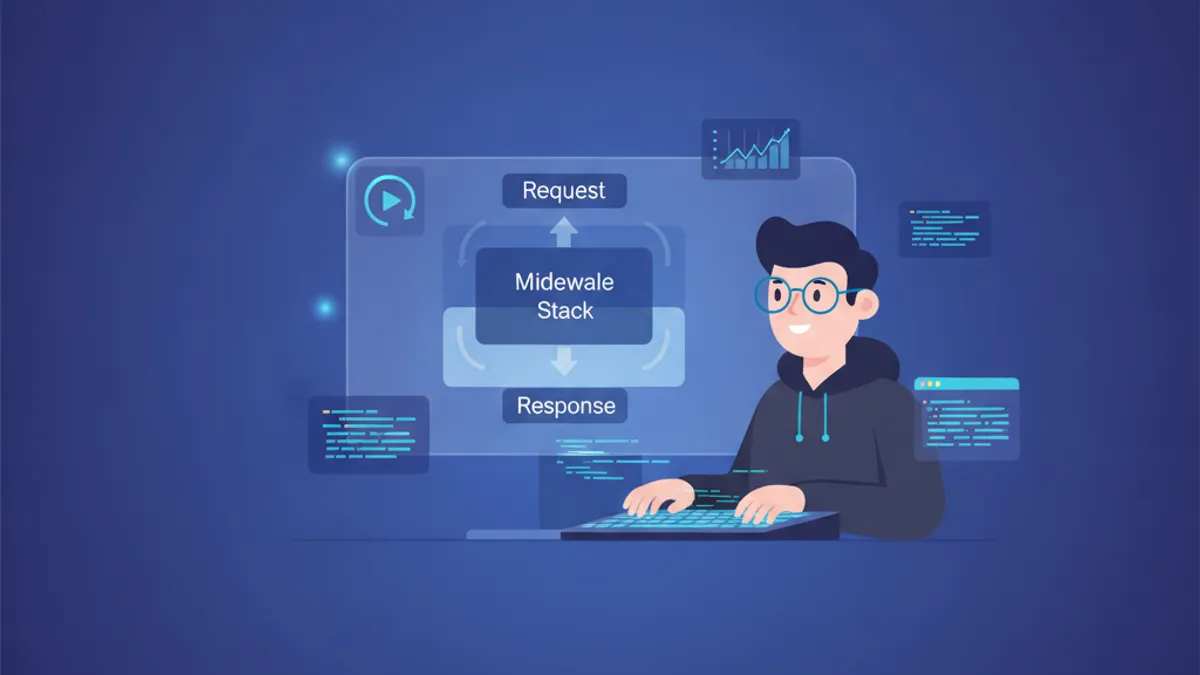
Django middleware sits at the core of every request-response cycle, yet many developers treat it as a black box. Understanding how middleware executes, when to write custom middleware, and how to implement logging at the middleware level separates senior Django developers from juniors in technical interviews.
Django 6.0 fully supports async middleware with native async/await syntax. Set async_capable = True and sync_capable = False on your middleware class to handle requests without thread overhead.
How Django Middleware Executes in the Request-Response Cycle
Middleware in Django follows an "onion" model. When a request arrives, it passes through each middleware in MIDDLEWARE from top to bottom. When the view returns a response, the response passes back through middleware from bottom to top. This ordering matters: middleware that needs session data must run after SessionMiddleware.
The default MIDDLEWARE configuration in Django 6.0:
# settings.py
MIDDLEWARE = [
    "django.middleware.security.SecurityMiddleware",
    "django.contrib.sessions.middleware.SessionMiddleware",
    "django.middleware.common.CommonMiddleware",
    "django.middleware.csrf.CsrfViewMiddleware",
    "django.contrib.auth.middleware.AuthenticationMiddleware",
    "django.contrib.messages.middleware.MessageMiddleware",
    "django.middleware.clickjacking.XFrameOptionsMiddleware",
]
Each middleware can short-circuit the chain by returning an HttpResponse directly instead of calling get_response(). When this happens, inner middleware and the view never execute, but outer middleware still process the response.
Writing Class-Based Custom Middleware in Django 6.0
The modern middleware pattern requires a class with __init__ and __call__ methods. The __init__ method runs once when the server starts, while __call__ runs for every request.
# middleware/timing.py
import time
import logging

logger = logging.getLogger(__name__)

class RequestTimingMiddleware:
    """Logs the time taken to process each request."""

    def __init__(self, get_response):
        # Called once when the server starts
        self.get_response = get_response

    def __call__(self, request):
        # Code before the view executes
        start_time = time.perf_counter()

        # Call the next middleware or view
        response = self.get_response(request)

        # Code after the view executes
        duration_ms = (time.perf_counter() - start_time) * 1000
        logger.info(
            "Request %s %s completed in %.2fms",
            request.method,
            request.path,
            duration_ms
        )

        return response
Register the middleware in settings.py by adding its import path to MIDDLEWARE. Position matters: place timing middleware early in the list to measure the full request lifecycle.
Async Middleware for High-Concurrency Django Applications
Django 6.0 handles async requests natively. For applications running under ASGI with async views, sync middleware creates performance bottlenecks because Django wraps sync middleware in thread pool executors. Writing async middleware eliminates this overhead.
# middleware/async_timing.py
import time
import logging
from asgiref.sync import iscoroutinefunction, markcoroutinefunction

logger = logging.getLogger(__name__)

class AsyncRequestTimingMiddleware:
    """Async-native timing middleware for ASGI deployments."""

    async_capable = True
    sync_capable = False

    def __init__(self, get_response):
        self.get_response = get_response
        if iscoroutinefunction(self.get_response):
            markcoroutinefunction(self)

    async def __call__(self, request):
        start_time = time.perf_counter()

        # Await the next middleware or async view
        response = await self.get_response(request)

        duration_ms = (time.perf_counter() - start_time) * 1000
        logger.info(
            "Async request %s %s completed in %.2fms",
            request.method,
            request.path,
            duration_ms
        )

        return response
The @sync_and_async_middleware decorator from django.utils.decorators creates middleware that handles both sync and async requests by checking iscoroutinefunction(get_response) at runtime.
Implementing Request ID Logging Middleware
Correlating logs across distributed systems requires a unique identifier per request. This pattern appears frequently in Django interview questions because it demonstrates understanding of middleware, logging, and debugging production systems.
# middleware/request_id.py
import uuid
import logging

class RequestIDMiddleware:
    """Attaches a unique request ID to every request for log correlation."""

    def __init__(self, get_response):
        self.get_response = get_response

    def __call__(self, request):
        # Generate or extract request ID from header
        request_id = request.headers.get("X-Request-ID")
        if not request_id:
            request_id = str(uuid.uuid4())

        # Attach to request object for access in views
        request.request_id = request_id

        response = self.get_response(request)

        # Add request ID to response headers
        response["X-Request-ID"] = request_id

        return response
To include request_id in all log messages, create a custom logging filter:
# logging_filters.py
import logging

class RequestIDFilter(logging.Filter):
    """Injects request_id into log records."""

    def filter(self, record):
        from django.middleware.request_id import local
        record.request_id = getattr(local, "request_id", "no-request-id")
        return True
Configure the filter in settings.py:
# settings.py
LOGGING = {
    "version": 1,
    "disable_existing_loggers": False,
    "filters": {
        "request_id": {
            "()": "logging_filters.RequestIDFilter",
        },
    },
    "formatters": {
        "verbose": {
            "format": "[{levelname}] {asctime} [{request_id}] {name}: {message}",
            "style": "{",
        },
    },
    "handlers": {
        "console": {
            "class": "logging.StreamHandler",
            "formatter": "verbose",
            "filters": ["request_id"],
        },
    },
    "root": {
        "handlers": ["console"],
        "level": "INFO",
    },
}
Ready to ace your Django interviews?
Practice with our interactive simulators, flashcards, and technical tests.
Middleware Hook Methods for Fine-Grained Control
Beyond __call__, Django middleware supports three hook methods: process_view, process_exception, and process_template_response. These provide control at specific points in the request lifecycle.
process_view for Pre-Execution Logic
# middleware/permission_check.py
from django.http import HttpResponseForbidden

class PermissionCheckMiddleware:
    """Checks permissions before view execution."""

    def __init__(self, get_response):
        self.get_response = get_response

    def __call__(self, request):
        return self.get_response(request)

    def process_view(self, request, view_func, view_args, view_kwargs):
        # Access view metadata
        required_permission = getattr(view_func, "required_permission", None)

        if required_permission:
            if not request.user.has_perm(required_permission):
                return HttpResponseForbidden("Permission denied")

        # Return None to continue to the view
        return None
This pattern allows decorating views with permission requirements:
# views.py
def require_permission(perm):
    def decorator(view_func):
        view_func.required_permission = perm
        return view_func
    return decorator

@require_permission("app.can_edit")
def edit_resource(request, pk):
    # View logic
    pass
process_exception for Centralized Error Handling
# middleware/error_tracking.py
import logging
import traceback

logger = logging.getLogger(__name__)

class ErrorTrackingMiddleware:
    """Logs exceptions with full context before Django handles them."""

    def __init__(self, get_response):
        self.get_response = get_response

    def __call__(self, request):
        return self.get_response(request)

    def process_exception(self, request, exception):
        logger.error(
            "Unhandled exception in %s %s: %s\n%s",
            request.method,
            request.path,
            str(exception),
            traceback.format_exc(),
            extra={
                "user_id": getattr(request.user, "id", None),
                "request_id": getattr(request, "request_id", None),
            }
        )
        # Return None to let Django handle the exception
        return None
Middleware process_exception methods execute in reverse order. If one returns an HttpResponse, middleware earlier in the stack will not see the exception.
Django 6.0 Security Middleware Updates
Django 6.0 shipped with several security fixes to UpdateCacheMiddleware. According to the Django security releases from 2026, responses with Cache-Control: private using mixed case were incorrectly cached, and responses to requests with Authorization headers could be stored in shared caches.
The LoginRequiredMiddleware, introduced in Django 5.1, enforces authentication site-wide:
# settings.py
MIDDLEWARE = [
    # ... other middleware
    "django.contrib.auth.middleware.LoginRequiredMiddleware",
]

# Exempt specific views
from django.contrib.auth.decorators import login_not_required

@login_not_required
def public_view(request):
    return HttpResponse("Public content")
This inverts the traditional pattern of decorating protected views with @login_required. For applications where most views require authentication, this reduces boilerplate and prevents accidental exposure of protected endpoints.
MiddlewareMixin and Migration from Legacy Middleware
The MiddlewareMixin bridges old-style middleware (using process_request and process_response methods) to the new callable pattern. Note that django.utils.deprecation.MiddlewareMixin is deprecated and will be removed in Django 6.2. Use django.middleware.MiddlewareMixin instead.
# middleware/legacy_style.py
from django.middleware import MiddlewareMixin

class LegacyStyleMiddleware(MiddlewareMixin):
    """Middleware using the legacy hook-based pattern."""

    def process_request(self, request):
        # Called before view, return None to continue
        request.custom_attribute = "value"
        return None

    def process_response(self, request, response):
        # Called after view, must return response
        response["X-Custom-Header"] = "middleware-added"
        return response
For new middleware, avoid MiddlewareMixin. The callable pattern provides clearer control flow and better compatibility with async Django.
Common Django Middleware Interview Questions
Technical interviews often include middleware questions to assess understanding of Django's request lifecycle. These questions frequently appear in senior Django developer interviews.
Q: What is the difference between middleware ordering and the execution order for responses?
Middleware processes requests top-to-bottom through MIDDLEWARE but processes responses bottom-to-top. Think of it as an onion: the outermost middleware is first to see the request and last to see the response.
Q: How does middleware short-circuiting work?
When middleware returns an HttpResponse instead of calling get_response(), the request never reaches inner middleware or the view. The response still passes through all outer middleware on its way back. This behavior differs from the legacy MIDDLEWARE_CLASSES setting, where all process_response methods ran regardless of short-circuiting.
Q: When should middleware access request.user?
Only after AuthenticationMiddleware has run. Accessing request.user before authentication middleware attaches it raises an AttributeError. Place custom middleware that needs user information after AuthenticationMiddleware in the MIDDLEWARE list.
Q: How do you make middleware async-compatible?
Set async_capable = True on the middleware class and implement __call__ as an async method using await get_response(request). For middleware that must work in both sync and async contexts, use @sync_and_async_middleware and check iscoroutinefunction(get_response) to branch accordingly.
Start practicing!
Test your knowledge with our interview simulators and technical tests.
Mastering Django Middleware for Production and Interviews
Django middleware controls cross-cutting concerns that span the entire request lifecycle. The key takeaways for working with middleware in Django 6.0:
- Middleware executes in an onion pattern: request flows top-to-bottom, response flows bottom-to-top
- Set
async_capable = Truefor async-native middleware in ASGI deployments to avoid thread pool overhead - Use
process_viewto inspect view metadata before execution,process_exceptionfor centralized error logging - Request ID middleware enables log correlation across distributed services, a common requirement in production
LoginRequiredMiddlewareinverts the authentication pattern: views are protected by default, public views are explicitly exempted- The deprecated
django.utils.deprecation.MiddlewareMixinmoves todjango.middleware.MiddlewareMixinin Django 6.2 - Middleware ordering determines which components see
request.user, session data, and other request attributes
For deeper coverage of Django ORM and REST framework patterns, see the Django ORM optimization guide.
Can you spot the bug in Django?
One real snippet, one hidden bug, one attempt a day. No account needed to try.

Written by
Anthony Fillion-MailletFounder of SharpSkill
Full-stack developer for over 10 years. Runs SharpSkill and answers for everything published here.
Updated on September 18, 2026
Tags
Share
Related articles
Django 5.2: Custom Middleware and Signal Handling for Technical Interviews
Master Django 5.2 custom middleware and signal handling with practical examples. Covers middleware lifecycle, async middleware, pre_save/post_save signals, and common interview patterns.
Django and Celery: Asynchronous Task Processing and Interview Questions 2026
Master Django and Celery asynchronous task processing with practical code examples, worker configuration, and real interview questions for 2026.

Django Interview Questions: ORM, Middleware and DRF Deep Dive
Django interview questions covering ORM optimization with select_related, prefetch_related, and Django 6.1 FETCH_PEERS mode, middleware architecture, and Django REST Framework serializer performance, permissions, and pagination patterns.