Vue 3 Performance in 2026: Vapor Mode, Alien Signals and the End of Virtual DOM
Deep dive into Vue 3.6 Vapor Mode performance: how it eliminates the Virtual DOM, the Alien Signals reactivity system, benchmarks vs Solid.js, and practical optimization techniques for production apps.
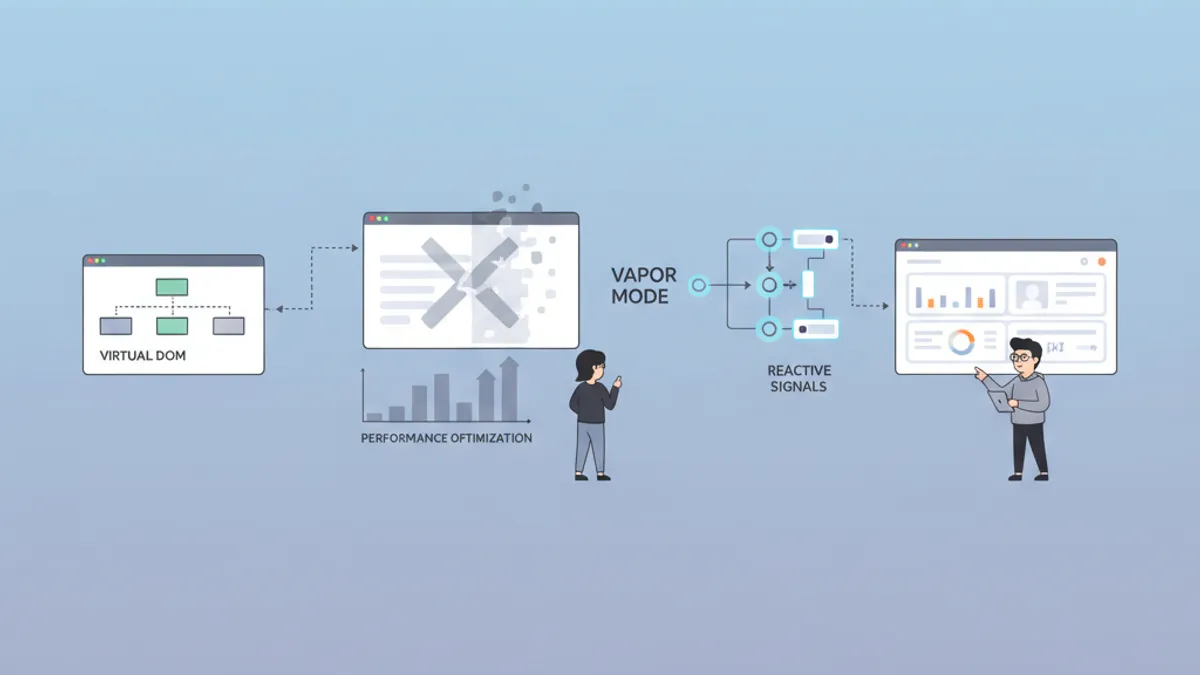
Vue 3.6 Vapor Mode represents the most significant rendering architecture change since Vue adopted the Virtual DOM in version 2. By compiling Single File Components directly into imperative DOM operations, Vapor Mode eliminates the diffing overhead that has defined Vue's rendering pipeline for years. Combined with the Alien Signals reactivity rewrite, Vue 3.6 reaches benchmark parity with Solid.js and Svelte 5, without requiring developers to learn a new API.
Vapor Mode is an opt-in compilation strategy in Vue 3.6 that bypasses the Virtual DOM entirely. Components compiled in Vapor Mode wire each reactive dependency directly to the exact DOM node it affects, producing surgical updates with zero tree traversal. Enable it with a single attribute: <script setup vapor>.
How Vue's Virtual DOM Works, and Why It Became a Bottleneck
The Virtual DOM (VDOM) pattern, popularized by React and adopted by Vue 2, creates a lightweight JavaScript representation of the actual DOM tree. On every state change, Vue generates a new VDOM tree, diffs it against the previous one, and patches only the changed nodes into the real DOM.
This approach works well for most applications. The diffing algorithm runs in O(n) time, and Vue's compiler already optimizes static subtrees out of the diff path. But the overhead compounds in specific scenarios:
- Large lists with hundreds of rows trigger full subtree comparisons on every update
- Frequent state changes (animations, real-time data) create VDOM churn that the garbage collector must clean up
- Deep component trees multiply the cost of tree traversal and patch generation
Vue 3's template compiler introduced several VDOM optimizations: static hoisting, patch flags, and block trees. These reduced unnecessary work, but the fundamental architecture still required generating, diffing, and discarding JavaScript objects on every render cycle.
Vue 3.6 Vapor Mode: Compiling Away the Virtual DOM
Vapor Mode takes a different approach entirely. Instead of compiling templates into render functions that return VDOM nodes, the Vapor compiler generates code that directly creates and updates DOM elements. Each reactive binding maps to a specific DOM mutation, with no intermediate representation needed.
Here is how a standard Vue component compiles differently under each mode:
<!-- Counter.vue -->
<script setup vapor>
import { ref } from 'vue'

const count = ref(0)
const increment = () => count.value++
</script>

<template>
  <button @click="increment">
    Count: {{ count }}
  </button>
</template>
In classic VDOM mode, this template compiles into a render function that returns a virtual node tree. On every click, Vue creates a new VDOM tree, diffs it against the previous one, detects that the text content changed, and patches the real DOM.
In Vapor Mode, the compiler generates something closer to this:
// Simplified Vapor compilation output
const button = document.createElement('button')
const text = document.createTextNode('Count: 0')
button.appendChild(text)

// Direct binding: reactive source -> DOM mutation
effect(() => {
  text.nodeValue = \`Count: \${count.value}\`
})

button.addEventListener('click', increment)
The reactive effect wires count directly to text.nodeValue. No VDOM creation, no diffing, no patching. The state change triggers exactly one DOM mutation.
Enabling Vapor Mode in a Project
Vapor Mode operates at the component level. Two integration strategies exist:
import { createVaporApp } from 'vue'
import App from './App.vue'

createVaporApp(App).mount('#app')import { createApp, vaporInteropPlugin } from 'vue'
import App from './App.vue'
createApp(App)
.use(vaporInteropPlugin)
.mount('#app')The hybrid approach allows gradual migration. Performance-critical components, including data tables, real-time dashboards, and animation-heavy views, can opt into Vapor while the rest of the application continues using the standard VDOM runtime. Both component types coexist in the same component tree.
Vapor Mode requires the Composition API with <script setup>. The Options API, app.config.globalProperties, getCurrentInstance(), v-memo, and per-element lifecycle events (@vue:mounted, etc.) are not supported. Custom directives use a different interface that accepts reactive getters instead of binding objects. Pure Vapor applications do not support <Suspense>, though Suspense works when Vapor components are wrapped inside a VDOM parent.
Event Delegation Changes in Vue 3.6 RC
Between the beta and RC releases, the Vue team changed how Vapor Mode handles events. In the beta, Vapor automatically delegated events to the document level. Starting with RC.2, listeners attach directly to elements by default. To opt into document-level delegation for performance in large lists, use the explicit .delegate modifier:
<template>
  <ul>
    <li v-for="item in items" :key="item.id">
      <button @click.delegate="selectItem(item)">
        {{ item.name }}
      </button>
    </li>
  </ul>
</template>
This change aligns Vapor with standard Vue semantics around stopPropagation() and matches developer expectations for event handling.
Alien Signals: Vue's New Reactivity Engine
Vue 3.6 ships a second major change alongside Vapor Mode: a complete rewrite of @vue/reactivity based on the Alien Signals library. Created by Johnson Chu, Alien Signals implements a push-pull reactivity algorithm that reduces both memory allocation and computation overhead.
The push-pull model works in two phases:
- Push phase: When a signal (reactive source) changes, it propagates a "dirty" flag to all dependent computed properties. This traversal is cheap because it only flips boolean flags without running any computation.
- Pull phase: When a computed property is read, it checks its dirty flag. If dirty, it recalculates. If clean, it returns the cached value immediately.
This design eliminates unnecessary recomputations. In Vue 3.5's reactivity system, a computed property depending on three signals would recalculate whenever any signal changed, even if the computed result stayed the same. Alien Signals only recalculates when the value is actually read and at least one dependency has changed.
import { ref, computed, watch } from 'vue'

const firstName = ref('Jane')
const lastName = ref('Doe')
const isActive = ref(true)

// This computed only recalculates when read AND dirty
const displayName = computed(() => {
  return isActive.value
    ? \`\${firstName.value} \${lastName.value}\`
    : 'Inactive User'
})

// Changing isActive marks displayName as dirty
// But no computation runs until something reads displayName.value
isActive.value = false

// NOW the recalculation happens
console.log(displayName.value) // 'Inactive User'
The internal data structure also changed. Alien Signals replaces Set-based dependency tracking with doubly linked lists, reducing memory per reactive dependency and improving traversal speed during cleanup.
Benchmark Results: Alien Signals in Practice
The numbers from Vue 3.6 RC benchmarks show consistent improvements over Vue 3.5:
| Metric | Vue 3.5 | Vue 3.6 (Alien Signals) | Improvement |
|---|---|---|---|
| Memory per reactive ref | Baseline | -14% | Reduced allocation |
| Computed recalculation | Baseline | -20% avg | Fewer unnecessary runs |
| Component mount (100k) | ~300ms | ~100ms | 3x faster |
| First Contentful Paint | Baseline | 0.7s typical | Framework overhead reduced |
| Base bundle size | ~16KB | <10KB | -37% |
These gains apply automatically to all Vue 3.6 applications. Unlike Vapor Mode, which requires opting in per component, the Alien Signals reactivity system is the default in Vue 3.6.
Ready to ace your Vue.js / Nuxt.js interviews?
Practice with our interactive simulators, flashcards, and technical tests.
Practical Vue 3 Performance Optimization Techniques
Vapor Mode and Alien Signals address framework-level overhead, but application-level performance still depends on how components are structured. These techniques apply to both VDOM and Vapor components. For more on building reusable performance-optimized logic, see the guide on advanced Vue 3 composables.
Shallow Reactivity for Large Data Structures
Deep reactivity wraps every nested property in a Proxy. For large datasets (API responses, configuration objects, cached state), this creates thousands of unnecessary Proxy wrappers. shallowRef and shallowReactive limit reactivity to the top-level reference.
import { shallowRef, triggerRef } from 'vue'

interface Product {
  id: number
  name: string
  variants: { sku: string; price: number }[]
}

// Only the ref itself is reactive, not the nested properties
const products = shallowRef<Product[]>([])

// Fetching data — assign the new array to trigger reactivity
async function fetchProducts() {
  const response = await fetch('/api/products')
  products.value = await response.json() // triggers update
}

// Mutating nested data — must manually trigger
function updatePrice(productId: number, sku: string, newPrice: number) {
  const product = products.value.find(p => p.id === productId)
  const variant = product?.variants.find(v => v.sku === sku)
  if (variant) {
    variant.price = newPrice
    triggerRef(products) // explicit trigger required
  }
}
The v-memo Directive for Expensive List Rendering
For VDOM components rendering long lists, v-memo caches subtree rendering results based on dependency values. The VDOM skips diffing entirely for memoized subtrees whose dependencies have not changed. Note that v-memo is not available in Vapor Mode.
<!-- ProductGrid.vue -->
<script setup>
import { ref } from 'vue'

const products = ref([])
const selectedId = ref(null)
</script>

<template>
  <div class="grid">
    <div
      v-for="product in products"
      :key="product.id"
      v-memo="[product.id === selectedId, product.price]"
      :class="{ selected: product.id === selectedId }"
    >
      <h3>{{ product.name }}</h3>
      <span>{{ product.price }}</span>
    </div>
  </div>
</template>
The v-memo array [product.id === selectedId, product.price] tells Vue to skip re-rendering this item unless the selection state or price changed. For a list of 500 products where only one gets selected, this reduces VDOM work from 500 subtree diffs to 2 (the previously selected and newly selected items).
Async Components with Suspense for Code Splitting
Lazy-loading heavy components keeps the initial bundle lean. Vue's defineAsyncComponent paired with Suspense handles the loading state declaratively. For a deeper look at Suspense patterns and edge cases, see the guide on Teleport and Suspense.
<!-- Dashboard.vue -->
<script setup>
import { defineAsyncComponent } from 'vue'

// Heavy charting library loaded only when needed
const AnalyticsChart = defineAsyncComponent(() =>
  import('./components/AnalyticsChart.vue')
)

const DataExport = defineAsyncComponent({
  loader: () => import('./components/DataExport.vue'),
  delay: 200,       // show loading after 200ms
  timeout: 10000,   // fail after 10s
})
</script>

<template>
  <Suspense>
    <template #default>
      <AnalyticsChart />
      <DataExport />
    </template>
    <template #fallback>
      <div class="skeleton-loader" />
    </template>
  </Suspense>
</template>
Vapor Mode vs VDOM: When to Use Each Approach
Vapor Mode is not a universal replacement for the Virtual DOM. Each compilation mode has strengths suited to different component profiles.
| Scenario | Recommended Mode | Reason |
|---|---|---|
| Data tables (1000+ rows) | Vapor | Eliminates per-row VDOM overhead |
| Real-time dashboards | Vapor | Frequent updates benefit from direct DOM binding |
| Animation-heavy components | Vapor | No GC pressure from VDOM churn |
| Third-party VDOM component libraries | VDOM | Interop layer adds complexity |
| Components using Options API | VDOM | Vapor requires Composition API |
| Forms with complex validation | Either | Minimal rendering overhead in both modes |
| Static content pages | Either | SSG/SSR handles the heavy lifting |
The recommended migration path: profile the application first using Vue DevTools' Performance tab. Identify the components with the highest render time and re-render frequency. Convert those to Vapor Mode, measure the impact, and expand from there.
Interview Questions: Vue 3 Performance and Vapor Mode
These questions reflect what engineering teams ask when evaluating Vue expertise in 2026. Each answer summarizes the technical reasoning an interviewer expects.
Q: What problem does Vapor Mode solve, and how does it differ from the VDOM optimizations Vue already had?
Vue 3's VDOM compiler already optimized static subtrees, added patch flags, and implemented block trees to skip unnecessary diffs. These reduced VDOM overhead but did not eliminate it: every state change still required creating VDOM nodes, traversing the tree, and generating patches. Vapor Mode removes this entire pipeline. The compiler maps reactive state directly to DOM mutations, so a state change triggers exactly the DOM operations needed. No intermediary data structures, no diffing algorithm, no garbage collection of discarded VDOM nodes.
Q: Can Vapor components and VDOM components coexist in the same application?
Yes. The vaporInteropPlugin allows both component types in a single component tree. A VDOM parent can render Vapor children and vice versa, with some caveats. Vapor slots cannot use slots.default() inside a VDOM component (use renderSlot instead). Suspense is now supported for Vapor components when they are wrapped in a VDOM parent, after fixes in RC.3. Interop with VDOM-based component libraries (Vuetify, PrimeVue) should be tested thoroughly before production deployment.
Q: Explain the push-pull reactivity model in Vue 3.6's Alien Signals.
The push-pull model splits reactive updates into two phases. In the push phase, when a signal changes value, the system propagates a dirty flag downstream through all dependent computed properties. This is cheap since it only flips boolean flags. In the pull phase, when a computed value is actually read, it checks whether it is dirty. If dirty, it recalculates from its dependencies. If clean, it returns the cached value. This avoids the problem of eagerly recalculating computed properties that may never be read during a particular update cycle.
Q: When should shallowRef be used instead of ref in a Vue 3 application?
shallowRef is appropriate when the data structure is large and only top-level reassignment should trigger reactivity. Use cases include API response caches, configuration objects, and large arrays where individual item mutations are controlled manually with triggerRef(). Deep reactivity wraps every nested property in a Proxy, which is unnecessary overhead for data that will be replaced wholesale rather than mutated in place.
Practice more Vue.js interview questions covering composables and reactivity patterns on SharpSkill.
The official Vue.js performance guide covers additional optimization techniques including prop stability, virtual scrolling, and SSR streaming. The Vue 3.6 RC release notes document the latest Vapor Mode APIs and known limitations.
Sources
- Vue 3.6 RC Release Notes: Official changelog documenting RC.7 changes and Vapor Mode status
- TODOvue: Vue 3.6 RC Status and Limits: Detailed analysis of RC.2/RC.3 breaking changes including event delegation
- Vue 3.6 RC Upgrade Guide: Migration path from Vue 3.5 to 3.6 RC
- Alien Signals GitHub: Source code and documentation for the new reactivity engine
Start practicing!
Test your knowledge with our interview simulators and technical tests.
What Vue 3.6 Vapor Mode Means for Production Applications
Vapor Mode compiles Vue SFCs into direct DOM operations, eliminating Virtual DOM creation, diffing, and patching overhead entirely. Enable it per component with <script setup vapor>, and no application-wide migration is required.
Alien Signals, the new default reactivity engine, reduces memory usage by 14% and improves computed property performance through push-pull lazy evaluation.
Use shallowRef for large data structures, v-memo for expensive list rendering (VDOM only), and defineAsyncComponent for code splitting. These patterns apply in both VDOM and Vapor modes.
Vapor Mode requires Composition API with <script setup>. Options API, getCurrentInstance(), v-memo, and globalProperties are not supported.
Profile with Vue DevTools first, convert high-impact components to Vapor, measure, and iterate.
Vue 3.6 is in release candidate phase as of September 2026. RC.7 addresses hydration, KeepAlive, Teleport, and Suspense interop with VDOM. Test thoroughly before production deployment, but the API surface is now stable enough for serious evaluation.
Can you spot the bug in Vue.js / Nuxt.js?
One real snippet, one hidden bug, one attempt a day. No account needed to try.

Written by
Anthony Fillion-MailletFounder of SharpSkill
Full-stack developer for over 10 years. Runs SharpSkill and answers for everything published here.
Updated on September 7, 2026
Tags
Share
Related articles

Nuxt 4 SEO and Meta Tags in 2026: useHead, useSeoMeta and Interview Questions
Master Nuxt 4 SEO with useHead and useSeoMeta composables. Learn type-safe meta tags, performance optimization, AI crawler compatibility, and common interview questions.
Vue 3 Teleport and Suspense: Advanced Patterns and Interview Questions 2026
Master Vue 3 Teleport for DOM portaling and Suspense for async rendering. Covers the new defer prop, nested Suspense patterns, and interview questions for 2026.
Vue 3 Testing in 2026: Vitest, Vue Test Utils and Interview Questions
A hands-on guide to Vue testing in 2026: configuring Vitest, mounting components with Vue Test Utils, testing composables and Pinia stores, mocking APIs, measuring coverage, and the interview questions hiring teams ask.