Solid Queue and Solid Cache in Rails 8: Complete Guide for Technical Interviews 2026
Deep dive into Solid Queue and Solid Cache, the database-backed defaults in Rails 8. Architecture, configuration, concurrency controls, and interview-ready knowledge for 2026.
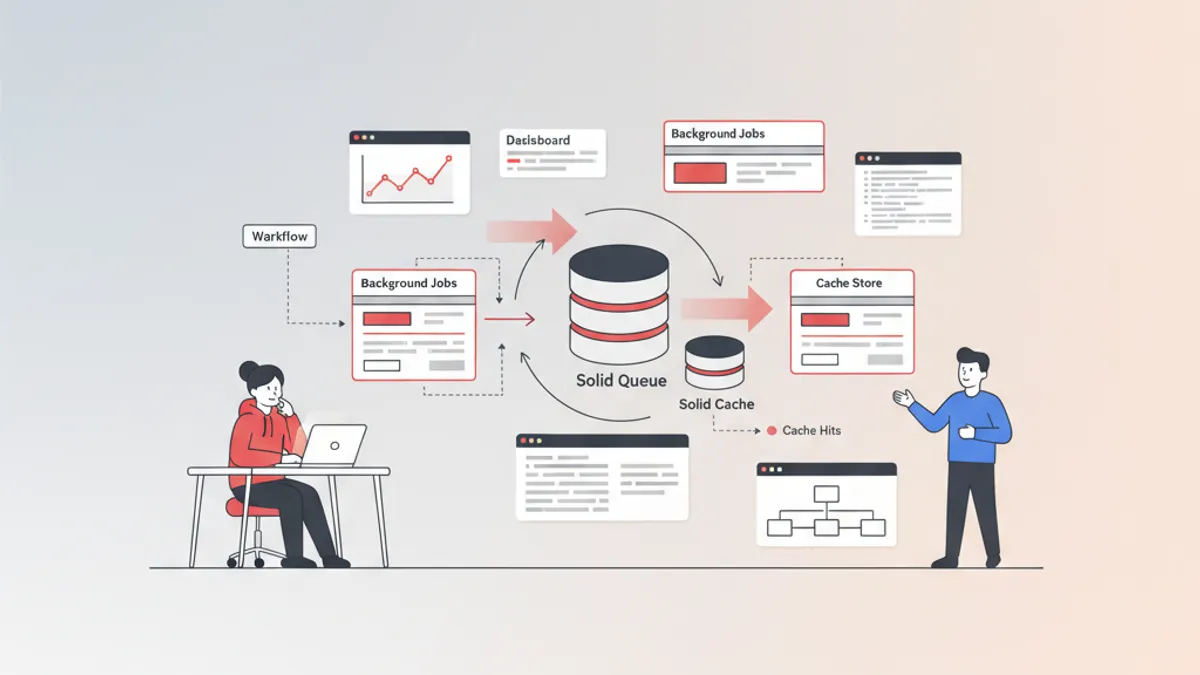
Solid Queue and Solid Cache represent the most significant infrastructure shift in Rails history. Both ship as defaults in Rails 8, replacing Redis for background jobs and caching with database-backed alternatives that eliminate an entire layer of operational complexity.
Rails 8 defaults to three database-backed components: Solid Queue (background jobs), Solid Cache (cache store), and Solid Cable (WebSockets). Together, they remove the Redis dependency for most Rails applications. This is a frequent topic in Rails 8 technical interviews.
How Solid Queue Replaces Redis-Based Job Backends
Solid Queue is a database-backed Active Job backend that stores jobs directly in PostgreSQL, MySQL, or SQLite. The key mechanism is FOR UPDATE SKIP LOCKED — a SQL feature available in PostgreSQL 9.5+ and MySQL 8+ that turns a regular database table into a concurrent job queue without blocking.
The architecture consists of three components:
- Workers poll
solid_queue_ready_executionsand claim jobs usingSKIP LOCKED - Dispatchers move scheduled jobs from
solid_queue_scheduled_executionsto the ready table when their execution time arrives - Schedulers handle recurring tasks defined in configuration
# config/solid_queue.yml
production:
  dispatchers:
    - polling_interval: 1
      batch_size: 500
  workers:
    - queues: "*"
      threads: 5
      polling_interval: 0.1
      processes: 2
This configuration runs two worker processes with 5 threads each, polling every 100ms. The dispatcher checks for scheduled jobs every second in batches of 500.
Transactional Job Enqueuing in Rails 8
One of the strongest arguments for Solid Queue over Redis-based backends is transactional enqueuing. When a job is enqueued inside a database transaction, it only becomes visible after the transaction commits. Redis-based backends cannot offer this guarantee — a job might execute before the transaction that created it finishes, referencing records that do not yet exist.
# app/jobs/send_welcome_email_job.rb
class SendWelcomeEmailJob < ApplicationJob
  self.enqueue_after_transaction_commit = true

  queue_as :default

  def perform(user_id)
    user = User.find(user_id)
    UserMailer.welcome(user).deliver_now
  end
end

# app/models/user.rb
class User < ApplicationRecord
  after_create do
    SendWelcomeEmailJob.perform_later(id)
    # Job only enqueued after the CREATE transaction commits
    # No risk of the job running before the user record exists
  end
end
With enqueue_after_transaction_commit enabled, the job is deferred until the wrapping transaction succeeds. If the transaction rolls back, the job is never enqueued. This eliminates an entire class of race conditions that plague Redis-backed queues.
Concurrency Controls and Priority Queues
Solid Queue provides built-in concurrency controls that Sidekiq only offers through its paid Enterprise tier. The concurrency_limit option restricts how many jobs of a given type can run simultaneously.
# app/jobs/api_sync_job.rb
class ApiSyncJob < ApplicationJob
  limits_concurrency to: 3, key: ->(account_id) { "api_sync_#{account_id}" }

  def perform(account_id)
    account = Account.find(account_id)
    ExternalApi.sync(account)
  end
end
This ensures at most 3 API sync jobs run concurrently per account, preventing rate limit violations without external coordination. Blocked jobs are stored in solid_queue_blocked_executions and automatically released when a slot opens.
Priority works at two levels: numeric priority per job (lower number = higher priority) and queue ordering in the worker configuration. Both can be combined for fine-grained control over job execution order.
A common Rails 8 interview question asks about the trade-offs between Solid Queue and Sidekiq. The key differentiator: Solid Queue offers transactional guarantees and built-in concurrency controls at no cost. Sidekiq wins on raw throughput for high-volume workloads (10,000+ jobs/minute) due to Redis being in-memory. For 95% of applications, Solid Queue provides sufficient performance.
Recurring Jobs Without Cron
Solid Queue replaces cron-based scheduling with a built-in scheduler. Recurring tasks are defined in a YAML configuration file and managed by the scheduler process.
# config/recurring.yml
production:
  cleanup_expired_sessions:
    class: CleanupExpiredSessionsJob
    schedule: every 6 hours
  daily_report:
    class: DailyReportJob
    schedule: every day at 6am
    queue: reports
  weekly_digest:
    class: WeeklyDigestJob
    schedule: every Monday at 9am
The scheduler process reads this file and enqueues the appropriate jobs at the defined intervals. Unlike cron, it runs within the same process supervisor and shares the same database connection.
Deployment with Puma Integration
Rails 8 with Kamal provides zero-configuration deployment for Solid Queue. Setting SOLID_QUEUE_IN_PUMA=1 tells Puma to fork and supervise Solid Queue processes alongside the web server.
# config/puma.rb (Rails 8 default)
plugin :solid_queue if ENV["SOLID_QUEUE_IN_PUMA"]
This single-process deployment model simplifies container orchestration. One Docker image runs both the web server and job processors, reducing operational overhead for small to medium applications.
Ready to ace your Ruby on Rails interviews?
Practice with our interactive simulators, flashcards, and technical tests.
Solid Cache: Database-Backed Caching That Scales
Solid Cache is a database-backed ActiveSupport::Cache::Store that leverages modern SSD performance to replace Redis and Memcached as the default cache store. The premise: SSDs are only marginally slower than RAM for read operations, but offer orders of magnitude more storage at a fraction of the cost.
Solid Cache uses a FIFO (First In, First Out) expiry strategy rather than LRU (Least Recently Used). While FIFO is theoretically less efficient, the vastly larger storage capacity compensates — entries stay cached much longer, reducing cache misses overall.
# config/environments/production.rb
config.cache_store = :solid_cache_store

# config/solid_cache.yml
production:
  databases:
    - cache
  store_options:
    max_age: 604800        # 1 week in seconds
    max_size: 256           # Max entry size in KB
    namespace: "app_v1"
    expiry_batch_size: 100  # Entries cleaned per expiry cycle
Cache Architecture and Expiry Mechanism
Solid Cache tracks writes using an internal counter. When the counter reaches 50% of the configured expiry_batch_size, a background task triggers to clean expired entries. This amortized approach avoids the stop-the-world pauses that can occur with LRU eviction in memory-constrained Redis instances.
The solid_cache_entries table stores all cached data:
# db/cache_schema.rb (generated by installer)
create_table :solid_cache_entries do |t|
  t.binary :key, null: false, limit: 1024
  t.binary :value, null: false, limit: 262144  # 256 KB default
  t.datetime :created_at, null: false
  t.index :key, unique: true
  t.index :created_at  # For FIFO expiry
end
Reading from and writing to this table uses the same connection pool as the rest of the application by default. For high-traffic applications, configuring a separate database for cache data prevents cache churn from impacting primary database performance.
Separate Database Configuration for Cache
Isolating Solid Cache on a dedicated database is straightforward and recommended for production workloads that generate significant cache traffic.
# config/database.yml
production:
  primary:
    <<: *default
    database: myapp_production
  cache:
    <<: *default
    database: myapp_cache_production
    migrations_paths: db/cache_migrate
This separation ensures that millions of cache write operations do not bloat the primary database WAL (Write-Ahead Log) or compete for connection pool slots with application queries.
Without a separate database, Solid Cache reads and writes participate in any wrapping ActiveRecord transaction. This means a long-running transaction holds cache entries in an uncommitted state. Always configure a dedicated cache database for production applications.
Sharding and Encryption
Solid Cache supports sharding cached data across multiple databases to distribute load. It also supports encrypted attributes — cached data remains encrypted at rest, a compliance requirement for applications handling sensitive information.
# config/solid_cache.yml
production:
  databases:
    - cache_shard_1
    - cache_shard_2
    - cache_shard_3
  store_options:
    max_age: 1209600  # 2 weeks
Entries are distributed across shards using consistent hashing on the cache key. Adding or removing shards causes a temporary increase in cache misses as entries are redistributed, but no data loss occurs.
Monitoring with Mission Control Jobs
Mission Control Jobs provides a web dashboard for inspecting and managing Solid Queue jobs. It displays workers, queues, and job states (in progress, finished, blocked, failed) through a mounted Rails engine.
# config/routes.rb
Rails.application.routes.draw do
  mount MissionControl::Jobs::Engine, at: "/jobs"
end

# Gemfile
gem "mission_control-jobs", ">= 1.0.1"
Mission Control also exposes a console API for bulk operations on failed jobs:
# Rails console
ActiveJob.jobs.failed.where(job_class: "ApiSyncJob").retry_all
ActiveJob.jobs.failed.where(job_class: "BrokenJob").discard_all
This programmatic access is essential for handling large-scale job failures without manually clicking through a dashboard.
Key Technical Interview Questions
Rails 8 interviews increasingly focus on the Solid stack. Here are the questions that come up most frequently, along with the expected depth of answer.
Q: How does Solid Queue achieve concurrent job processing without Redis?
Solid Queue uses FOR UPDATE SKIP LOCKED, a SQL clause that allows multiple workers to poll the same table without blocking each other. Each worker locks a batch of rows, processes them, and deletes the execution records. Other workers skip already-locked rows and claim different jobs.
Q: What problem does transactional enqueuing solve?
It prevents jobs from executing before the database transaction that triggered them has committed. Without this, a job might reference a record that was rolled back, causing ActiveRecord::RecordNotFound errors.
Q: Why does Solid Cache use FIFO instead of LRU? FIFO is simpler to implement in a database and avoids the write amplification of updating access timestamps on every read. The trade-off is offset by SSD capacity — entries live longer, so the hit rate remains high despite the less optimal eviction strategy.
Q: When should an application still use Redis over the Solid stack? Redis remains superior for applications processing more than 10,000 jobs per minute, workloads requiring sub-millisecond cache reads, or applications already running Redis for other purposes (Pub/Sub, rate limiting, session storage). The Solid stack targets simplicity, not peak throughput.
Practice these questions and more on SharpSkill's ActiveJob & Background Jobs module and Caching Strategies module.
Ready to ace your Ruby on Rails interviews?
Practice with our interactive simulators, flashcards, and technical tests.
Conclusion
- Solid Queue replaces Redis-backed job queues with a database-backed solution using
FOR UPDATE SKIP LOCKEDfor concurrent processing - Transactional enqueuing eliminates race conditions between database writes and job execution — a guarantee Redis cannot provide
- Built-in concurrency controls, recurring jobs, and Puma integration ship with Solid Queue at no additional cost
- Solid Cache uses SSD-backed FIFO caching with optional sharding and encryption, removing Memcached and Redis from the infrastructure stack
- Separate database configuration for Solid Cache prevents cache churn from impacting primary database performance
- Mission Control Jobs provides production monitoring and bulk job management through a web dashboard and console API
- For most Rails 8 applications in 2026, the Solid stack is the recommended default — Redis remains the choice only for high-throughput edge cases exceeding 10,000 jobs per minute
Start practicing!
Test your knowledge with our interview simulators and technical tests.
Can you spot the bug in Ruby on Rails?
One real snippet, one hidden bug, one attempt a day. No account needed to try.

Written by
Anthony Fillion-MailletFounder of SharpSkill
Full-stack developer for over 10 years. Runs SharpSkill and answers for everything published here.
Updated on May 13, 2026
Tags
Share
Related articles

Ruby on Rails 8: New Features and Migration Guide 2026
Ruby on Rails 8 ships with the Solid Trifecta, a built-in authentication generator, Kamal 2 deployment, and Propshaft. This tutorial covers every major feature and walks through upgrading from Rails 7 step by step.

Rails Background Jobs in 2026: Sidekiq vs Good Job and Interview Questions
Compare Sidekiq, Good Job, and Solid Queue for Rails background jobs. Learn when to choose each option and prepare for technical interview questions about Active Job.
Rails Active Storage in 2026: File Uploads, S3 Integration and Interview Questions
Master Rails Active Storage for file uploads with S3 and direct uploads. Complete tutorial with code examples and common interview questions about file handling in Ruby on Rails.