2026년 Spring Boot 3와 GraalVM Native Image: 단계별 AOT 컴파일
GraalVM으로 Spring Boot 3 애플리케이션을 네이티브 이미지로 컴파일하는 완벽 가이드. AOT 설정, 최적화 및 운영 배포까지.
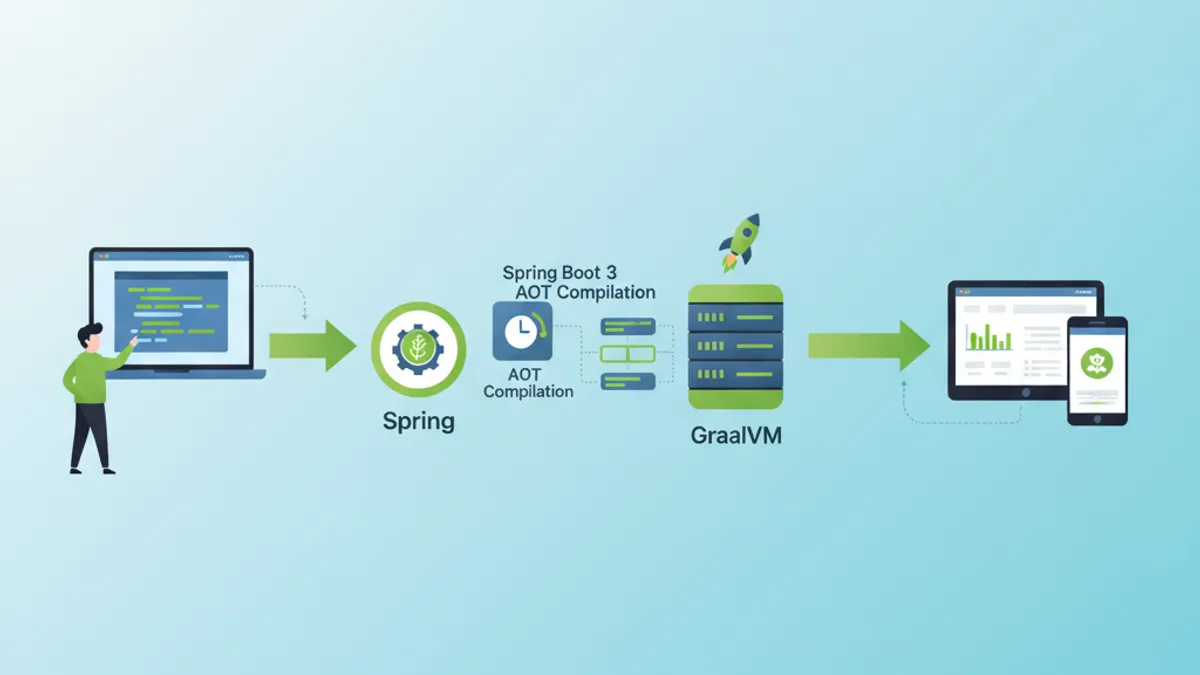
GraalVM 네이티브 컴파일은 Spring Boot 3 애플리케이션을 네이티브 실행 파일로 변환합니다. 시작 시간이 초 단위에서 밀리초 단위로 떨어지고 메모리 사용량도 크게 감소합니다. 본 가이드는 AOT 설정부터 운영 배포까지 모든 단계를 다룹니다.
Native Image가 설치된 GraalVM 22.3+, Spring Boot 3.2+, 그리고 Maven 또는 Gradle이 필요합니다. 네이티브 컴파일은 더 많은 RAM(최소 8GB 권장)을 요구하며 완료까지 몇 분이 걸립니다.
AOT와 Native Image 컴파일 이해
JIT와 AOT의 차이
전통적인 JVM은 Just-In-Time(JIT) 컴파일을 사용합니다. 바이트코드는 인터프리터로 실행된 뒤 실행 시점에 머신 코드로 컴파일됩니다. GraalVM Native Image는 Ahead-Of-Time(AOT) 방식을 채택하여 모든 코드를 실행 전에 컴파일합니다.
┌─────────────────────────────────────────────────────────────┐
│                    JIT Compilation                          │
├─────────────────────────────────────────────────────────────┤
│                                                             │
│   .java → .class → JVM → Interpretation → JIT → Machine    │
│                           (runtime)        (runtime)        │
│                                                             │
│   Advantages: Adaptive optimizations, fast class loading   │
│   Disadvantages: Slow startup, high memory consumption     │
└─────────────────────────────────────────────────────────────┘

┌─────────────────────────────────────────────────────────────┐
│                    AOT Compilation                          │
├─────────────────────────────────────────────────────────────┤
│                                                             │
│   .java → .class → GraalVM Native Image → Native executable │
│                    (build time)                              │
│                                                             │
│   Advantages: Instant startup, low memory footprint         │
│   Disadvantages: Long build, no dynamic reflection          │
└─────────────────────────────────────────────────────────────┘
AOT 컴파일은 진입점에서 도달 가능한 모든 코드를 정적으로 분석합니다. 컴파일 시점에 감지되지 않은 코드는 네이티브 이미지에서 제외되며, 이로 인해 리플렉션과 동적 클래스 로딩에 제약이 따릅니다.
Spring AOT 아키텍처
Spring Boot 3는 AOT 지원을 네이티브로 통합합니다. 컴파일 과정은 동적 메커니즘을 정적인 등가물로 대체하는 추가 소스 코드를 생성합니다.
// Standard Spring configuration
@Configuration
@EnableCaching
public class ApplicationConfig {

    @Bean
    public CacheManager cacheManager() {
        // Bean created dynamically at runtime in JIT mode
        // Pre-generated statically in AOT mode
        return new ConcurrentMapCacheManager("users", "products");
    }

    @Bean
    @ConditionalOnProperty(name = "app.feature.enabled", havingValue = "true")
    public FeatureService featureService() {
        // Conditions are evaluated at build time in AOT
        return new FeatureServiceImpl();
    }
}
Spring AOT 프로세스는 target/spring-aot/main 아래에 다음과 같은 파일을 자동으로 생성합니다.
target/spring-aot/main/
├── sources/                    # Generated Java code
│   └── com/example/
│       └── ApplicationConfig__BeanDefinitions.java
├── resources/
│   └── META-INF/
│       └── native-image/
│           ├── reflect-config.json    # Reflection configuration
│           ├── resource-config.json   # Included resources
│           └── proxy-config.json      # JDK proxies
Spring Boot 프로젝트 설정
Maven 의존성
Maven 설정은 native 프로파일이 있는 Spring Boot 플러그인을 사용합니다. 의존성은 GraalVM과 호환되어야 합니다.
<!-- pom.xml -->
<!-- Complete configuration for Spring Boot 3 Native -->
<?xml version="1.0" encoding="UTF-8"?>
<project xmlns="http://maven.apache.org/POM/4.0.0"
         xmlns:xsi="http://www.w3.org/2001/XMLSchema-instance"
         xsi:schemaLocation="http://maven.apache.org/POM/4.0.0
         https://maven.apache.org/xsd/maven-4.0.0.xsd">

    <modelVersion>4.0.0</modelVersion>

    <parent>
        <groupId>org.springframework.boot</groupId>
        <artifactId>spring-boot-starter-parent</artifactId>
        <version>3.4.2</version>
        <relativePath/>
    </parent>

    <groupId>com.example</groupId>
    <artifactId>native-demo</artifactId>
    <version>1.0.0</version>

    <properties>
        <java.version>21</java.version>
    </properties>

    <dependencies>
        <!-- Web starter with built-in native support -->
        <dependency>
            <groupId>org.springframework.boot</groupId>
            <artifactId>spring-boot-starter-web</artifactId>
        </dependency>

        <!-- JPA with native-compatible Hibernate 6 -->
        <dependency>
            <groupId>org.springframework.boot</groupId>
            <artifactId>spring-boot-starter-data-jpa</artifactId>
        </dependency>

        <!-- Native-compatible PostgreSQL driver -->
        <dependency>
            <groupId>org.postgresql</groupId>
            <artifactId>postgresql</artifactId>
            <scope>runtime</scope>
        </dependency>

        <!-- Validation with native hints -->
        <dependency>
            <groupId>org.springframework.boot</groupId>
            <artifactId>spring-boot-starter-validation</artifactId>
        </dependency>

        <!-- Tests with native support -->
        <dependency>
            <groupId>org.springframework.boot</groupId>
            <artifactId>spring-boot-starter-test</artifactId>
            <scope>test</scope>
        </dependency>
    </dependencies>

    <build>
        <plugins>
            <plugin>
                <groupId>org.springframework.boot</groupId>
                <artifactId>spring-boot-maven-plugin</artifactId>
            </plugin>

            <!-- GraalVM plugin for native compilation -->
            <plugin>
                <groupId>org.graalvm.buildtools</groupId>
                <artifactId>native-maven-plugin</artifactId>
            </plugin>
        </plugins>
    </build>

    <!-- Profile for native build -->
    <profiles>
        <profile>
            <id>native</id>
            <build>
                <plugins>
                    <plugin>
                        <groupId>org.graalvm.buildtools</groupId>
                        <artifactId>native-maven-plugin</artifactId>
                        <configuration>
                            <!-- Native build options -->
                            <buildArgs>
                                <!-- Size optimizations -->
                                <buildArg>-O2</buildArg>
                                <!-- Generate build report -->
                                <buildArg>--verbose</buildArg>
                                <!-- Enable HTTP/2 support -->
                                <buildArg>--enable-http</buildArg>
                                <buildArg>--enable-https</buildArg>
                            </buildArgs>
                            <!-- Memory for build -->
                            <jvmArgs>
                                <jvmArg>-Xmx8g</jvmArg>
                            </jvmArgs>
                        </configuration>
                    </plugin>
                </plugins>
            </build>
        </profile>
    </profiles>

</project>
동등한 Gradle 설정
Gradle 프로젝트에서는 GraalVM native 플러그인을 통해 비슷한 방식으로 네이티브 빌드를 구성합니다.
// Gradle configuration for Spring Boot Native
plugins {
    java
    id("org.springframework.boot") version "3.4.2"
    id("io.spring.dependency-management") version "1.1.7"
    // GraalVM Native plugin
    id("org.graalvm.buildtools.native") version "0.10.4"
}

group = "com.example"
version = "1.0.0"

java {
    toolchain {
        languageVersion = JavaLanguageVersion.of(21)
    }
}

dependencies {
    implementation("org.springframework.boot:spring-boot-starter-web")
    implementation("org.springframework.boot:spring-boot-starter-data-jpa")
    runtimeOnly("org.postgresql:postgresql")
    testImplementation("org.springframework.boot:spring-boot-starter-test")
}

// Native build configuration
graalvmNative {
    binaries {
        named("main") {
            // Generated executable name
            imageName = "native-demo"

            // Compilation options
            buildArgs.addAll(
                "-O2",                    // Optimization level
                "--enable-http",          // HTTP support
                "--enable-https",         // HTTPS support
                "--verbose"               // Detailed logs
            )

            // Memory configuration for build
            jvmArgs.addAll("-Xmx8g")
        }

        named("test") {
            // Native tests with report
            buildArgs.add("--verbose")
        }
    }

    // Tracing agent for automatic discovery
    agent {
        defaultMode = "standard"
        enabled = true
    }
}

tasks.withType<Test> {
    useJUnitPlatform()
}Tracing agent(-agentlib:native-image-agent)는 실행 중에 리플렉션 호출을 자동으로 탐지합니다. agent와 함께 애플리케이션을 실행해 모든 기능을 사용한 뒤, 생성된 설정 파일을 그대로 활용하면 됩니다.
리플렉션과 리소스 관리
리플렉션 수동 설정
일부 라이브러리는 정적 분석으로 감지되지 않는 방식으로 리플렉션을 사용합니다. 이때는 수동 설정이 필요합니다.
// Configuration for classes requiring reflection
[
  {
    "name": "com.example.entity.User",
    "allDeclaredConstructors": true,
    "allDeclaredMethods": true,
    "allDeclaredFields": true
  },
  {
    "name": "com.example.dto.UserDTO",
    "allDeclaredConstructors": true,
    "allDeclaredMethods": true,
    "allDeclaredFields": true
  },
  {
    "name": "com.example.config.DynamicProperties",
    "methods": [
      { "name": "getValue", "parameterTypes": [] },
      { "name": "setValue", "parameterTypes": ["java.lang.String"] }
    ]
  }
]
Spring RuntimeHints 활용
Spring Boot 3는 네이티브 힌트를 선언할 수 있는 프로그래밍 API를 제공하며, JSON 파일보다 유지보수가 쉽습니다.
// Programmatic registration of native hints
@Configuration
@ImportRuntimeHints(NativeHintsRegistrar.AppRuntimeHints.class)
public class NativeHintsRegistrar {

    static class AppRuntimeHints implements RuntimeHintsRegistrar {

        @Override
        public void registerHints(RuntimeHints hints, ClassLoader classLoader) {
            // Register classes for reflection
            hints.reflection()
                // JPA entities with all members
                .registerType(User.class, MemberCategory.values())
                .registerType(Order.class, MemberCategory.values())
                // DTOs with constructors and getters/setters
                .registerType(UserDTO.class,
                    MemberCategory.INVOKE_DECLARED_CONSTRUCTORS,
                    MemberCategory.INVOKE_DECLARED_METHODS,
                    MemberCategory.DECLARED_FIELDS
                );

            // Register resources to include
            hints.resources()
                // Configuration files
                .registerPattern("application*.yml")
                .registerPattern("application*.properties")
                // Templates and static files
                .registerPattern("templates/*")
                .registerPattern("static/**/*")
                // Validation messages
                .registerPattern("ValidationMessages*.properties");

            // Register JDK proxies
            hints.proxies()
                .registerJdkProxy(
                    UserRepository.class,
                    Repository.class
                );

            // Serialization for caching
            hints.serialization()
                .registerType(User.class)
                .registerType(ArrayList.class);
        }
    }
}// Automatic hints for JPA entities
@Component
public class EntityRuntimeHints implements RuntimeHintsRegistrar {
@Override
public void registerHints(RuntimeHints hints, ClassLoader classLoader) {
// Automatic scan of entities in package
ClassPathScanningCandidateComponentProvider scanner =
new ClassPathScanningCandidateComponentProvider(false);
scanner.addIncludeFilter(new AnnotationTypeFilter(Entity.class));
for (BeanDefinition bd : scanner.findCandidateComponents("com.example.entity")) {
try {
Class<?> entityClass = Class.forName(bd.getBeanClassName());
// Register each entity for full reflection
hints.reflection().registerType(
entityClass,
MemberCategory.INVOKE_DECLARED_CONSTRUCTORS,
MemberCategory.INVOKE_DECLARED_METHODS,
MemberCategory.DECLARED_FIELDS
);
} catch (ClassNotFoundException e) {
// Log error without interrupting build
System.err.println("Entity class not found: " + bd.getBeanClassName());
}
}
}
}Spring Boot 면접 준비가 되셨나요?
인터랙티브 시뮬레이터, flashcards, 기술 테스트로 연습하세요.
네이티브 이미지 컴파일과 최적화
빌드 명령
네이티브 컴파일은 Maven 또는 Gradle로 수행합니다. 작업에는 수 분이 소요되며 상당한 리소스를 사용합니다.
# Maven build with native profile
# Generates executable in target/
mvn -Pnative native:compile

# Gradle build
# Generates executable in build/native/nativeCompile/
./gradlew nativeCompile

# Build with native tests included
mvn -Pnative native:compile -DskipTests=false

# Build with tracing agent enabled
mvn -Pnative -Dagent=true test
mvn -Pnative native:compile
고급 최적화 옵션
컴파일 옵션은 이미지 크기, 시작 시간, 런타임 성능에 영향을 줍니다.
<!-- pom.xml -->
<!-- Advanced native build configuration -->
<plugin>
    <groupId>org.graalvm.buildtools</groupId>
    <artifactId>native-maven-plugin</artifactId>
    <configuration>
        <buildArgs>
            <!-- Optimization level (0-3, default: 2) -->
            <buildArg>-O3</buildArg>

            <!-- Optimization for startup time -->
            <buildArg>--pgo-instrument</buildArg>

            <!-- Executable compression (reduces size) -->
            <buildArg>-H:+CompressStrings</buildArg>

            <!-- Optimal garbage collector for containers -->
            <buildArg>--gc=serial</buildArg>

            <!-- Build time initialization -->
            <buildArg>--initialize-at-build-time=org.slf4j</buildArg>

            <!-- Debug symbols (disable in prod) -->
            <buildArg>-H:-IncludeAllTimeZones</buildArg>

            <!-- Detailed build report -->
            <buildArg>-H:+ReportExceptionStackTraces</buildArg>
            <buildArg>--verbose</buildArg>

            <!-- Monitoring support -->
            <buildArg>--enable-monitoring=heapdump,jfr</buildArg>
        </buildArgs>

        <!-- Quickbuild for development (faster, less optimized) -->
        <quickBuild>false</quickBuild>

        <!-- Fallback to jar if native fails -->
        <fallback>false</fallback>
    </configuration>
</plugin>// Build time initialization to reduce startup
@Configuration
public class BuildTimeInitializer {
// These configurations are evaluated at build time
// not at runtime
static {
// Initialize loggers at build time
LoggerFactory.getLogger(BuildTimeInitializer.class);
}
@Bean
@NativeHint(options = "--initialize-at-build-time=com.example.Constants")
public ConstantsProvider constantsProvider() {
// Constants are computed once at build
return new ConstantsProvider();
}
}성능 비교
네이티브 컴파일을 통해 얻는 성능 향상은 매우 큽니다.
┌─────────────────────────────────────────────────────────────────────┐
│                    JIT vs Native Comparison                         │
├─────────────────────┬─────────────────┬─────────────────────────────┤
│ Metric              │ JIT (JVM)       │ Native (GraalVM)            │
├─────────────────────┼─────────────────┼─────────────────────────────┤
│ Startup time        │ 2.5 - 5 sec     │ 50 - 200 ms                 │
│ RSS Memory          │ 200 - 400 MB    │ 50 - 100 MB                 │
│ Executable size     │ JAR ~30 MB      │ Binary ~80 MB               │
│ First request time  │ 100 - 500 ms    │ < 10 ms                     │
│ Peak throughput     │ Excellent       │ Good (85-95% of JIT)        │
│ Build time          │ 30 sec          │ 3 - 10 min                  │
└─────────────────────┴─────────────────┴─────────────────────────────┘네이티브 모드의 최대 처리량은 JIT의 적응형 최적화가 사용되지 않아 JIT 모드보다 다소 낮을 수 있습니다. 지속적인 고성능이 요구되는 워크로드에서는 두 모드를 모두 평가해야 합니다.
흔한 문제 해결
리플렉션 오류
가장 흔한 오류는 선언되지 않은 리플렉션에서 발생합니다. 예외 메시지가 누락된 클래스를 알려줍니다.
// Diagnosing and resolving reflection errors
@Component
@Slf4j
public class ReflectionErrorHandler {

    // Typical error:
    // java.lang.ClassNotFoundException: com.example.SomeClass
    // when accessing via reflection

    // Solution 1: Add manual configuration
    // src/main/resources/META-INF/native-image/reflect-config.json

    // Solution 2: Use @RegisterReflection annotation
    @RegisterReflection(classes = {
        SomeClass.class,
        AnotherClass.class
    })
    public void configureReflection() {
        // Annotated classes will be available for reflection
    }

    // Solution 3: Programmatic RuntimeHints
    public void registerHints(RuntimeHints hints) {
        hints.reflection().registerType(
            SomeClass.class,
            MemberCategory.INVOKE_DECLARED_CONSTRUCTORS,
            MemberCategory.INVOKE_DECLARED_METHODS
        );
    }
}
누락된 리소스
리소스 파일을 네이티브 이미지에 포함하려면 명시적으로 선언해야 합니다.
// Configuration for resources to include
{
  "resources": {
    "includes": [
      {"pattern": "application\\.yml"},
      {"pattern": "application-.*\\.yml"},
      {"pattern": "messages.*\\.properties"},
      {"pattern": "templates/.*\\.html"},
      {"pattern": "static/.*"},
      {"pattern": "db/migration/.*\\.sql"}
    ],
    "excludes": [
      {"pattern": ".*\\.java"},
      {"pattern": ".*\\.class"}
    ]
  },
  "bundles": [
    {"name": "messages"},
    {"name": "ValidationMessages"}
  ]
}// Programmatic resource configuration
@Configuration
@ImportRuntimeHints(ResourceHintsConfig.ResourceHints.class)
public class ResourceHintsConfig {
static class ResourceHints implements RuntimeHintsRegistrar {
@Override
public void registerHints(RuntimeHints hints, ClassLoader classLoader) {
// YAML/Properties files
hints.resources()
.registerPattern("application*.yml")
.registerPattern("application*.properties");
// Thymeleaf templates
hints.resources().registerPattern("templates/**");
// Flyway SQL scripts
hints.resources().registerPattern("db/migration/*.sql");
// Static files
hints.resources().registerPattern("static/**");
// Message bundles
hints.resources().registerResourceBundle("messages");
hints.resources().registerResourceBundle("ValidationMessages");
}
}
}프록시 문제
JDK 및 CGLIB 프록시는 네이티브 모드에서 동작하려면 별도의 설정이 필요합니다.
// Managing proxies for native compilation
@Configuration
public class ProxyConfiguration implements RuntimeHintsRegistrar {

    @Override
    public void registerHints(RuntimeHints hints, ClassLoader classLoader) {
        // JDK proxies for Spring Data interfaces
        hints.proxies().registerJdkProxy(
            UserRepository.class,
            Repository.class,
            CrudRepository.class
        );

        // Proxies for service interfaces
        hints.proxies().registerJdkProxy(
            PaymentService.class,
            TransactionalService.class
        );
    }

    // Alternative: force CGLIB proxies
    @Bean
    public BeanFactoryPostProcessor forceProxyTargetClass() {
        return beanFactory -> {
            // Use CGLIB instead of JDK proxies
            // More compatible with native compilation
        };
    }
}
Docker와 Kubernetes 배포
최적화된 멀티스테이지 Dockerfile
멀티스테이지 빌드는 컴파일과 실행을 분리해 최소한의 이미지를 만듭니다.
# Dockerfile
# Multi-stage build for Spring Boot Native
# Stage 1: Build with GraalVM
FROM ghcr.io/graalvm/graalvm-community:21 AS builder
# Install Native Image
RUN gu install native-image
WORKDIR /app
# Copy build files
COPY pom.xml .
COPY src ./src
# Install Maven
RUN microdnf install -y maven
# Native build with dependency caching
RUN \
mvn -Pnative native:compile -DskipTests
# Stage 2: Minimal runtime image
FROM gcr.io/distroless/base-debian12
WORKDIR /app
# Copy native executable
COPY /app/target/native-demo /app/native-demo
# Exposed port
EXPOSE 8080
# Healthcheck
HEALTHCHECK \
CMD ["/app/native-demo", "--health"]
# Execution
ENTRYPOINT ["/app/native-demo"]# Dockerfile.alpine
# Alternative with Alpine for even smaller image
FROM ghcr.io/graalvm/native-image-community:21-muslib AS builder
WORKDIR /app
COPY pom.xml .
COPY src ./src
RUN \
mvn -Pnative native:compile \
-Dspring-boot.aot.jvmArguments="-Dspring.aot.processing.resource.matching.strategy=GLOB" \
-DskipTests
# Minimal Alpine image (< 20 MB)
FROM alpine:3.19
RUN apk add --no-cache libc6-compat
WORKDIR /app
COPY /app/target/native-demo /app/native-demo
EXPOSE 8080
ENTRYPOINT ["/app/native-demo"]리소스를 최적화한 Kubernetes 배포
네이티브 애플리케이션은 일반 JVM 애플리케이션보다 적은 리소스를 사용합니다.
# kubernetes/deployment.yaml
# Optimized Kubernetes deployment for native
apiVersion: apps/v1
kind: Deployment
metadata:
  name: native-demo
spec:
  replicas: 3
  selector:
    matchLabels:
      app: native-demo
  template:
    metadata:
      labels:
        app: native-demo
    spec:
      containers:
        - name: native-demo
          image: registry.example.com/native-demo:1.0.0
          ports:
            - containerPort: 8080

          # Reduced resources thanks to native
          resources:
            requests:
              memory: "64Mi"    # vs 256Mi for JVM
              cpu: "50m"        # vs 200m for JVM
            limits:
              memory: "128Mi"   # vs 512Mi for JVM
              cpu: "200m"       # vs 500m for JVM

          # Fast probes (instant startup)
          readinessProbe:
            httpGet:
              path: /actuator/health/readiness
              port: 8080
            initialDelaySeconds: 1    # vs 30s for JVM
            periodSeconds: 5
            failureThreshold: 3

          livenessProbe:
            httpGet:
              path: /actuator/health/liveness
              port: 8080
            initialDelaySeconds: 2    # vs 60s for JVM
            periodSeconds: 10
            failureThreshold: 3

          # Environment variables
          env:
            - name: SPRING_PROFILES_ACTIVE
              value: "production"
            - name: JAVA_TOOL_OPTIONS
              value: ""  # No JVM options needed

---
apiVersion: v1
kind: Service
metadata:
  name: native-demo
spec:
  selector:
    app: native-demo
  ports:
    - port: 80
      targetPort: 8080
  type: ClusterIP

---
apiVersion: autoscaling/v2
kind: HorizontalPodAutoscaler
metadata:
  name: native-demo-hpa
spec:
  scaleTargetRef:
    apiVersion: apps/v1
    kind: Deployment
    name: native-demo
  minReplicas: 2
  maxReplicas: 10
  metrics:
    - type: Resource
      resource:
        name: cpu
        target:
          type: Utilization
averageUtilization: 70즉시 시작 시간 덕분에 수평 스케일링이 매우 빠릅니다. 새로운 파드가 몇 초 안에 준비되므로 트래픽 급증 워크로드에 이상적입니다.
네이티브 이미지 테스트와 검증
네이티브 테스트 설정
테스트도 네이티브 모드로 컴파일하고 실행해 동작을 검증할 수 있습니다.
// Integration tests for native validation
@SpringBootTest(webEnvironment = SpringBootTest.WebEnvironment.RANDOM_PORT)
@TestPropertySource(properties = {
    "spring.datasource.url=jdbc:h2:mem:testdb",
    "spring.jpa.hibernate.ddl-auto=create-drop"
})
class NativeIntegrationTest {

    @Autowired
    private TestRestTemplate restTemplate;

    @Autowired
    private UserRepository userRepository;

    @Test
    void shouldCreateAndRetrieveUser() {
        // Arrange: create a user
        UserDTO request = new UserDTO("John", "john@example.com");

        // Act: API call
        ResponseEntity<UserDTO> createResponse = restTemplate.postForEntity(
            "/api/users",
            request,
            UserDTO.class
        );

        // Assert: verify creation
        assertThat(createResponse.getStatusCode()).isEqualTo(HttpStatus.CREATED);
        assertThat(createResponse.getBody()).isNotNull();
        assertThat(createResponse.getBody().getName()).isEqualTo("John");

        // Verify retrieval
        Long userId = createResponse.getBody().getId();
        ResponseEntity<UserDTO> getResponse = restTemplate.getForEntity(
            "/api/users/{id}",
            UserDTO.class,
            userId
        );

        assertThat(getResponse.getStatusCode()).isEqualTo(HttpStatus.OK);
        assertThat(getResponse.getBody().getEmail()).isEqualTo("john@example.com");
    }

    @Test
    void shouldHandleReflectionCorrectly() {
        // Specific test to validate reflection configuration
        User user = new User();
        user.setName("Test");
        user.setEmail("test@example.com");

        // ORM uses reflection to map entities
        User saved = userRepository.save(user);

        assertThat(saved.getId()).isNotNull();
        assertThat(userRepository.findById(saved.getId())).isPresent();
    }
}<!-- pom.xml -->
<!-- Native tests configuration -->
<plugin>
<groupId>org.graalvm.buildtools</groupId>
<artifactId>native-maven-plugin</artifactId>
<configuration>
<testArgs>
<!-- Include tests in native build -->
<testArg>--verbose</testArg>
</testArgs>
</configuration>
<executions>
<execution>
<id>test-native</id>
<goals>
<goal>test</goal>
</goals>
<phase>test</phase>
</execution>
</executions>
</plugin>Spring Boot 면접 준비가 되셨나요?
인터랙티브 시뮬레이터, flashcards, 기술 테스트로 연습하세요.
결론
GraalVM 네이티브 컴파일은 Spring Boot 3 애플리케이션을 고성능 실행 파일로 변환합니다. 핵심 정리:
프로젝트 설정:
- ✅ Spring Boot 3.2+와 GraalVM native 플러그인
- ✅ 리플렉션과 리소스를 위한 RuntimeHints
- ✅ 자동 탐지를 위한 Tracing agent
빌드 최적화:
- ✅ 적절한 컴파일 옵션(O2/O3, GC, 압축)
- ✅ 정적 컴포넌트의 빌드 타임 초기화
- ✅ 개발에는 quickbuild, 운영에는 전체 빌드 사용
문제 해결:
- ✅ 외부 라이브러리에 대한 명시적 리플렉션 설정
- ✅ 포함할 리소스의 명시적 선언
- ✅ JDK 및 CGLIB 프록시 관리
배포:
- ✅ distroless 기반 멀티스테이지 Docker 이미지
- ✅ 절감된 Kubernetes 리소스(256 Mi 대신 64 Mi)
- ✅ 지연 시간을 최소화한 프로브(즉시 시작)
네이티브 컴파일은 마이크로서비스, 서버리스 함수, 자원이 제한된 환경에 매우 적합합니다. 즉시 시작과 낮은 메모리 사용량은 길어진 빌드 시간을 충분히 상쇄합니다.
연습을 시작하세요!
면접 시뮬레이터와 기술 테스트로 지식을 테스트하세요.
Spring Boot 코드의 버그를 찾을 수 있나요
실제 코드 한 조각, 숨은 버그 하나, 하루 한 번. 계정 없이 바로 도전할 수 있습니다.

작성자
Anthony Fillion-MailletSharpSkill 창업자
10년 이상 풀스택 개발을 해왔습니다. SharpSkill을 운영하며 이곳에 게시되는 모든 내용에 책임을 집니다.
2026년 5월 1일 업데이트
태그
공유
관련 기사

Spring Boot Observability 2026 완벽 가이드: OpenTelemetry, 분산 추적, 면접 질문
Spring Boot 3.4의 Observation API, OpenTelemetry 연동, 분산 추적 구현 방법을 상세히 설명합니다. Micrometer Tracing과 OTLP 내보내기 설정, 실무 면접 질문도 다룹니다.

Spring Boot YAML vs Properties: 설정 파일 비교 및 면접 질문 2026
Spring Boot의 YAML과 Properties 파일 차이점을 상세히 비교합니다. application.yml과 application.properties 선택 기준, 모범 사례, 기술 면접 대비 가이드를 다룹니다.

2026년 Spring Boot 구조화 로깅: Logback과 OpenTelemetry로 운영 JSON 출력
Spring Boot 4.x 구조화 로깅 완벽 가이드입니다. 네이티브 JSON 출력, OpenTelemetry Starter, MDC 추적, 운영 옵저버빌리티를 위한 ELK Stack 연동을 다룹니다.