Bảo mật Pipeline DevOps 2026: Thực tiễn DevSecOps và Câu hỏi Phỏng vấn
Hướng dẫn toàn diện về bảo mật pipeline DevOps năm 2026, bao gồm các thực tiễn tốt nhất DevSecOps, triển khai CI/CD an toàn, và câu hỏi phỏng vấn kỹ thuật để chuẩn bị sự nghiệp.
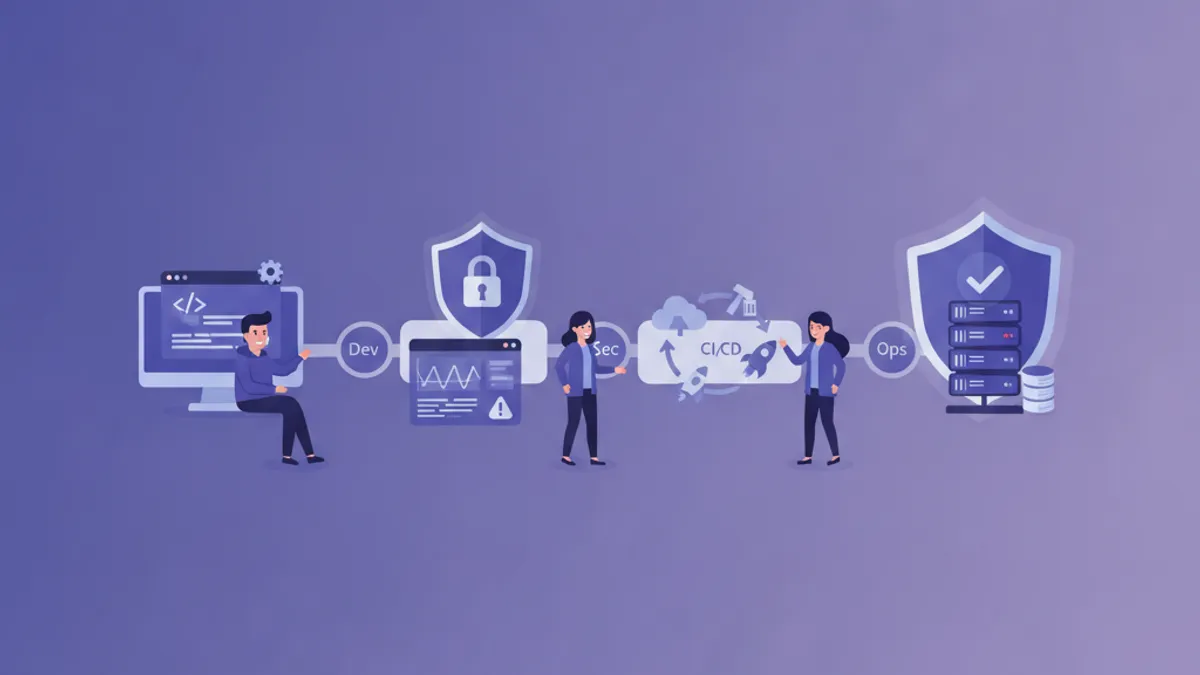
Bảo mật pipeline DevOps đã trở thành ưu tiên hàng đầu của các tổ chức trên toàn thế giới vào năm 2026. Với sự gia tăng của các cuộc tấn công chuỗi cung ứng và mối đe dọa bảo mật ngày càng tinh vi, việc triển khai DevSecOps toàn diện không còn là lựa chọn mà là bắt buộc. Bài viết này khám phá các thực tiễn tốt nhất để bảo mật pipeline CI/CD và cung cấp các câu hỏi phỏng vấn thường gặp trong tuyển dụng vị trí DevSecOps.
DevSecOps tích hợp bảo mật vào mọi giai đoạn của vòng đời phát triển phần mềm, thay vì là bước cuối cùng trước khi triển khai. Phương pháp "shift-left" này cho phép phát hiện lỗ hổng sớm hơn và giảm đáng kể chi phí khắc phục.
Hiểu về Bối cảnh Bảo mật Pipeline DevOps
Các pipeline CI/CD hiện đại đối mặt với nhiều vector tấn công mà đội ngũ bảo mật cần phải dự đoán. Từ việc tiêm mã độc đến đánh cắp thông tin xác thực, mỗi giai đoạn của pipeline đều có những rủi ro riêng.
Các thành phần chính cần được chú ý bảo mật bao gồm:
- Source Code Repository: Nơi lưu trữ mã nguồn cần được bảo vệ khỏi truy cập trái phép
- Build Environment: Môi trường biên dịch mã dễ bị thao túng
- Artifact Registry: Kho lưu trữ kết quả build cần được đảm bảo tính toàn vẹn
- Deployment Target: Hạ tầng production là mục tiêu cuối cùng
Triển khai Quản lý Secret An toàn
Quản lý secret là nền tảng của bảo mật pipeline DevOps. Thông tin xác thực, API key, và chứng chỉ phải được lưu trữ và truy cập một cách an toàn.
# Cấu hình HashiCorp Vault trong pipeline GitLab CI
variables:
  VAULT_ADDR: "https://vault.company.com:8200"

stages:
  - authenticate
  - build
  - deploy

vault_auth:
  stage: authenticate
  script:
    - export VAULT_TOKEN=$(vault write -field=token auth/jwt/login role=ci-role jwt=$CI_JOB_JWT)
    - vault kv get -field=password secret/database/prod > /tmp/db_password
  artifacts:
    paths:
      - /tmp/db_password
    expire_in: 5 minutes
Các thực tiễn tốt nhất cho quản lý secret:
- Xoay vòng Tự động: Triển khai xoay vòng thông tin xác thực định kỳ
- Least Privilege: Cấp quyền truy cập tối thiểu cần thiết
- Audit Trail: Ghi lại mọi truy cập vào secret để phục vụ điều tra
- Mã hóa at Rest: Đảm bảo secret được mã hóa khi lưu trữ
Quét Bảo mật trong Pipeline CI/CD
Tích hợp nhiều loại quét bảo mật vào pipeline cho phép phát hiện lỗ hổng tự động trước khi mã đến production.
# GitHub Actions workflow với quét bảo mật toàn diện
name: Security Pipeline

on:
  push:
    branches: [main, develop]
  pull_request:
    branches: [main]

jobs:
  sast-scan:
    runs-on: ubuntu-latest
    steps:
      - uses: actions/checkout@v4

      - name: Run Semgrep SAST
        uses: returntocorp/semgrep-action@v1
        with:
          config: >-
            p/security-audit
            p/secrets
            p/owasp-top-ten
          generateSarif: true

      - name: Upload SARIF
        uses: github/codeql-action/upload-sarif@v3
        with:
          sarif_file: semgrep.sarif

  dependency-scan:
    runs-on: ubuntu-latest
    steps:
      - uses: actions/checkout@v4

      - name: Run Trivy vulnerability scanner
        uses: aquasecurity/trivy-action@master
        with:
          scan-type: 'fs'
          scan-ref: '.'
          format: 'sarif'
          output: 'trivy-results.sarif'
          severity: 'CRITICAL,HIGH'

  container-scan:
    runs-on: ubuntu-latest
    needs: [sast-scan]
    steps:
      - uses: actions/checkout@v4

      - name: Build container image
        run: docker build -t app:${{ github.sha }} .

      - name: Scan container image
        uses: aquasecurity/trivy-action@master
        with:
          image-ref: 'app:${{ github.sha }}'
          format: 'sarif'
          severity: 'CRITICAL,HIGH,MEDIUM'
Bảo mật Infrastructure as Code
Bảo mật hạ tầng bắt đầu từ mã định nghĩa nó. Quét IaC đảm bảo cấu hình cloud không có lỗi cấu hình nguy hiểm.
# Cấu hình Terraform với các thực tiễn bảo mật tốt nhất
resource "aws_s3_bucket" "secure_bucket" {
  bucket = "company-secure-data-bucket"

  # Checkov: CKV_AWS_18 - Ensure S3 bucket has access logging enabled
  logging {
    target_bucket = aws_s3_bucket.log_bucket.id
    target_prefix = "log/"
  }
}

resource "aws_s3_bucket_versioning" "secure_bucket" {
  bucket = aws_s3_bucket.secure_bucket.id
  versioning_configuration {
    status = "Enabled"
  }
}

resource "aws_s3_bucket_server_side_encryption_configuration" "secure_bucket" {
  bucket = aws_s3_bucket.secure_bucket.id

  rule {
    apply_server_side_encryption_by_default {
      sse_algorithm     = "aws:kms"
      kms_master_key_id = aws_kms_key.bucket_key.arn
    }
    bucket_key_enabled = true
  }
}

resource "aws_s3_bucket_public_access_block" "secure_bucket" {
  bucket = aws_s3_bucket.secure_bucket.id

  block_public_acls       = true
  block_public_policy     = true
  ignore_public_acls      = true
  restrict_public_buckets = true
}
Chạy quét IaC với Checkov:
# Quét Terraform files để tìm vấn đề bảo mật
checkov -d ./terraform --framework terraform \
  --check CKV_AWS_18,CKV_AWS_19,CKV_AWS_21 \
  --output sarif --output-file checkov-results.sarif

# Quét Kubernetes manifests
checkov -d ./k8s --framework kubernetes \
  --soft-fail-on LOW \
  --hard-fail-on CRITICAL,HIGH
Bảo mật Chuỗi Cung ứng với SLSA
Supply-chain Levels for Software Artifacts (SLSA) cung cấp framework để đảm bảo tính toàn vẹn của chuỗi cung ứng phần mềm.
# SLSA Level 3 compliant build với GitHub Actions
name: SLSA Build

on:
  push:
    tags:
      - 'v*'

jobs:
  build:
    runs-on: ubuntu-latest
    outputs:
      digest: ${{ steps.build.outputs.digest }}
    steps:
      - uses: actions/checkout@v4

      - name: Build artifact
        id: build
        run: |
          npm ci --ignore-scripts
          npm run build
          sha256sum dist/app.js | awk '{print $1}' > digest.txt
          echo "digest=$(cat digest.txt)" >> $GITHUB_OUTPUT

      - name: Upload artifact
        uses: actions/upload-artifact@v4
        with:
          name: build-artifact
          path: dist/

  provenance:
    needs: build
    permissions:
      actions: read
      id-token: write
      contents: write
    uses: slsa-framework/slsa-github-generator/.github/workflows/generator_generic_slsa3.yml@v1.9.0
    with:
      base64-subjects: |
        ${{ needs.build.outputs.digest }} dist/app.js
Bảo mật Runtime và Giám sát
Bảo mật không dừng lại sau khi triển khai. Giám sát runtime đảm bảo ứng dụng vẫn an toàn trong quá trình vận hành.
# Kubernetes Pod Security với Falco rules
apiVersion: v1
kind: ConfigMap
metadata:
  name: falco-rules
  namespace: falco-system
data:
  custom-rules.yaml: |
    - rule: Detect Crypto Mining
      desc: Detect crypto mining processes
      condition: >
        spawned_process and
        (proc.name in (crypto_miner_names) or
         proc.cmdline contains "stratum+tcp" or
         proc.cmdline contains "pool.")
      output: >
        Crypto mining detected
        (user=%user.name command=%proc.cmdline container=%container.name)
      priority: CRITICAL
      tags: [crypto, mining, security]

    - rule: Sensitive File Access
      desc: Detect access to sensitive files
      condition: >
        open_read and
        fd.name in (/etc/shadow, /etc/passwd, /etc/sudoers)
      output: >
        Sensitive file accessed
        (file=%fd.name user=%user.name container=%container.name)
      priority: WARNING
Policy as Code với OPA Gatekeeper
Open Policy Agent cho phép định nghĩa chính sách bảo mật như mã có thể kiểm toán và quản lý phiên bản.
# Gatekeeper ConstraintTemplate cho container security
apiVersion: templates.gatekeeper.sh/v1
kind: ConstraintTemplate
metadata:
  name: k8srequiredsecuritycontext
spec:
  crd:
    spec:
      names:
        kind: K8sRequiredSecurityContext
  targets:
    - target: admission.k8s.gatekeeper.sh
      rego: |
        package k8srequiredsecuritycontext

        violation[{"msg": msg}] {
          container := input.review.object.spec.containers[_]
          not container.securityContext.runAsNonRoot
          msg := sprintf("Container %v must set runAsNonRoot to true", [container.name])
        }

        violation[{"msg": msg}] {
          container := input.review.object.spec.containers[_]
          not container.securityContext.readOnlyRootFilesystem
          msg := sprintf("Container %v must use read-only root filesystem", [container.name])
        }

        violation[{"msg": msg}] {
          container := input.review.object.spec.containers[_]
          container.securityContext.privileged == true
          msg := sprintf("Container %v must not run in privileged mode", [container.name])
        }
Sẵn sàng chinh phục phỏng vấn DevOps?
Luyện tập với mô phỏng tương tác, flashcards và bài kiểm tra kỹ thuật.
Câu hỏi Phỏng vấn DevSecOps
Dưới đây là các câu hỏi thường được đặt ra trong phỏng vấn vị trí DevSecOps cùng với các điểm trả lời mong đợi.
Câu hỏi Kỹ thuật Cơ bản
1. Giải thích sự khác biệt giữa SAST, DAST, và IAST.
- SAST (Static Application Security Testing): Phân tích mã nguồn mà không cần thực thi, phát hiện lỗ hổng ở giai đoạn phát triển
- DAST (Dynamic Application Security Testing): Kiểm tra ứng dụng đang chạy từ góc nhìn bên ngoài
- IAST (Interactive Application Security Testing): Kết hợp cả hai, sử dụng instrumentation để phân tích runtime
2. Làm thế nào để triển khai shift-left security trong pipeline CI/CD?
Các điểm trả lời:
- Tích hợp pre-commit hooks để quét sớm
- Quét SAST trên mọi pull request
- Quét dependency tự động
- Security unit testing như một phần của test suite
- Đào tạo bảo mật liên tục cho developer
3. Software supply chain attack là gì và cách phòng chống?
Ví dụ tấn công: SolarWinds, Codecov, Log4j Phòng chống:
- Triển khai SLSA framework
- Software Bill of Materials (SBOM)
- Xác minh chữ ký cho dependencies
- Private registry với vulnerability scanning
Câu hỏi Tình huống
4. Làm thế nào để xử lý secret vô tình được commit vào repository?
Các bước:
- Xoay vòng secret bị lộ ngay lập tức
- Sử dụng công cụ như git-filter-repo để xóa khỏi history
- Kiểm tra access logs để phát hiện lạm dụng
- Triển khai pre-commit hooks để ngăn chặn tái diễn
5. Thiết kế kiến trúc bảo mật cho pipeline multi-cloud.
Các thành phần cần thảo luận:
- Quản lý secret tập trung (HashiCorp Vault)
- Federated identity với OIDC
- Network segmentation và zero-trust
- Logging thống nhất và tích hợp SIEM
- Cross-cloud policy enforcement
Câu hỏi Thực hành
6. Các công cụ thường được sử dụng trong pipeline DevSecOps?
Danh mục và ví dụ:
- SAST: Semgrep, SonarQube, Checkmarx
- DAST: OWASP ZAP, Burp Suite
- Container Security: Trivy, Clair, Snyk
- IaC Scanning: Checkov, tfsec, KICS
- Secret Detection: GitLeaks, TruffleHog
- Runtime Security: Falco, Sysdig
Metrics và KPI Bảo mật Pipeline
Đo lường hiệu quả của chương trình DevSecOps đòi hỏi các metrics phù hợp:
# Script để tính toán security metrics
import json
from datetime import datetime, timedelta

def calculate_mttr(incidents: list) -> float:
    """Calculate Mean Time To Remediate for security issues"""
    remediation_times = []
    for incident in incidents:
        detected = datetime.fromisoformat(incident['detected_at'])
        resolved = datetime.fromisoformat(incident['resolved_at'])
        remediation_times.append((resolved - detected).total_seconds() / 3600)
    return sum(remediation_times) / len(remediation_times) if remediation_times else 0

def vulnerability_escape_rate(total_vulns: int, escaped_vulns: int) -> float:
    """Calculate percentage of vulnerabilities reaching production"""
    return (escaped_vulns / total_vulns * 100) if total_vulns > 0 else 0

def security_coverage(pipelines_with_security: int, total_pipelines: int) -> float:
    """Calculate percentage of pipelines with security scanning"""
    return (pipelines_with_security / total_pipelines * 100) if total_pipelines > 0 else 0
Các metrics quan trọng cần theo dõi:
- Mean Time to Detect (MTTD): Thời gian trung bình để phát hiện lỗ hổng
- Mean Time to Remediate (MTTR): Thời gian trung bình để khắc phục lỗ hổng
- Vulnerability Escape Rate: Tỷ lệ lỗ hổng lọt vào production
- Security Test Coverage: Độ phủ kiểm thử bảo mật trong pipeline
- False Positive Rate: Tỷ lệ phát hiện sai để tinh chỉnh công cụ
Kết luận
Bảo mật pipeline DevOps năm 2026 đòi hỏi cách tiếp cận toàn diện tích hợp bảo mật vào mọi giai đoạn của vòng đời phát triển phần mềm. Từ quản lý secret đến giám sát runtime, mỗi thành phần đều đóng vai trò quan trọng trong việc xây dựng tư thế bảo mật vững chắc.
Chìa khóa thành công của DevSecOps nằm ở:
- Tự động hóa quét bảo mật trong toàn bộ pipeline
- Triển khai policy as code để đảm bảo tính nhất quán
- Giám sát liên tục để phát hiện mối đe dọa runtime
- Đo lường và cải tiến dựa trên metrics
- Văn hóa security-first trong toàn đội engineering
Với sự hiểu biết sâu sắc về các thực tiễn tốt nhất này và khả năng trả lời câu hỏi phỏng vấn kỹ thuật, các chuyên gia DevOps có thể định vị mình là ứng viên cạnh tranh trong thị trường việc làm ngày càng chú trọng bảo mật.
Bạn có tìm ra lỗi trong DevOps không?
Một đoạn mã thật, một lỗi ẩn, mỗi ngày một lượt. Không cần tài khoản để thử.

Viết bởi
Anthony Fillion-MailletNgười sáng lập SharpSkill
Lập trình viên fullstack hơn 10 năm. Anh điều hành SharpSkill và chịu trách nhiệm về mọi nội dung đăng tại đây.
Cập nhật ngày 8 tháng 9, 2026
Thẻ
Chia sẻ
Bài viết liên quan

Câu Hỏi Phỏng Vấn CI/CD Pipeline: GitHub Actions, GitLab CI và Jenkins Năm 2026
Chuẩn bị câu hỏi phỏng vấn CI/CD pipeline bao gồm GitHub Actions, GitLab CI và Jenkins. Bao gồm ví dụ code thực tế, mẫu cấu hình pipeline và thực hành bảo mật tốt nhất cho năm 2026.
Quản lý Secrets Kubernetes 2026: External Secrets, Vault và Câu hỏi Phỏng vấn
Hướng dẫn toàn diện về quản lý secrets Kubernetes với External Secrets Operator và HashiCorp Vault. Bao gồm cấu hình production, rotation tự động và câu hỏi phỏng vấn DevOps.
Kubernetes: Triển khai ứng dụng đầu tiên
Hướng dẫn thực hành để triển khai ứng dụng trên Kubernetes. Từ cài đặt minikube đến Deployments, Services và ConfigMaps với các ví dụ cụ thể.