NgRx Signal Store vs Classic NgRx trong 2026: Nên Chọn Giải Pháp Nào?
So sánh chi tiết NgRx Signal Store và Classic NgRx cho quản lý state Angular trong 2026. Tìm hiểu ưu điểm, nhược điểm và khi nào nên sử dụng mỗi cách tiếp cận.
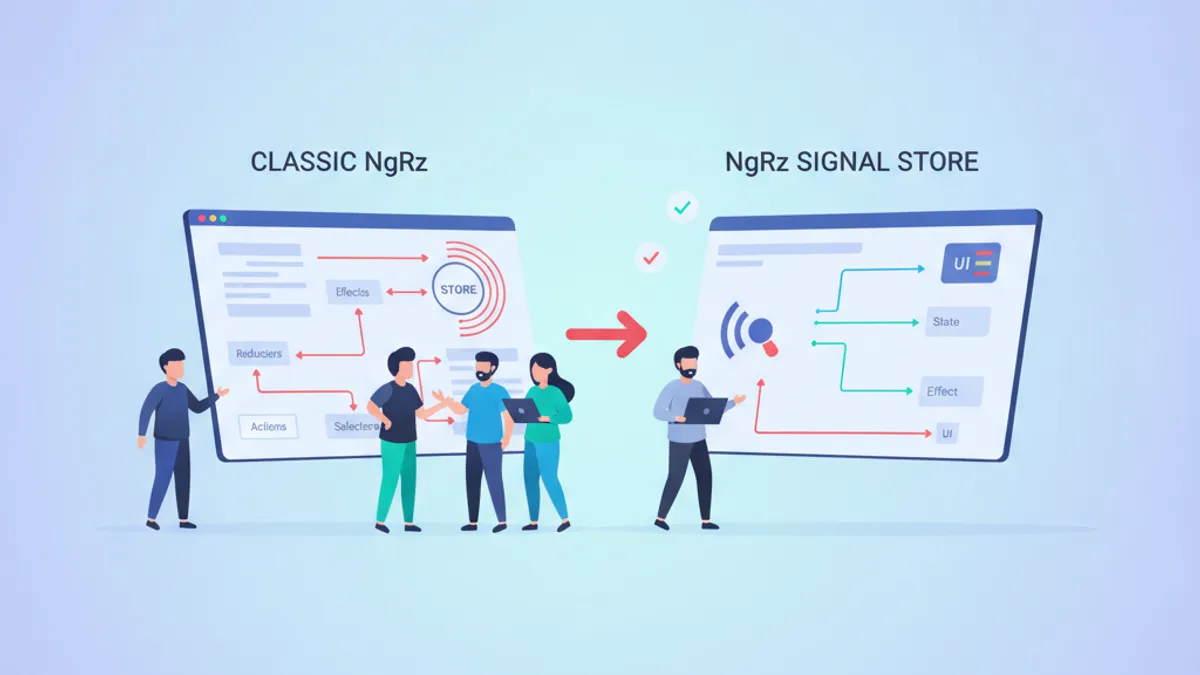
NgRx Signal Store đại diện cho sự thay đổi căn bản trong quản lý state Angular, thay thế mô hình truyền thống actions-reducers-selectors theo Redux bằng cách tiếp cận reactive dựa trên signal. Bài so sánh này phân tích cả hai giải pháp để giúp các nhà phát triển Angular đưa ra quyết định kiến trúc đúng đắn trong năm 2026.
Sử dụng Signal Store cho state cấp feature và ứng dụng độ phức tạp trung bình khi việc giảm boilerplate là quan trọng. Sử dụng Classic NgRx cho ứng dụng enterprise yêu cầu audit trail nghiêm ngặt, side effects phức tạp và debugging DevTools mở rộng.
Hiểu Rõ Sự Khác Biệt Kiến Trúc
Classic NgRx tuân theo mô hình Redux: actions mô tả events, reducers tạo ra state mới immutable, và selectors trích xuất dữ liệu. Mọi thay đổi state đều đi qua một pipeline có thể dự đoán và theo dõi được.
Signal Store có cách tiếp cận khác. Thay vì dispatch actions thông qua reducers, state tồn tại trong các signals reactive. Cập nhật xảy ra thông qua các methods gọi patchState(), và các giá trị dẫn xuất đến từ computed signals thay vì selectors được memoize.
| Khía Cạnh | Classic NgRx | Signal Store |
|---|---|---|
| Mô Hình Tư Duy | Redux/Flux | Reactive Services |
| Boilerplate | Cao (actions, reducers, selectors, effects) | Thấp (state, methods, computed) |
| Reactivity | RxJS Observables | Angular Signals |
| DevTools | Redux DevTools Đầy Đủ | Signal Store DevTools (qua plugin) |
| Độ Khó Học | Dốc | Vừa Phải |
| Kích Thước Bundle | Lớn Hơn | Nhỏ Hơn |
Đối với các nhà phát triển đã quen thuộc với Angular Signals, Signal Store cảm giác như một phần mở rộng tự nhiên của các primitives reactive trong framework.
Classic NgRx: Mô Hình Redux trong Angular
Classic NgRx tổ chức quản lý state xung quanh actions, reducers, selectors và effects. Sự phân tách này đảm bảo tính dự đoán được với chi phí là độ dài dòng.
import { createActionGroup, emptyProps, props } from '@ngrx/store';
import { Book } from './book.model';

export const BooksActions = createActionGroup({
  source: 'Books',
  events: {
    'Load Books': emptyProps(),
    'Load Books Success': props<{ books: Book[] }>(),
    'Load Books Failure': props<{ error: string }>(),
    'Add Book': props<{ book: Book }>(),
    'Remove Book': props<{ id: string }>(),
  },
});
API createActionGroup nhóm các actions liên quan dưới một source duy nhất, cải thiện độ đọc của DevTools và giảm boilerplate so với các lời gọi createAction riêng lẻ.
import { createReducer, on } from '@ngrx/store';
import { BooksActions } from './books.actions';
import { Book } from './book.model';

export interface BooksState {
  books: Book[];
  loading: boolean;
  error: string | null;
}

const initialState: BooksState = {
  books: [],
  loading: false,
  error: null,
};

export const booksReducer = createReducer(
  initialState,
  on(BooksActions.loadBooks, (state) => ({
    ...state,
    loading: true,
    error: null,
  })),
  on(BooksActions.loadBooksSuccess, (state, { books }) => ({
    ...state,
    books,
    loading: false,
  })),
  on(BooksActions.loadBooksFailure, (state, { error }) => ({
    ...state,
    loading: false,
    error,
  }))
);
Reducers vẫn là các hàm thuần túy trả về đối tượng state mới. Hàm on() xử lý việc khớp action và cập nhật state một cách ngắn gọn.
import { createFeatureSelector, createSelector } from '@ngrx/store';
import { BooksState } from './books.reducer';

export const selectBooksState = createFeatureSelector<BooksState>('books');

export const selectAllBooks = createSelector(
  selectBooksState,
  (state) => state.books
);

export const selectBooksLoading = createSelector(
  selectBooksState,
  (state) => state.loading
);

export const selectPublishedBooks = createSelector(
  selectAllBooks,
  (books) => books.filter((book) => book.published)
);
Selectors cung cấp memoization tự động. Selector selectPublishedBooks chỉ tính toán lại khi mảng books thay đổi, làm cho việc đọc hiệu quả ngay cả trong các store được cập nhật thường xuyên.
NgRx Signal Store: Quản Lý State Signals-First
Signal Store hợp nhất state, computed values và methods vào một service injectable duy nhất. Tài liệu chính thức NgRx mô tả nó như "giải pháp quản lý state đầy đủ tính năng với hỗ trợ native cho Angular Signals."
import { computed, inject } from '@angular/core';
import { patchState, signalStore, withComputed, withMethods, withState } from '@ngrx/signals';
import { BooksService } from './books.service';
import { Book } from './book.model';

interface BooksState {
  books: Book[];
  loading: boolean;
  error: string | null;
}

const initialState: BooksState = {
  books: [],
  loading: false,
  error: null,
};

export const BooksStore = signalStore(
  { providedIn: 'root' },
  withState(initialState),
  withComputed(({ books }) => ({
    publishedBooks: computed(() => books().filter((book) => book.published)),
    totalBooks: computed(() => books().length),
  })),
  withMethods((store, booksService = inject(BooksService)) => ({
    async loadBooks() {
      patchState(store, { loading: true, error: null });
      try {
        const books = await booksService.getAll();
        patchState(store, { books, loading: false });
      } catch (error) {
        patchState(store, { loading: false, error: 'Failed to load books' });
      }
    },
    addBook(book: Book) {
      patchState(store, ({ books }) => ({ books: [...books, book] }));
    },
    removeBook(id: string) {
      patchState(store, ({ books }) => ({
        books: books.filter((book) => book.id !== id),
      }));
    },
  }))
);
Toàn bộ quản lý state của feature nằm gọn trong một file. Các thuộc tính state tự động trở thành signals, computed signals thay thế selectors, và methods thay thế dispatch actions.
Quản Lý Entity với withEntities
Cả hai cách tiếp cận đều hỗ trợ collections entity, nhưng tính năng withEntities của Signal Store giảm đáng kể lượng code.
import { computed, inject } from '@angular/core';
import { patchState, signalStore, withComputed, withMethods } from '@ngrx/signals';
import {
  addEntity,
  removeEntity,
  setAllEntities,
  updateEntity,
  withEntities,
} from '@ngrx/signals/entities';
import { BooksService } from './books.service';
import { Book } from './book.model';

export const BooksEntityStore = signalStore(
  { providedIn: 'root' },
  withEntities<Book>(),
  withComputed(({ entities }) => ({
    publishedBooks: computed(() => entities().filter((book) => book.published)),
  })),
  withMethods((store, booksService = inject(BooksService)) => ({
    async loadBooks() {
      const books = await booksService.getAll();
      patchState(store, setAllEntities(books));
    },
    addBook(book: Book) {
      patchState(store, addEntity(book));
    },
    updateBook(id: string, changes: Partial<Book>) {
      patchState(store, updateEntity({ id, changes }));
    },
    removeBook(id: string) {
      patchState(store, removeEntity(id));
    },
  }))
);
Tính năng withEntities tự động cung cấp các signals ids, entityMap và entities. Các entity updaters như addEntity, removeEntity và updateEntity xử lý các mutations của collection.
Sẵn sàng chinh phục phỏng vấn Angular?
Luyện tập với mô phỏng tương tác, flashcards và bài kiểm tra kỹ thuật.
Store Features Tùy Chỉnh Cho Tái Sử Dụng
Hàm signalStoreFeature của Signal Store cho phép trích xuất và tái sử dụng các cross-cutting concerns qua nhiều stores.
import { computed } from '@angular/core';
import { signalStoreFeature, withComputed, withState } from '@ngrx/signals';

type RequestStatus = 'idle' | 'pending' | 'fulfilled' | 'error';

export function withRequestStatus() {
  return signalStoreFeature(
    withState<{ requestStatus: RequestStatus }>({ requestStatus: 'idle' }),
    withComputed(({ requestStatus }) => ({
      isPending: computed(() => requestStatus() === 'pending'),
      isFulfilled: computed(() => requestStatus() === 'fulfilled'),
      isError: computed(() => requestStatus() === 'error'),
    }))
  );
}

export function setPending(): { requestStatus: RequestStatus } {
  return { requestStatus: 'pending' };
}

export function setFulfilled(): { requestStatus: RequestStatus } {
  return { requestStatus: 'fulfilled' };
}

export function setError(): { requestStatus: RequestStatus } {
  return { requestStatus: 'error' };
}
Feature tùy chỉnh này giờ có thể được compose vào bất kỳ store nào cần theo dõi trạng thái loading.
import { inject } from '@angular/core';
import { patchState, signalStore, withMethods } from '@ngrx/signals';
import { setAllEntities, withEntities } from '@ngrx/signals/entities';
import { withRequestStatus, setFulfilled, setPending, setError } from './with-request-status';
import { BooksService } from './books.service';
import { Book } from './book.model';

export const BooksStore = signalStore(
  { providedIn: 'root' },
  withEntities<Book>(),
  withRequestStatus(),
  withMethods((store, booksService = inject(BooksService)) => ({
    async loadBooks() {
      patchState(store, setPending());
      try {
        const books = await booksService.getAll();
        patchState(store, setAllEntities(books), setFulfilled());
      } catch {
        patchState(store, setError());
      }
    },
  }))
);
Store đã được compose giờ đây expose các computed signals isPending(), isFulfilled() và isError() mà không cần trùng lặp logic.
Mẫu Tích Hợp Component
Signal Store tích hợp tự nhiên với cú pháp template Angular thông qua việc đọc signal.
import { Component, inject } from '@angular/core';
import { BooksStore } from './books.store';

@Component({
  selector: 'app-books-list',
  standalone: true,
  template: `
    @if (store.isPending()) {
      <div class="loading-spinner">Đang tải sách...</div>
    }

    @if (store.isError()) {
      <div class="error-message">Không thể tải sách</div>
    }

    @for (book of store.entities(); track book.id) {
      <div class="book-card">
        <h3>{{ book.title }}</h3>
        <p>{{ book.author }}</p>
        <button (click)="store.removeBook(book.id)">Xóa</button>
      </div>
    }

    <p>Tổng cộng: {{ store.totalBooks() }} sách</p>
  `,
})
export class BooksListComponent {
  readonly store = inject(BooksStore);

  constructor() {
    this.store.loadBooks();
  }
}
Không cần quản lý subscription. Không cần async pipes. Signals tích hợp với zoneless change detection của Angular để đạt hiệu suất tối ưu.
Cân Nhắc Về Hiệu Suất và Kích Thước Bundle
Kiến trúc nhẹ hơn của Signal Store dẫn đến bundles nhỏ hơn. Package core @ngrx/signals thêm khoảng 4KB gzipped, so với 15-20KB cho stack classic NgRx đầy đủ (@ngrx/store, @ngrx/effects, @ngrx/entity).
Signal Store cũng hưởng lợi từ signal-based change detection của Angular. Computed signals chỉ tính toán lại khi dependencies thay đổi, và components chỉ re-render khi signals được sử dụng cập nhật. Reactivity chi tiết này loại bỏ các chu kỳ change detection không cần thiết phổ biến trong các patterns dựa trên Observable.
Đối với các ứng dụng đã sử dụng RxJS nhiều, selectors dựa trên Observable của classic NgRx tích hợp mượt mà với các pipelines hiện có.
Chiến Lược Di Chuyển Từ Classic Sang Signal Store
Di chuyển ứng dụng classic NgRx hiện có không yêu cầu viết lại toàn bộ. Cả hai giải pháp có thể tồn tại song song, cho phép áp dụng dần dần.
- Bắt đầu với các features mới sử dụng Signal Store
- Di chuyển các feature modules độc lập từng cái một
- Giữ các features phức tạp với nhiều effects trên classic NgRx nếu chi phí di chuyển vượt quá lợi ích
- Sử dụng các utilities interop NgRx Signals để kết nối giữa state dựa trên Observable và dựa trên signal
Classic NgRx Store và Signal Store có thể chạy song song trong cùng một ứng dụng. Đội ngũ NgRx chính thức hỗ trợ cả hai cách tiếp cận và cung cấp các utilities interop để kết nối chúng.
Khi Nào Chọn Mỗi Cách Tiếp Cận
Chọn Signal Store khi:
- Xây dựng ứng dụng Angular 20+ mới
- Quản lý state cấp feature hoặc component
- Ưu tiên trải nghiệm developer và giảm boilerplate
- Đội ngũ có kinh nghiệm NgRx hạn chế
- Kích thước bundle quan trọng
Chọn Classic NgRx khi:
- Bảo trì ứng dụng NgRx hiện có
- Yêu cầu action logging và audit trails nghiêm ngặt
- Xây dựng workflows phức tạp với side effects mở rộng
- Cần full Redux DevTools time-travel debugging
- Đội ngũ có chuyên môn NgRx sâu
Để hiểu các nguyên tắc cơ bản về quản lý state, việc hiểu cả hai cách tiếp cận chuẩn bị cho các nhà phát triển làm việc với đa dạng codebases Angular.
Bắt đầu luyện tập!
Kiểm tra kiến thức với mô phỏng phỏng vấn và bài kiểm tra kỹ thuật.
Kết Luận
- Signal Store giảm boilerplate quản lý state 60-70% so với classic NgRx
- Classic NgRx vẫn là lựa chọn tốt hơn cho ứng dụng enterprise yêu cầu audit trails nghiêm ngặt và side effects phức tạp
- Cả hai cách tiếp cận có thể tồn tại song song trong cùng một ứng dụng, cho phép di chuyển dần dần
- Computed signals của Signal Store cung cấp memoization tự động mà không cần định nghĩa selector rõ ràng
- Store features tùy chỉnh (
signalStoreFeature) cho phép cross-cutting concerns có thể tái sử dụng - Đối với các dự án Angular 20+ mới trong 2026, Signal Store nên là lựa chọn mặc định trừ khi các yêu cầu cụ thể đòi hỏi classic NgRx
Bạn có tìm ra lỗi trong Angular không?
Một đoạn mã thật, một lỗi ẩn, mỗi ngày một lượt. Không cần tài khoản để thử.

Viết bởi
Anthony Fillion-MailletNgười sáng lập SharpSkill
Lập trình viên fullstack hơn 10 năm. Anh điều hành SharpSkill và chịu trách nhiệm về mọi nội dung đăng tại đây.
Cập nhật ngày 11 tháng 7, 2026
Chia sẻ
Bài viết liên quan

Angular Signals và Computed năm 2026: Reactivity Chi Tiết và Câu Hỏi Phỏng Vấn
Tìm hiểu Angular Signals và computed signals để có reactivity chi tiết trong Angular 20+. Hướng dẫn toàn diện bao gồm signal primitives, linkedSignal, tương tác RxJS và các câu hỏi phỏng vấn kỹ thuật.

Dependency Injection Nang Cao trong Angular 2026: Providers, Tokens va Cau Hoi Phong Van
Tim hieu sau ve he thong dependency injection cua Angular bao gom chien luoc provider, InjectionToken, injector phan cap va cac cau hoi phong van thuong gap cho developer Angular co kinh nghiem.

Cú Pháp Control Flow trong Angular 2026: @if, @for, @switch và Câu Hỏi Phỏng Vấn
Tìm hiểu cú pháp control flow Angular (@if, @for, @switch) thay thế các structural directive. Hướng dẫn đầy đủ với ví dụ code, tips migration và câu hỏi phỏng vấn kỹ thuật.