iOS Push Notifications-sollicitatiegesprek 2026: APNs, tokens en troubleshooting
Complete gids om je voor te bereiden op iOS-sollicitatiegesprekken over Push Notifications, APNs, tokenbeheer en troubleshooting. Veelgestelde vragen met uitgebreide antwoorden.
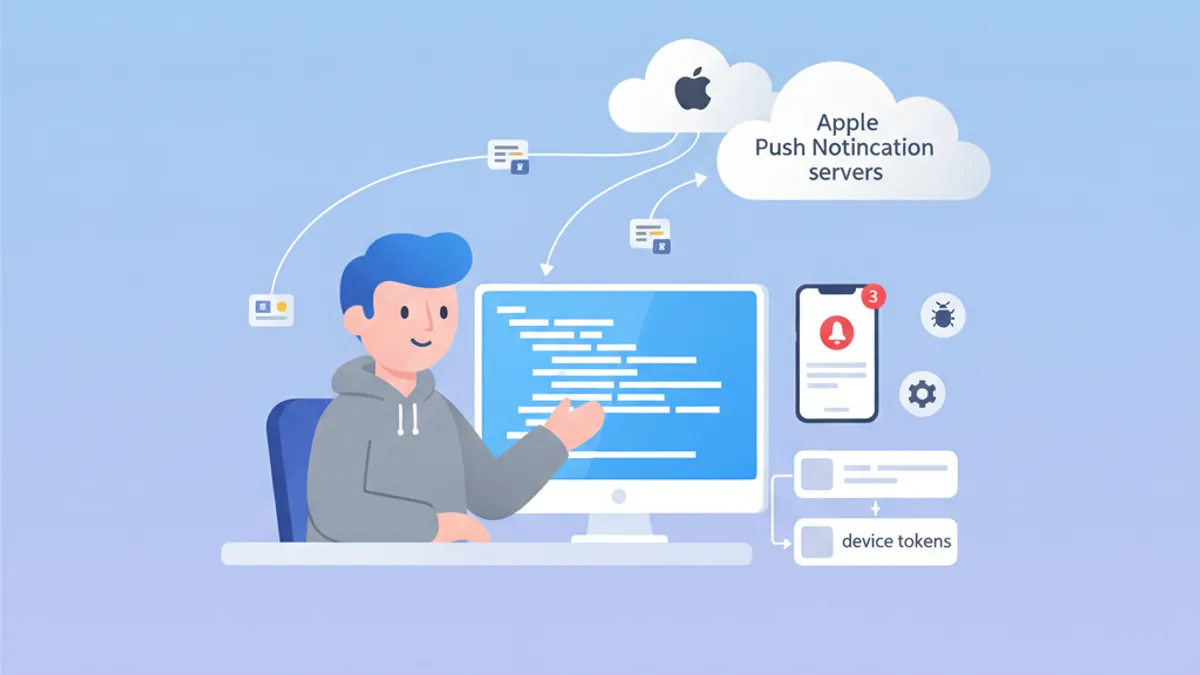
Push Notifications blijven een essentieel onderwerp in iOS-sollicitatiegesprekken. Begrip van de werking van APNs, het beheer van device tokens en het oplossen van veelvoorkomende problemen toont diepgaande kennis van het Apple-ecosysteem. Deze gids behandelt de meest gestelde vragen tijdens sollicitaties.
Interviewers letten op kandidaten die de volledige levenscyclus begrijpen: van apparaatregistratie tot afleveren van de notificatie, inclusief correcte foutafhandeling in elke stap.
APNs-architectuur: de basis van iOS-notificaties
Apple Push Notification service (APNs) is de centrale dienst die de aflevering van push notifications naar Apple-apparaten verzorgt. De architectuur kennen is cruciaal om sollicitatievragen overtuigend te beantwoorden.
Hoe werkt APNs?
De communicatieflow betrekt drie hoofdspelers: de iOS-app, APNs en de backendserver. Dit is het volledige proces:
import UIKit
import UserNotifications

@main
class AppDelegate: UIResponder, UIApplicationDelegate {

    func application(
        _ application: UIApplication,
        didFinishLaunchingWithOptions launchOptions: [UIApplication.LaunchOptionsKey: Any]?
    ) -> Bool {
        // Request notification authorization
        UNUserNotificationCenter.current().requestAuthorization(
            options: [.alert, .badge, .sound]
        ) { granted, error in
            guard granted else { return }
            // Register with APNs
            DispatchQueue.main.async {
                application.registerForRemoteNotifications()
            }
        }
        return true
    }
}
De registratie bij APNs gebeurt in twee stappen: eerst toestemming vragen aan de gebruiker en daarna registerForRemoteNotifications() aanroepen.
Beheer van het device token
Het device token is een unieke identifier die door APNs wordt gegenereerd om een specifiek apparaat aan te spreken. Dit token kan veranderen en moet bij elke app-start naar de backendserver worden gestuurd.
extension AppDelegate {

    // Callback when APNs provides the token
    func application(
        _ application: UIApplication,
        didRegisterForRemoteNotificationsWithDeviceToken deviceToken: Data
    ) {
        // Convert token to hexadecimal string
        let tokenString = deviceToken.map { String(format: "%02.2hhx", $0) }.joined()
        print("Device Token: \(tokenString)")

        // Send to backend server
        sendTokenToServer(tokenString)
    }

    // Callback on registration failure
    func application(
        _ application: UIApplication,
        didFailToRegisterForRemoteNotificationsWithError error: Error
    ) {
        print("Failed to register: \(error.localizedDescription)")
    }

    private func sendTokenToServer(_ token: String) {
        // Implement HTTP request to backend
    }
}
Het token komt binnen als Data en moet eerst naar een hexadecimale string worden omgezet voordat het naar de server gaat.
Veelgestelde APNs-vragen tijdens sollicitaties
iOS-gesprekken combineren meestal theoretische en praktische vragen over APNs. Hier de meest voorkomende met uitgebreide antwoorden.
Vraag 1: Wat is het verschil tussen APNs sandbox en productie?
APNs heeft twee gescheiden omgevingen met verschillende endpoints. Tokens uit de ene omgeving werken niet in de andere.
| Omgeving | Endpoint | Gebruik |
|---|---|---|
| Sandbox | api.sandbox.push.apple.com | Debug, TestFlight |
| Productie | api.push.apple.com | App Store |
Vraag 2: Hoe ga je om met het verlopen van een token?
Device tokens kunnen om verschillende redenen veranderen: systeemherstel, installatie op een nieuw toestel of periodieke verversing door APNs. De server moet de foutresponses van APNs correct verwerken.
enum APNsError: Int {
    case badDeviceToken = 400
    case unregistered = 410
    case payloadTooLarge = 413
    case tooManyRequests = 429
    case internalServerError = 500

    var shouldRemoveToken: Bool {
        // Remove token only if device is no longer registered
        return self == .unregistered || self == .badDeviceToken
    }
}

struct APNsResponse {
    let statusCode: Int
    let deviceToken: String

    func handleError() {
        guard let error = APNsError(rawValue: statusCode) else { return }

        if error.shouldRemoveToken {
            // Remove token from database
            TokenRepository.shared.remove(deviceToken)
        }
    }
}
Serverseitige foutafhandeling van APNs is cruciaal om de tokendatabase schoon te houden en onnodige requests te voorkomen.
Vraag 3: Hoe implementeer je silent notifications?
Met silent notifications kan de app op de achtergrond worden gewekt om taken uit te voeren zonder een melding aan de gebruiker te tonen.
func application(
    _ application: UIApplication,
    didReceiveRemoteNotification userInfo: [AnyHashable: Any],
    fetchCompletionHandler completionHandler: @escaping (UIBackgroundFetchResult) -> Void
) {
    // Check if this is a silent notification
    guard let aps = userInfo["aps"] as? [String: Any],
          aps["content-available"] as? Int == 1 else {
        completionHandler(.noData)
        return
    }

    // Perform background task
    performBackgroundTask { result in
        switch result {
        case .success:
            completionHandler(.newData)
        case .failure:
            completionHandler(.failed)
        }
    }
}
De JSON-payload van een silent notification moet "content-available": 1 bevatten in het aps-object.
Klaar om je iOS gesprekken te halen?
Oefen met onze interactieve simulatoren, flashcards en technische tests.
Notification Service Extension: geavanceerde maatwerk
Notification Service Extensions maken het mogelijk om de inhoud van een notificatie aan te passen vóór de weergave. Deze functionaliteit komt vaak terug in gesprekken.
Een Service Extension maken
import UserNotifications

class NotificationService: UNNotificationServiceExtension {

    var contentHandler: ((UNNotificationContent) -> Void)?
    var bestAttemptContent: UNMutableNotificationContent?

    override func didReceive(
        _ request: UNNotificationRequest,
        withContentHandler contentHandler: @escaping (UNNotificationContent) -> Void
    ) {
        self.contentHandler = contentHandler
        bestAttemptContent = request.content.mutableCopy() as? UNMutableNotificationContent

        guard let bestAttemptContent = bestAttemptContent else {
            contentHandler(request.content)
            return
        }

        // Modify content
        if let imageURLString = bestAttemptContent.userInfo["image-url"] as? String,
           let imageURL = URL(string: imageURLString) {
            downloadImage(from: imageURL) { attachment in
                if let attachment = attachment {
                    bestAttemptContent.attachments = [attachment]
                }
                contentHandler(bestAttemptContent)
            }
        } else {
            contentHandler(bestAttemptContent)
        }
    }

    override func serviceExtensionTimeWillExpire() {
        // Called when time limit (30 seconds) is exceeded
        if let contentHandler = contentHandler,
           let bestAttemptContent = bestAttemptContent {
            contentHandler(bestAttemptContent)
        }
    }

    private func downloadImage(
        from url: URL,
        completion: @escaping (UNNotificationAttachment?) -> Void
    ) {
        URLSession.shared.downloadTask(with: url) { localURL, _, error in
            guard let localURL = localURL, error == nil else {
                completion(nil)
                return
            }

            let tempDirectory = FileManager.default.temporaryDirectory
            let fileName = url.lastPathComponent
            let destinationURL = tempDirectory.appendingPathComponent(fileName)

            try? FileManager.default.moveItem(at: localURL, to: destinationURL)

            let attachment = try? UNNotificationAttachment(
                identifier: fileName,
                url: destinationURL,
                options: nil
            )
            completion(attachment)
        }.resume()
    }
}
De extension heeft 30 seconden om de inhoud aan te passen. De methode serviceExtensionTimeWillExpire() wordt aangeroepen als die limiet wordt overschreden.
Troubleshooting van Push Notifications
Het debuggen van push notifications is een terugkerend onderwerp in sollicitaties. Kandidaten moeten de tools en diagnosetechnieken kennen.
De registratiestatus controleren
struct PushNotificationDebugger {

    static func checkNotificationStatus() async {
        let center = UNUserNotificationCenter.current()
        let settings = await center.notificationSettings()

        print("=== Push Notification Status ===")
        print("Authorization: \(settings.authorizationStatus.description)")
        print("Alert: \(settings.alertSetting.description)")
        print("Badge: \(settings.badgeSetting.description)")
        print("Sound: \(settings.soundSetting.description)")
        print("Notification Center: \(settings.notificationCenterSetting.description)")
    }
}

extension UNAuthorizationStatus {
    var description: String {
        switch self {
        case .notDetermined: return "Not Determined"
        case .denied: return "Denied"
        case .authorized: return "Authorized"
        case .provisional: return "Provisional"
        case .ephemeral: return "Ephemeral"
        @unknown default: return "Unknown"
        }
    }
}
Deze debugfunctie laat snel zien wat de autorisatiestatus van de notificaties is.
Veelvoorkomende fouten en oplossingen
Interviewers vragen vaak naar veelvoorkomende fouten en hun oplossingen. Hieronder de belangrijkste om te onthouden.
| Fout | Oorzaak | Oplossing |
|---|---|---|
| Ongeldig token | Verkeerde omgeving (sandbox/prod) | Provisioning profile controleren |
| Notificatie niet ontvangen | Energiebesparingsmodus actief | Testen met opgeladen batterij |
| Extension wordt niet aangeroepen | Payload zonder mutable-content | "mutable-content": 1 toevoegen |
| Background fetch faalt | App door gebruiker gesloten | Gebruiker informeren over deze beperking |
APNs rechtstreeks testen
Om notificaties tijdens de ontwikkeling te testen, kan met curl direct naar APNs worden gepost:
struct APNsTestPayload {

    static let silentNotification = """
    {
        "aps": {
            "content-available": 1
        },
        "custom-data": "test"
    }
    """

    static let richNotification = """
    {
        "aps": {
            "alert": {
                "title": "New message",
                "body": "Message content"
            },
            "mutable-content": 1,
            "sound": "default"
        },
        "image-url": "https://example.com/image.jpg"
    }
    """
}
Deze test-payloads zijn handig om het gedrag van de app met verschillende notificatietypes te valideren.
Best practices in productie
Vragen over best practices helpen om de ervaring van de kandidaat met productieapplicaties te peilen.
Afhandeling van netwerkfouten
actor PushTokenManager {

    private var pendingToken: String?
    private var retryCount = 0
    private let maxRetries = 3

    func registerToken(_ token: String) async {
        pendingToken = token
        await sendTokenWithRetry()
    }

    private func sendTokenWithRetry() async {
        guard let token = pendingToken else { return }

        do {
            try await APIClient.shared.registerPushToken(token)
            pendingToken = nil
            retryCount = 0
        } catch {
            retryCount += 1
            if retryCount < maxRetries {
                // Retry with exponential backoff
                let delay = UInt64(pow(2.0, Double(retryCount))) * 1_000_000_000
                try? await Task.sleep(nanoseconds: delay)
                await sendTokenWithRetry()
            }
        }
    }
}
Een actor zorgt voor thread-veilig tokenbeheer in concurrente omgevingen.
Lokale persistentie van het token
struct TokenStorage {

    private static let tokenKey = "com.app.pushToken"

    static func save(_ token: String) {
        UserDefaults.standard.set(token, forKey: tokenKey)
    }

    static func retrieve() -> String? {
        UserDefaults.standard.string(forKey: tokenKey)
    }

    static func hasTokenChanged(_ newToken: String) -> Bool {
        guard let savedToken = retrieve() else { return true }
        return savedToken != newToken
    }
}
Door het token lokaal op te slaan worden onnodige netwerkaanroepen vermeden zodra het token niet is veranderd.
Conclusie
Wie iOS Push Notifications beheerst, toont een diepgaand begrip van het Apple-ecosysteem en van de client-server-interacties. Belangrijke punten om bij sollicitaties te onthouden:
✅ APNs-architectuur: het volledige traject van registratie tot aflevering doorgronden
✅ Device tokens: levenscyclus en omgang met tokenwijzigingen
✅ Notification Service Extension: contentaanpassing met een limiet van 30 seconden
✅ Troubleshooting: veelvoorkomende fouten en hun oplossingen kennen
✅ Silent notifications: content-available voor background fetch
✅ Best practices: retry-logica, lokale persistentie, foutafhandeling
Begin met oefenen!
Test je kennis met onze gespreksimulatoren en technische tests.
Zie jij de bug in iOS?
Een echt codefragment, een verborgen bug, één poging per dag. Zonder account uit te proberen.

Geschreven door
Anthony Fillion-MailletOprichter van SharpSkill
Al meer dan 10 jaar fullstack-ontwikkelaar. Hij leidt SharpSkill en staat in voor alles wat hier verschijnt.
Bijgewerkt op 29 april 2026
Tags
Delen
Gerelateerde artikelen

StoreKit 2 Sollicitatiegesprek: Abonnementenbeheer en Bonvalidatie
Beheers iOS sollicitatievragen over StoreKit 2, abonnementenbeheer, bonvalidatie en de implementatie van in-app aankopen met praktische Swift-codevoorbeelden.

Swift Testing Framework Sollicitatiegesprek 2026: Macro's #expect en #require vs XCTest
Beheers het nieuwe Swift Testing Framework voor iOS-sollicitaties: macro's #expect en #require, migratie vanuit XCTest, geavanceerde patronen en veelgemaakte fouten.
iOS Senior Sollicitatiegesprek 2026: Vragen over Architectuur en Design Patterns
Voorbereiding op iOS senior sollicitatiegesprekken met kernvragen over MVVM, VIPER, Clean Architecture en design patterns. Volledige gids met Swift-codevoorbeelden.