Phỏng vấn Spring GraphQL: Resolver, DataLoader và Giải pháp cho Vấn đề N+1
Chuẩn bị cho phỏng vấn Spring GraphQL với hướng dẫn đầy đủ này. Resolver, DataLoader, xử lý vấn đề N+1, mutation và các thực hành tốt nhất cho câu hỏi kỹ thuật.
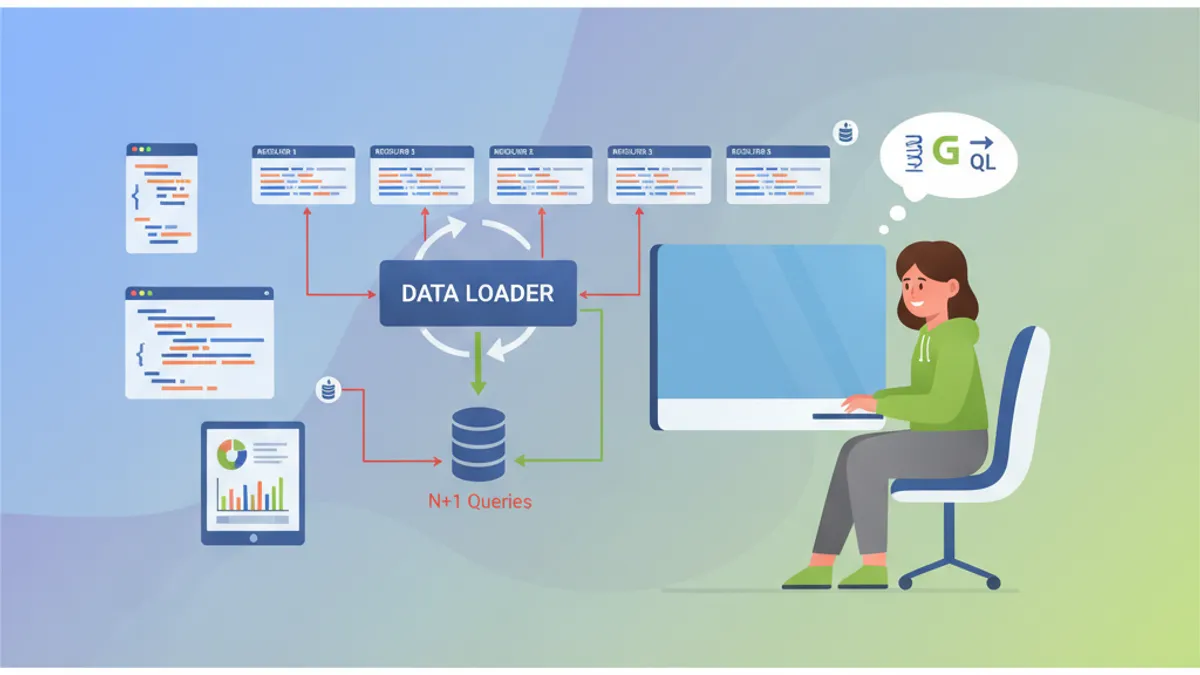
Spring for GraphQL đơn giản hóa việc tích hợp GraphQL trong các ứng dụng Spring Boot. Công nghệ này đã trở nên thiết yếu cho các API hiện đại, và các câu hỏi phỏng vấn về chủ đề này ngày càng phổ biến. Hướng dẫn này bao gồm các khái niệm cốt lõi: resolver, DataLoader, vấn đề N+1 và các pattern nâng cao.
Nhà tuyển dụng đặc biệt kiểm tra hiểu biết về vấn đề N+1 và cách sử dụng DataLoader. Hai chủ đề này chiếm 60% câu hỏi trong các buổi phỏng vấn Spring GraphQL.
Spring for GraphQL là gì?
Spring for GraphQL là người kế nhiệm chính thức của GraphQL Java Spring, được tích hợp tự nhiên vào framework Spring từ phiên bản 2.7. Sự tích hợp này mang lại nhiều lợi thế: hỗ trợ annotation Spring, tích hợp với Spring Security và sử dụng minh bạch WebFlux hoặc MVC.
Cấu hình cơ bản chỉ yêu cầu phụ thuộc spring-boot-starter-graphql và một schema GraphQL.
dependencies {
    // Spring GraphQL starter với Spring MVC
    implementation("org.springframework.boot:spring-boot-starter-graphql")
    implementation("org.springframework.boot:spring-boot-starter-web")

    // Cho các test GraphQL
    testImplementation("org.springframework.graphql:spring-graphql-test")
}
Schema GraphQL nằm trong src/main/resources/graphql/ với phần mở rộng .graphqls.
# schema.graphqls
type Query {
    # Lấy bài viết theo định danh
    article(id: ID!): Article

    # Danh sách bài viết phân trang
    articles(page: Int = 0, size: Int = 10): [Article!]!
}

type Article {
    id: ID!
    title: String!
    content: String!
    # Quan hệ với tác giả
    author: Author!
    # Danh sách bình luận
    comments: [Comment!]!
    createdAt: String!
}

type Author {
    id: ID!
    name: String!
    email: String!
    # Bài viết do tác giả này viết
    articles: [Article!]!
}

type Comment {
    id: ID!
    content: String!
    author: Author!
    createdAt: String!
}
Kiến trúc này khai báo các kiểu và mối quan hệ của chúng. GraphQL tự động tạo tài liệu và xác thực các truy vấn ở phía máy chủ.
Resolver Spring GraphQL hoạt động như thế nào?
Resolver là trái tim của việc thực thi GraphQL. Mỗi trường schema có thể có một resolver riêng. Spring sử dụng annotation @QueryMapping cho các truy vấn gốc và @SchemaMapping cho các quan hệ.
@Controller
public class ArticleController {

    private final ArticleRepository articleRepository;
    private final AuthorRepository authorRepository;

    public ArticleController(ArticleRepository articleRepository,
                            AuthorRepository authorRepository) {
        this.articleRepository = articleRepository;
        this.authorRepository = authorRepository;
    }

    // Resolver cho Query.article(id)
    @QueryMapping
    public Article article(@Argument Long id) {
        return articleRepository.findById(id)
            .orElseThrow(() -> new ArticleNotFoundException(id));
    }

    // Resolver cho Query.articles(page, size)
    @QueryMapping
    public List<Article> articles(@Argument int page,
                                  @Argument int size) {
        Pageable pageable = PageRequest.of(page, size);
        return articleRepository.findAll(pageable).getContent();
    }

    // Resolver cho Article.author - được gọi cho mỗi bài viết
    @SchemaMapping(typeName = "Article", field = "author")
    public Author author(Article article) {
        return authorRepository.findById(article.getAuthorId())
            .orElseThrow(() -> new AuthorNotFoundException(article.getAuthorId()));
    }
}
Resolver author được thực thi cho mỗi bài viết được trả về. Kiến trúc linh hoạt này tải dữ liệu theo yêu cầu nhưng giới thiệu vấn đề N+1.
Ứng viên triển khai resolver @SchemaMapping mà không đề cập đến vấn đề N+1 thể hiện sự hiểu biết không đầy đủ về GraphQL. Nhà tuyển dụng luôn mong đợi phân tích này.
Vấn đề N+1 trong GraphQL là gì?
Vấn đề N+1 xảy ra khi một truy vấn GraphQL kích hoạt N truy vấn bổ sung để tải các quan hệ. Pattern phá hoại này xảy ra một cách có hệ thống với các resolver cơ bản.
Xem xét một truy vấn lấy 50 bài viết với tác giả của chúng:
# Truy vấn GraphQL
query {
    articles(size: 50) {
        id
        title
        author {
            name
        }
    }
}
Với resolver trước đó, truy vấn này thực thi:
- 1 truy vấn cho 50 bài viết
- 50 truy vấn để tải từng tác giả riêng lẻ
-- Truy vấn 1: lấy bài viết
SELECT * FROM articles LIMIT 50

-- Truy vấn 2-51: từng tác giả riêng lẻ
SELECT * FROM authors WHERE id = 1
SELECT * FROM authors WHERE id = 2
SELECT * FROM authors WHERE id = 3
-- ... 47 truy vấn bổ sung
Việc nhân số truy vấn này làm giảm hiệu suất đáng kể. Một endpoint phản hồi trong 50ms có thể nhảy lên 2 giây với N+1.
DataLoader hoạt động như thế nào?
DataLoader nhóm các truy vấn riêng lẻ thành các yêu cầu hàng loạt. Thay vì tải từng tác giả riêng biệt, DataLoader thu thập tất cả các ID được yêu cầu và thực hiện một truy vấn duy nhất.
@Component
public class AuthorBatchLoader {

    private final AuthorRepository authorRepository;

    public AuthorBatchLoader(AuthorRepository authorRepository) {
        this.authorRepository = authorRepository;
    }

    // Phương thức tải hàng loạt
    public Mono<Map<Long, Author>> loadAuthors(Set<Long> authorIds) {
        // Truy vấn duy nhất cho tất cả tác giả
        List<Author> authors = authorRepository.findAllById(authorIds);

        // Chuyển đổi thành Map để tra cứu nhanh
        Map<Long, Author> authorMap = authors.stream()
            .collect(Collectors.toMap(Author::getId, Function.identity()));

        return Mono.just(authorMap);
    }
}
Việc đăng ký DataLoader được thực hiện thông qua BatchLoaderRegistry trong một cấu hình chuyên dụng.
@Configuration
public class GraphQLConfig {

    @Bean
    public BatchLoaderRegistry batchLoaderRegistry(
            AuthorBatchLoader authorBatchLoader) {

        return registry -> {
            // Đăng ký DataLoader cho tác giả
            registry.forTypePair(Long.class, Author.class)
                .registerMappedBatchLoader((authorIds, env) ->
                    authorBatchLoader.loadAuthors(authorIds));
        };
    }
}
Resolver được sửa đổi giờ đây sử dụng DataLoader thay vì truy cập trực tiếp:
@Controller
public class ArticleController {

    private final ArticleRepository articleRepository;

    public ArticleController(ArticleRepository articleRepository) {
        this.articleRepository = articleRepository;
    }

    @QueryMapping
    public List<Article> articles(@Argument int page,
                                  @Argument int size) {
        Pageable pageable = PageRequest.of(page, size);
        return articleRepository.findAll(pageable).getContent();
    }

    // Resolver được tối ưu với DataLoader
    @SchemaMapping(typeName = "Article", field = "author")
    public CompletableFuture<Author> author(
            Article article,
            DataLoader<Long, Author> authorDataLoader) {

        // DataLoader tự động nhóm các cuộc gọi
        return authorDataLoader.load(article.getAuthorId());
    }
}
Với cách tiếp cận này, cùng truy vấn cho 50 bài viết chỉ thực thi 2 truy vấn SQL:
-- Truy vấn 1: lấy bài viết
SELECT * FROM articles LIMIT 50

-- Truy vấn 2: tất cả tác giả cùng một lúc
SELECT * FROM authors WHERE id IN (1, 2, 3, 4, 5, ..., 50)
Sẵn sàng chinh phục phỏng vấn Spring Boot?
Luyện tập với mô phỏng tương tác, flashcards và bài kiểm tra kỹ thuật.
Cách triển khai DataLoader với context?
DataLoader nâng cao đôi khi yêu cầu context bổ sung, chẳng hạn như định danh tenant cho ứng dụng đa tenant hoặc bộ lọc bảo mật.
@Component
public class SecuredAuthorBatchLoader {

    private final AuthorRepository authorRepository;
    private final SecurityContextHolder securityContext;

    public SecuredAuthorBatchLoader(AuthorRepository authorRepository,
                                    SecurityContextHolder securityContext) {
        this.authorRepository = authorRepository;
        this.securityContext = securityContext;
    }

    public Mono<Map<Long, Author>> loadAuthorsForTenant(
            Set<Long> authorIds,
            BatchLoaderEnvironment env) {

        // Lấy context GraphQL
        GraphQLContext context = env.getContext();
        String tenantId = context.get("tenantId");

        // Truy vấn được lọc theo tenant
        List<Author> authors = authorRepository
            .findAllByIdInAndTenantId(authorIds, tenantId);

        Map<Long, Author> authorMap = authors.stream()
            .collect(Collectors.toMap(Author::getId, Function.identity()));

        return Mono.just(authorMap);
    }
}
Cấu hình context được thực hiện thông qua interceptor WebGraphQL:
@Component
public class TenantInterceptor implements WebGraphQlInterceptor {

    @Override
    public Mono<WebGraphQlResponse> intercept(
            WebGraphQlRequest request,
            Chain chain) {

        // Trích xuất tenant từ headers
        String tenantId = request.getHeaders()
            .getFirst("X-Tenant-ID");

        // Thêm vào context GraphQL
        request.configureExecutionInput((input, builder) ->
            builder.graphQLContext(ctx ->
                ctx.put("tenantId", tenantId)
            ).build()
        );

        return chain.next(request);
    }
}
Sự khác biệt giữa @QueryMapping và @SchemaMapping là gì?
Câu hỏi phỏng vấn cổ điển này xác minh sự hiểu biết về phân cấp resolver.
| Annotation | Sử dụng | Tương đương |
|---|---|---|
@QueryMapping | Trường gốc của kiểu Query | @SchemaMapping(typeName = "Query") |
@MutationMapping | Trường gốc của kiểu Mutation | @SchemaMapping(typeName = "Mutation") |
@SubscriptionMapping | Subscription thời gian thực | @SchemaMapping(typeName = "Subscription") |
@SchemaMapping | Tất cả trường của bất kỳ kiểu nào | Dạng tổng quát |
@Controller
public class EquivalenceDemo {

    // Hai khai báo này tương đương
    @QueryMapping
    public Article article(@Argument Long id) {
        return findArticle(id);
    }

    @SchemaMapping(typeName = "Query", field = "article")
    public Article articleEquivalent(@Argument Long id) {
        return findArticle(id);
    }

    // Đối với các trường lồng nhau, chỉ @SchemaMapping hoạt động
    @SchemaMapping(typeName = "Article", field = "author")
    public Author author(Article article) {
        return findAuthor(article.getAuthorId());
    }

    // Cú pháp thay thế với kiểu làm tham số
    @SchemaMapping
    public Author author(Article article) {
        // Spring suy luận typeName = "Article" từ tham số
        return findAuthor(article.getAuthorId());
    }
}
Cách quản lý mutation với xác thực?
Mutation GraphQL sửa đổi dữ liệu. Spring GraphQL tích hợp với Bean Validation để xác thực đầu vào.
# schema.graphqls
type Mutation {
    createArticle(input: CreateArticleInput!): Article!
    updateArticle(id: ID!, input: UpdateArticleInput!): Article!
    deleteArticle(id: ID!): Boolean!
}

input CreateArticleInput {
    title: String!
    content: String!
    authorId: ID!
}

input UpdateArticleInput {
    title: String
    content: String
}
Controller sử dụng @Valid để kích hoạt xác thực:
@Controller
public class ArticleMutationController {

    private final ArticleService articleService;

    public ArticleMutationController(ArticleService articleService) {
        this.articleService = articleService;
    }

    @MutationMapping
    public Article createArticle(@Argument @Valid CreateArticleInput input) {
        // Xác thực được thực hiện tự động
        return articleService.create(input);
    }

    @MutationMapping
    public Article updateArticle(@Argument Long id,
                                 @Argument @Valid UpdateArticleInput input) {
        return articleService.update(id, input);
    }

    @MutationMapping
    public boolean deleteArticle(@Argument Long id) {
        articleService.delete(id);
        return true;
    }
}public record CreateArticleInput(
@NotBlank(message = "Tiêu đề là bắt buộc")
@Size(min = 5, max = 200, message = "Tiêu đề phải từ 5 đến 200 ký tự")
String title,
@NotBlank(message = "Nội dung là bắt buộc")
@Size(min = 100, message = "Nội dung phải có ít nhất 100 ký tự")
String content,
@NotNull(message = "Tác giả là bắt buộc")
Long authorId
) {}Lỗi xác thực tự động trả về một lỗi GraphQL có cấu trúc với đường dẫn của trường không hợp lệ. Spring GraphQL định dạng các lỗi này theo đặc tả GraphQL.
Cách tối ưu hóa truy vấn với @BatchMapping?
Annotation @BatchMapping đơn giản hóa việc tạo DataLoader trực tiếp trong các controller. Cách tiếp cận này tránh cấu hình BatchLoaderRegistry rõ ràng.
@Controller
public class OptimizedArticleController {

    private final ArticleRepository articleRepository;
    private final AuthorRepository authorRepository;
    private final CommentRepository commentRepository;

    public OptimizedArticleController(ArticleRepository articleRepository,
                                      AuthorRepository authorRepository,
                                      CommentRepository commentRepository) {
        this.articleRepository = articleRepository;
        this.authorRepository = authorRepository;
        this.commentRepository = commentRepository;
    }

    @QueryMapping
    public List<Article> articles(@Argument int page,
                                  @Argument int size) {
        return articleRepository.findAll(PageRequest.of(page, size))
            .getContent();
    }

    // BatchMapping cho tác giả - xử lý tất cả bài viết cùng một lúc
    @BatchMapping
    public Map<Article, Author> author(List<Article> articles) {
        // Thu thập ID tác giả duy nhất
        Set<Long> authorIds = articles.stream()
            .map(Article::getAuthorId)
            .collect(Collectors.toSet());

        // Truy vấn duy nhất cho tất cả tác giả
        Map<Long, Author> authorsById = authorRepository
            .findAllById(authorIds)
            .stream()
            .collect(Collectors.toMap(Author::getId, Function.identity()));

        // Liên kết bài viết -> tác giả
        return articles.stream()
            .collect(Collectors.toMap(
                Function.identity(),
                article -> authorsById.get(article.getAuthorId())
            ));
    }

    // BatchMapping cho bình luận
    @BatchMapping
    public Map<Article, List<Comment>> comments(List<Article> articles) {
        List<Long> articleIds = articles.stream()
            .map(Article::getId)
            .toList();

        // Lấy hàng loạt bình luận
        List<Comment> allComments = commentRepository
            .findByArticleIdIn(articleIds);

        // Nhóm theo bài viết
        Map<Long, List<Comment>> commentsByArticle = allComments.stream()
            .collect(Collectors.groupingBy(Comment::getArticleId));

        return articles.stream()
            .collect(Collectors.toMap(
                Function.identity(),
                article -> commentsByArticle
                    .getOrDefault(article.getId(), List.of())
            ));
    }
}
@BatchMapping cung cấp cú pháp ngắn gọn hơn so với cấu hình DataLoader thủ công trong khi vẫn đảm bảo các đảm bảo hiệu suất tương tự.
Cách kiểm tra Resolver GraphQL?
Spring GraphQL cung cấp GraphQlTester để viết các test biểu cảm và dễ đọc.
@SpringBootTest
@AutoConfigureGraphQlTester
class ArticleControllerTest {

    @Autowired
    private GraphQlTester graphQlTester;

    @Test
    void shouldReturnArticleById() {
        // Given: tài liệu GraphQL
        String query = """
            query {
                article(id: 1) {
                    id
                    title
                    author {
                        name
                    }
                }
            }
            """;

        // When & Then
        graphQlTester.document(query)
            .execute()
            .path("article.id").entity(String.class).isEqualTo("1")
            .path("article.title").entity(String.class).isNotEmpty()
            .path("article.author.name").entity(String.class).isNotEmpty();
    }

    @Test
    void shouldCreateArticle() {
        String mutation = """
            mutation {
                createArticle(input: {
                    title: "Tiêu đề mới",
                    content: "Nội dung kiểm tra đủ dài để đáp ứng các ràng buộc xác thực",
                    authorId: 1
                }) {
                    id
                    title
                }
            }
            """;

        graphQlTester.document(mutation)
            .execute()
            .path("createArticle.id").entity(String.class).isNotEmpty()
            .path("createArticle.title").entity(String.class)
                .isEqualTo("Tiêu đề mới");
    }

    @Test
    void shouldReturnErrorForInvalidInput() {
        String mutation = """
            mutation {
                createArticle(input: {
                    title: "",
                    content: "ngắn",
                    authorId: 1
                }) {
                    id
                }
            }
            """;

        graphQlTester.document(mutation)
            .execute()
            .errors()
            .expect(error -> error.getMessage()
                .contains("Tiêu đề là bắt buộc"));
    }

    @Test
    void shouldHandleVariables() {
        String query = """
            query GetArticle($id: ID!) {
                article(id: $id) {
                    id
                    title
                }
            }
            """;

        graphQlTester.document(query)
            .variable("id", 42)
            .execute()
            .path("article").valueIsNull();
    }
}
Bắt đầu luyện tập!
Kiểm tra kiến thức với mô phỏng phỏng vấn và bài kiểm tra kỹ thuật.
Cách quản lý subscription thời gian thực?
Subscription cho phép đẩy dữ liệu thời gian thực đến các client thông qua WebSocket.
# schema.graphqls
type Subscription {
    articleCreated: Article!
    commentAdded(articleId: ID!): Comment!
}@Controller
public class SubscriptionController {
private final Sinks.Many<Article> articleSink =
Sinks.many().multicast().onBackpressureBuffer();
private final Sinks.Many<Comment> commentSink =
Sinks.many().multicast().onBackpressureBuffer();
@SubscriptionMapping
public Flux<Article> articleCreated() {
return articleSink.asFlux();
}
@SubscriptionMapping
public Flux<Comment> commentAdded(@Argument Long articleId) {
return commentSink.asFlux()
.filter(comment -> comment.getArticleId().equals(articleId));
}
// Phương thức được gọi khi tạo bài viết
public void publishArticle(Article article) {
articleSink.tryEmitNext(article);
}
// Phương thức được gọi khi thêm bình luận
public void publishComment(Comment comment) {
commentSink.tryEmitNext(comment);
}
}Cấu hình WebSocket yêu cầu một phụ thuộc bổ sung:
dependencies {
    implementation("org.springframework.boot:spring-boot-starter-websocket")
}@Configuration
public class WebSocketConfig {
@Bean
public ServerEndpointExporter serverEndpointExporter() {
return new ServerEndpointExporter();
}
}Các thực hành tốt nhất về bảo mật GraphQL là gì?
Bảo mật GraphQL yêu cầu nhiều lớp bảo vệ chống lại các cuộc tấn công từ chối dịch vụ và truy cập trái phép.
@Configuration
@EnableMethodSecurity
public class SecurityConfig {

    @Bean
    public SecurityFilterChain filterChain(HttpSecurity http) throws Exception {
        return http
            .authorizeHttpRequests(auth -> auth
                // Endpoint GraphQL được bảo vệ
                .requestMatchers("/graphql").authenticated()
                // GraphiQL chỉ có thể truy cập trong dev
                .requestMatchers("/graphiql").permitAll()
            )
            .oauth2ResourceServer(oauth2 -> oauth2.jwt(Customizer.withDefaults()))
            .build();
    }
}@Controller
public class SecuredArticleController {
private final ArticleRepository articleRepository;
public SecuredArticleController(ArticleRepository articleRepository) {
this.articleRepository = articleRepository;
}
// Truy cập bị giới hạn cho người dùng đã xác thực
@QueryMapping
@PreAuthorize("isAuthenticated()")
public List<Article> articles(@Argument int page,
@Argument int size) {
return articleRepository.findAll(PageRequest.of(page, size))
.getContent();
}
// Chỉ quản trị viên mới có thể xóa
@MutationMapping
@PreAuthorize("hasRole('ADMIN')")
public boolean deleteArticle(@Argument Long id) {
articleRepository.deleteById(id);
return true;
}
// Kiểm tra chi tiết: chỉ tác giả mới có thể sửa đổi
@MutationMapping
@PreAuthorize("@articleSecurity.isAuthor(#id, authentication)")
public Article updateArticle(@Argument Long id,
@Argument UpdateArticleInput input) {
return articleRepository.findById(id)
.map(article -> {
article.setTitle(input.title());
article.setContent(input.content());
return articleRepository.save(article);
})
.orElseThrow();
}
}Bảo vệ chống lại các truy vấn phức tạp:
# application.yml
spring:
  graphql:
    schema:
      introspection:
        # Tắt introspection trong môi trường production
enabled: false@Component
public class QueryComplexityInstrumentation extends SimplePerformantInstrumentation {
private static final int MAX_COMPLEXITY = 100;
@Override
public InstrumentationState createState(InstrumentationCreateStateParameters parameters) {
return new ComplexityState();
}
@Override
public InstrumentationContext<ExecutionResult> beginExecution(
InstrumentationExecutionParameters parameters,
InstrumentationState state) {
int complexity = calculateComplexity(parameters.getDocument());
if (complexity > MAX_COMPLEXITY) {
throw new GraphQLException(
"Truy vấn quá phức tạp: " + complexity + " (max: " + MAX_COMPLEXITY + ")"
);
}
return super.beginExecution(parameters, state);
}
}Kết luận
Spring for GraphQL cung cấp tích hợp GraphQL thanh lịch vào hệ sinh thái Spring. Việc thành thạo resolver, DataLoader và quản lý vấn đề N+1 tạo nên nền tảng kiến thức được mong đợi trong các buổi phỏng vấn.
Danh sách kiểm tra phỏng vấn Spring GraphQL:
- ✅ Giải thích vai trò của các annotation
@QueryMapping,@MutationMappingvà@SchemaMapping - ✅ Mô tả vấn đề N+1 và tác động của nó đối với hiệu suất GraphQL
- ✅ Triển khai DataLoader với
@BatchMappinghoặc BatchLoaderRegistry - ✅ Xác thực đầu vào mutation với Bean Validation
- ✅ Bảo mật resolver với
@PreAuthorizevà Spring Security - ✅ Kiểm tra resolver với GraphQlTester
- ✅ Cấu hình subscription cho các tính năng thời gian thực
- ✅ Bảo vệ API khỏi các truy vấn quá phức tạp
Bạn có tìm ra lỗi trong Spring Boot không?
Một đoạn mã thật, một lỗi ẩn, mỗi ngày một lượt. Không cần tài khoản để thử.

Viết bởi
Anthony Fillion-MailletNgười sáng lập SharpSkill
Lập trình viên fullstack hơn 10 năm. Anh điều hành SharpSkill và chịu trách nhiệm về mọi nội dung đăng tại đây.
Cập nhật ngày 4 tháng 5, 2026
Thẻ
Chia sẻ
Bài viết liên quan

Phỏng vấn Spring Boot: Lan truyền Giao dịch
Làm chủ lan truyền giao dịch Spring Boot: REQUIRED, REQUIRES_NEW, NESTED và hơn thế. 12 câu hỏi phỏng vấn với mã ví dụ và bẫy thường gặp.

Giải pháp N+1 trong Spring Data JPA: Fetch Join, EntityGraph và Hibernate 7.4
Hướng dẫn đầy đủ để phát hiện và khắc phục vấn đề N+1 trong Spring Data JPA. Fetch join, @EntityGraph, batch fetching và các chiến lược hiệu năng truy vấn.
30 Câu Hỏi Phỏng Vấn Spring Boot: Hướng Dẫn Đầy Đủ cho Lập Trình Viên Java
Chuẩn bị các buổi phỏng vấn Spring Boot với 30 câu hỏi cốt lõi về auto-configuration, starter, Spring Data JPA, bảo mật và kiểm thử. Cập nhật cho Spring Boot 4.x.