Spring Security 6: налаштування OAuth2 Resource Server
Практичний посібник з налаштування OAuth2 Resource Server зі Spring Security 6. Валідація JWT, конфігурація issuer, керування scope та інтеграція з Keycloak.
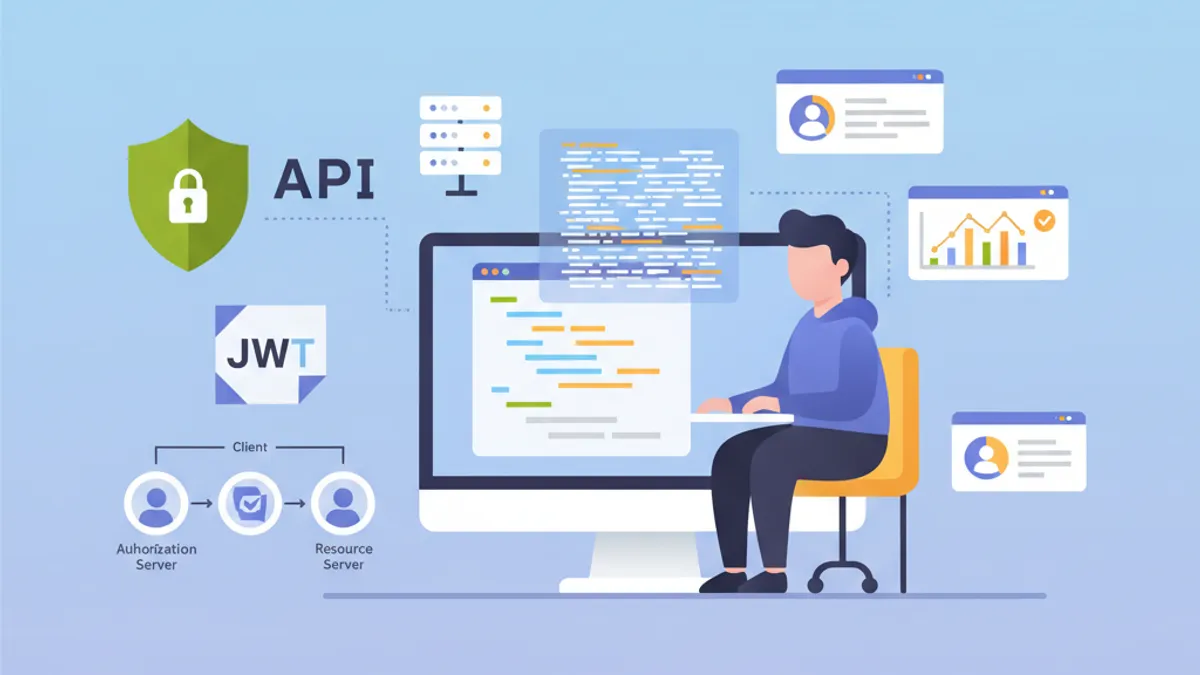
OAuth2 Resource Server захищає API, валідуючи JWT-токени, видані зовнішнім Authorization Server, таким як Keycloak, Auth0 чи Okta. На відміну від кастомної JWT-автентифікації, де додаток генерує власні токени, Resource Server повністю делегує управління ідентифікацією виділеному Identity Provider (IdP).
Resource Server ніколи не генерує токени. Він лише валідує їх. Такий розподіл відповідальностей посилює безпеку та спрощує архітектуру за рахунок централізації управління ідентифікацією.
Архітектура OAuth2 Resource Server
Потік OAuth2 включає трьох основних учасників. Клієнт (фронтенд або мобільний додаток) отримує access token від Authorization Server. Потім він додає цей токен у кожен запит до Resource Server. Resource Server валідує токен, перевіряючи його підпис за допомогою публічного ключа Authorization Server.
Така архітектура має декілька переваг. Resource Server залишається без стану, оскільки вся необхідна інформація міститься у JWT-токені. Валідація відбувається без мережевих викликів до IdP завдяки асиметричній перевірці підпису. Декілька API можуть використовувати один і той самий Authorization Server, що спрощує управління користувачами.
┌──────────────┐     1. Login      ┌─────────────────────┐
│   Client     │ ───────────────►  │  Authorization      │
│   (SPA/App)  │                   │  Server (Keycloak)  │
│              │ ◄─────────────────│                     │
└──────────────┘   2. JWT Token    └─────────────────────┘
       │                                    │
       │ 3. Request + Bearer Token          │
       ▼                                    ▼
┌──────────────────────┐           ┌─────────────────────┐
│   Resource Server    │ ◄─────── │   JWKS Endpoint     │
│   (Spring Boot API)  │  4. Public Keys (cached)       │
└──────────────────────┘           └─────────────────────┘
Resource Server завантажує публічні ключі під час запуску та кешує їх, уникаючи мережевих викликів для кожного запиту.
Залежності Maven для OAuth2 Resource Server
Налаштування Resource Server вимагає двох конкретних залежностей. Стартер oauth2-resource-server забезпечує базову інфраструктуру, тоді як oauth2-jose містить класи для декодування та валідації JWT.
<!-- pom.xml -->
<dependencies>
    <!-- OAuth2 Resource Server support -->
    <dependency>
        <groupId>org.springframework.boot</groupId>
        <artifactId>spring-boot-starter-oauth2-resource-server</artifactId>
    </dependency>

    <!-- Spring Web for REST endpoints -->
    <dependency>
        <groupId>org.springframework.boot</groupId>
        <artifactId>spring-boot-starter-web</artifactId>
    </dependency>

    <!-- DTO validation -->
    <dependency>
        <groupId>org.springframework.boot</groupId>
        <artifactId>spring-boot-starter-validation</artifactId>
    </dependency>
</dependencies>
Додаткові залежності, такі як JJWT, не потрібні. Spring Security використовує бібліотеку Nimbus JOSE+JWT, що входить до spring-security-oauth2-jose, для обробки токенів.
Базова конфігурація з issuer-uri
Мінімальна конфігурація Resource Server вимагає лише двох рядків. Spring Security автоматично виявляє ендпоінти IdP через протокол OpenID Connect Discovery.
# application.yml
spring:
  security:
    oauth2:
      resourceserver:
        jwt:
          # URI Authorization Server
          # Spring автоматично отримує публічні ключі через /.well-known/openid-configuration
          issuer-uri: https://keycloak.example.com/realms/myrealm
На основі issuer-uri Spring Security надсилає запит до {issuer-uri}/.well-known/openid-configuration, щоб отримати метадані Authorization Server. Потім витягує URL JWKS (JSON Web Key Set), який містить публічні ключі для валідації підписів токенів.
@Configuration
@EnableWebSecurity
@EnableMethodSecurity
public class SecurityConfig {

    @Bean
    public SecurityFilterChain securityFilterChain(HttpSecurity http) throws Exception {
        return http
            // Disable CSRF for stateless APIs
            .csrf(csrf -> csrf.disable())

            // Authorization rules
            .authorizeHttpRequests(auth -> auth
                // Public endpoints
                .requestMatchers("/api/public/**").permitAll()
                .requestMatchers("/actuator/health").permitAll()
                // All other requests require a valid token
                .anyRequest().authenticated()
            )

            // Enable OAuth2 JWT validation
            .oauth2ResourceServer(oauth2 -> oauth2
                .jwt(Customizer.withDefaults())
            )

            // Stateless mode required for Resource Servers
            .sessionManagement(session -> session
                .sessionCreationPolicy(SessionCreationPolicy.STATELESS)
            )

            .build();
    }
}
Цієї конфігурації достатньо для захисту API. Spring Security автоматично валідує підпис токена, перевіряє часові мітки (exp, nbf, iat) і гарантує, що claim iss відповідає налаштованому issuer-uri.
За замовчуванням додаток не запускається, якщо Authorization Server недоступний. Щоб дозволити незалежний запуск, потрібно налаштувати jwk-set-uri явно замість issuer-uri.
Розширена конфігурація з jwk-set-uri
Коли Authorization Server не підтримує OpenID Connect Discovery або коли додаток повинен запускатися без мережевої залежності від IdP, явна конфігурація JWKS є кращим вибором.
# application.yml
spring:
  security:
    oauth2:
      resourceserver:
        jwt:
          # Direct URL to JWKS (public keys)
          jwk-set-uri: https://keycloak.example.com/realms/myrealm/protocol/openid-connect/certs
          # Expected value of the "iss" claim in tokens
          issuer-uri: https://keycloak.example.com/realms/myrealm
          # Allowed audiences ("aud" claim)
          audiences:
            - my-api
            - account
Цей підхід забезпечує більший контроль. Валідація audience запобігає використанню токенів, призначених для інших сервісів. Токен, виданий для додатку frontend-app, буде відхилено, якщо API приймає лише audience my-api та account.
@Configuration
@EnableWebSecurity
public class SecurityConfig {

    @Value("${spring.security.oauth2.resourceserver.jwt.issuer-uri}")
    private String issuerUri;

    @Bean
    public SecurityFilterChain securityFilterChain(HttpSecurity http) throws Exception {
        return http
            .csrf(csrf -> csrf.disable())

            .authorizeHttpRequests(auth -> auth
                .requestMatchers("/api/public/**").permitAll()
                .anyRequest().authenticated()
            )

            // Custom JWT configuration
            .oauth2ResourceServer(oauth2 -> oauth2
                .jwt(jwt -> jwt
                    .jwtAuthenticationConverter(jwtAuthenticationConverter())
                )
            )

            .sessionManagement(session -> session
                .sessionCreationPolicy(SessionCreationPolicy.STATELESS)
            )

            .build();
    }

    // Custom converter to extract authorities from the token
    @Bean
    public JwtAuthenticationConverter jwtAuthenticationConverter() {
        JwtGrantedAuthoritiesConverter grantedAuthoritiesConverter =
            new JwtGrantedAuthoritiesConverter();
        // SCOPE_ prefix for authorities (e.g., SCOPE_read, SCOPE_write)
        grantedAuthoritiesConverter.setAuthorityPrefix("SCOPE_");
        // Claim containing scopes (OAuth2 standard)
        grantedAuthoritiesConverter.setAuthoritiesClaimName("scope");

        JwtAuthenticationConverter jwtAuthenticationConverter =
            new JwtAuthenticationConverter();
        jwtAuthenticationConverter.setJwtGrantedAuthoritiesConverter(
            grantedAuthoritiesConverter
        );

        return jwtAuthenticationConverter;
    }
}
JwtAuthenticationConverter перетворює claims токена на об'єкти GrantedAuthority, які можна використовувати у виразах безпеки.
Готовий до співбесід з Spring Boot?
Практикуйся з нашими інтерактивними симуляторами, flashcards та технічними тестами.
Витягування ролей Keycloak
Keycloak структурує ролі інакше, ніж стандарт OAuth2. Ролі знаходяться у realm_access.roles (ролі realm) або resource_access.{client}.roles (ролі для конкретного клієнта). Кастомний конвертер витягує цю інформацію.
@Component
public class KeycloakJwtAuthenticationConverter
    implements Converter<Jwt, AbstractAuthenticationToken> {

    private static final String REALM_ACCESS_CLAIM = "realm_access";
    private static final String RESOURCE_ACCESS_CLAIM = "resource_access";
    private static final String ROLES_CLAIM = "roles";

    @Value("${keycloak.client-id}")
    private String clientId;

    @Override
    public AbstractAuthenticationToken convert(Jwt jwt) {
        // Combine realm and client roles
        Collection<GrantedAuthority> authorities = Stream.concat(
            extractRealmRoles(jwt).stream(),
            extractClientRoles(jwt).stream()
        ).collect(Collectors.toSet());

        // Return authentication token with extracted authorities
        return new JwtAuthenticationToken(jwt, authorities, extractUsername(jwt));
    }

    // Extract realm-level roles
    private Collection<GrantedAuthority> extractRealmRoles(Jwt jwt) {
        Map<String, Object> realmAccess = jwt.getClaim(REALM_ACCESS_CLAIM);
        if (realmAccess == null) {
            return Collections.emptyList();
        }

        @SuppressWarnings("unchecked")
        List<String> roles = (List<String>) realmAccess.get(ROLES_CLAIM);
        if (roles == null) {
            return Collections.emptyList();
        }

        // ROLE_ prefix for compatibility with hasRole()
        return roles.stream()
            .map(role -> new SimpleGrantedAuthority("ROLE_" + role.toUpperCase()))
            .collect(Collectors.toList());
    }

    // Extract client-specific roles
    private Collection<GrantedAuthority> extractClientRoles(Jwt jwt) {
        Map<String, Object> resourceAccess = jwt.getClaim(RESOURCE_ACCESS_CLAIM);
        if (resourceAccess == null) {
            return Collections.emptyList();
        }

        @SuppressWarnings("unchecked")
        Map<String, Object> clientAccess =
            (Map<String, Object>) resourceAccess.get(clientId);
        if (clientAccess == null) {
            return Collections.emptyList();
        }

        @SuppressWarnings("unchecked")
        List<String> roles = (List<String>) clientAccess.get(ROLES_CLAIM);
        if (roles == null) {
            return Collections.emptyList();
        }

        return roles.stream()
            .map(role -> new SimpleGrantedAuthority("ROLE_" + role.toUpperCase()))
            .collect(Collectors.toList());
    }

    // Extract username from token
    private String extractUsername(Jwt jwt) {
        // Keycloak uses "preferred_username" by default
        String username = jwt.getClaimAsString("preferred_username");
        if (username != null) {
            return username;
        }
        // Fallback to subject (usually the user UUID)
        return jwt.getSubject();
    }
}
Інтеграція в конфігурацію безпеки відбувається через параметр jwtAuthenticationConverter.
@Configuration
@EnableWebSecurity
@EnableMethodSecurity
@RequiredArgsConstructor
public class SecurityConfig {

    private final KeycloakJwtAuthenticationConverter keycloakConverter;

    @Bean
    public SecurityFilterChain securityFilterChain(HttpSecurity http) throws Exception {
        return http
            .csrf(csrf -> csrf.disable())

            .authorizeHttpRequests(auth -> auth
                .requestMatchers("/api/public/**").permitAll()
                // Protection by Keycloak role
                .requestMatchers("/api/admin/**").hasRole("ADMIN")
                .anyRequest().authenticated()
            )

            .oauth2ResourceServer(oauth2 -> oauth2
                .jwt(jwt -> jwt
                    // Use Keycloak converter
                    .jwtAuthenticationConverter(keycloakConverter)
                )
            )

            .sessionManagement(session -> session
                .sessionCreationPolicy(SessionCreationPolicy.STATELESS)
            )

            .build();
    }
}
Витягнуті ролі тепер можна використовувати з анотаціями @PreAuthorize("hasRole('ADMIN')") або у виразах requestMatchers().hasRole().
Кастомна валідація токенів
Додаткові валідації можуть бути необхідні залежно від бізнес-вимог: перевірка кастомних claims, валідація audience або контроль максимального часу життя.
@Component
public class CustomJwtValidator implements OAuth2TokenValidator<Jwt> {

    private static final OAuth2Error AUDIENCE_ERROR =
        new OAuth2Error("invalid_token", "Token audience is not valid", null);

    private static final OAuth2Error CUSTOM_CLAIM_ERROR =
        new OAuth2Error("invalid_token", "Required custom claim missing", null);

    @Value("${app.jwt.required-audience}")
    private String requiredAudience;

    @Value("${app.jwt.required-tenant-claim:tenant_id}")
    private String tenantClaimName;

    @Override
    public OAuth2TokenValidatorResult validate(Jwt jwt) {
        List<OAuth2Error> errors = new ArrayList<>();

        // Audience validation
        if (!validateAudience(jwt)) {
            errors.add(AUDIENCE_ERROR);
        }

        // Custom business claim validation
        if (!validateTenantClaim(jwt)) {
            errors.add(CUSTOM_CLAIM_ERROR);
        }

        if (!errors.isEmpty()) {
            return OAuth2TokenValidatorResult.failure(errors);
        }

        return OAuth2TokenValidatorResult.success();
    }

    private boolean validateAudience(Jwt jwt) {
        List<String> audiences = jwt.getAudience();
        return audiences != null && audiences.contains(requiredAudience);
    }

    private boolean validateTenantClaim(Jwt jwt) {
        // Check for required business claim
        String tenantId = jwt.getClaimAsString(tenantClaimName);
        return tenantId != null && !tenantId.isBlank();
    }
}
Кастомний валідатор інтегрується в конфігурацію JwtDecoder.
@Configuration
@RequiredArgsConstructor
public class JwtConfig {

    private final CustomJwtValidator customValidator;

    @Value("${spring.security.oauth2.resourceserver.jwt.issuer-uri}")
    private String issuerUri;

    @Value("${spring.security.oauth2.resourceserver.jwt.jwk-set-uri}")
    private String jwkSetUri;

    @Bean
    public JwtDecoder jwtDecoder() {
        // Create decoder with JWKS URL
        NimbusJwtDecoder jwtDecoder = NimbusJwtDecoder
            .withJwkSetUri(jwkSetUri)
            .build();

        // Combine default validators with custom validator
        OAuth2TokenValidator<Jwt> defaultValidators =
            JwtValidators.createDefaultWithIssuer(issuerUri);

        OAuth2TokenValidator<Jwt> combinedValidator =
            new DelegatingOAuth2TokenValidator<>(defaultValidators, customValidator);

        jwtDecoder.setJwtValidator(combinedValidator);

        return jwtDecoder;
    }
}Синхронні валідації блокують потік обробки. Для валідацій, що вимагають зовнішніх викликів (база даних, сторонні сервіси), краще використовувати асинхронний фільтр або наступну перевірку.
Доступ до інформації токена в контролерах
Spring Security надає декілька методів доступу до інформації JWT-токена в контролерах.
@RestController
@RequestMapping("/api/users")
public class UserController {

    // Direct JWT injection via @AuthenticationPrincipal
    @GetMapping("/me")
    public ResponseEntity<UserInfoResponse> getCurrentUser(
        @AuthenticationPrincipal Jwt jwt
    ) {
        String userId = jwt.getSubject();
        String email = jwt.getClaimAsString("email");
        String username = jwt.getClaimAsString("preferred_username");
        List<String> roles = extractRoles(jwt);

        return ResponseEntity.ok(new UserInfoResponse(
            userId, email, username, roles
        ));
    }

    // Alternative with JwtAuthenticationToken to access authorities
    @GetMapping("/profile")
    public ResponseEntity<ProfileResponse> getProfile(
        JwtAuthenticationToken authentication
    ) {
        Jwt jwt = authentication.getToken();
        Collection<String> authorities = authentication.getAuthorities()
            .stream()
            .map(GrantedAuthority::getAuthority)
            .toList();

        return ResponseEntity.ok(new ProfileResponse(
            jwt.getSubject(),
            jwt.getClaimAsString("name"),
            authorities
        ));
    }

    // Access scopes for conditional business logic
    @GetMapping("/data")
    @PreAuthorize("hasAuthority('SCOPE_read')")
    public ResponseEntity<DataResponse> getData(
        @AuthenticationPrincipal Jwt jwt
    ) {
        boolean canWrite = hasScope(jwt, "write");

        // Business logic adapted according to permissions
        DataResponse response = buildDataResponse(jwt.getSubject(), canWrite);
        return ResponseEntity.ok(response);
    }

    private List<String> extractRoles(Jwt jwt) {
        Map<String, Object> realmAccess = jwt.getClaim("realm_access");
        if (realmAccess == null) {
            return Collections.emptyList();
        }
        @SuppressWarnings("unchecked")
        List<String> roles = (List<String>) realmAccess.get("roles");
        return roles != null ? roles : Collections.emptyList();
    }

    private boolean hasScope(Jwt jwt, String scope) {
        String scopes = jwt.getClaimAsString("scope");
        return scopes != null && scopes.contains(scope);
    }
}public record UserInfoResponse(
String userId,
String email,
String username,
List<String> roles
) {}
// ProfileResponse.java
public record ProfileResponse(
String userId,
String name,
Collection<String> authorities
) {}Анотація @AuthenticationPrincipal уникає необхідності вручну отримувати автентифікацію з SecurityContextHolder.
Обробка помилок автентифікації OAuth2
Спеціальна обробка помилок покращує досвід розробника для споживачів API.
@RestControllerAdvice
public class OAuth2SecurityExceptionHandler {

    private static final Logger log =
        LoggerFactory.getLogger(OAuth2SecurityExceptionHandler.class);

    // Missing token or invalid format
    @ExceptionHandler(AuthenticationException.class)
    @ResponseStatus(HttpStatus.UNAUTHORIZED)
    public ErrorResponse handleAuthenticationException(AuthenticationException ex) {
        log.warn("Authentication failed: {}", ex.getMessage());

        return new ErrorResponse(
            "UNAUTHORIZED",
            "Authentication required. Provide a valid Bearer token.",
            Map.of("error", ex.getMessage())
        );
    }

    // Access denied despite valid token
    @ExceptionHandler(AccessDeniedException.class)
    @ResponseStatus(HttpStatus.FORBIDDEN)
    public ErrorResponse handleAccessDeniedException(AccessDeniedException ex) {
        log.warn("Access denied: {}", ex.getMessage());

        return new ErrorResponse(
            "FORBIDDEN",
            "Insufficient permissions for this resource",
            null
        );
    }

    // OAuth2-specific error (expired token, invalid signature, etc.)
    @ExceptionHandler(OAuth2AuthenticationException.class)
    @ResponseStatus(HttpStatus.UNAUTHORIZED)
    public ErrorResponse handleOAuth2Exception(OAuth2AuthenticationException ex) {
        OAuth2Error error = ex.getError();
        log.warn("OAuth2 authentication error: {} - {}",
            error.getErrorCode(), error.getDescription());

        String message = switch (error.getErrorCode()) {
            case "invalid_token" -> "Token is invalid or expired";
            case "insufficient_scope" -> "Token does not have required scopes";
            default -> "Authentication failed";
        };

        return new ErrorResponse(
            error.getErrorCode().toUpperCase(),
            message,
            Map.of("details", error.getDescription())
        );
    }
}

// ErrorResponse.java
public record ErrorResponse(
    String code,
    String message,
    Map<String, String> details
) {}
Стандартизовані коди помилок OAuth2 (invalid_token, insufficient_scope) спрощують обробку на стороні клієнта.
Конфігурація для декількох середовищ
Конфігурація відрізняється залежно від середовища. У розробці можна використовувати локальний сервер Keycloak, тоді як у продакшні цю роль бере на себе керований IdP, такий як Auth0.
# application.yml (common configuration)
app:
  jwt:
    required-audience: my-api

---
# application-dev.yml
spring:
  config:
    activate:
      on-profile: dev
  security:
    oauth2:
      resourceserver:
        jwt:
          issuer-uri: http://localhost:8180/realms/dev-realm

keycloak:
  client-id: my-api-dev

logging:
  level:
    org.springframework.security: DEBUG

---
# application-prod.yml
spring:
  config:
    activate:
      on-profile: prod
  security:
    oauth2:
      resourceserver:
        jwt:
          issuer-uri: ${OAUTH2_ISSUER_URI}
          audiences: ${OAUTH2_AUDIENCES:my-api}

keycloak:
  client-id: ${KEYCLOAK_CLIENT_ID}

logging:
  level:
    org.springframework.security: WARN
У продакшні конфіденційні значення надходять зі змінних середовища або з менеджера секретів.
Інтеграційні тести з мокованими JWT
Інтеграційні тести використовують утиліти Spring Security Test для симуляції валідних JWT-токенів.
@SpringBootTest(webEnvironment = WebEnvironment.RANDOM_PORT)
@AutoConfigureMockMvc
class ResourceServerIntegrationTest {

    @Autowired
    private MockMvc mockMvc;

    @Test
    void shouldRejectRequestWithoutToken() throws Exception {
        mockMvc.perform(get("/api/users/me"))
            .andExpect(status().isUnauthorized());
    }

    @Test
    @WithMockJwtAuth(
        claims = @OpenIdClaims(sub = "user-123", preferredUsername = "john.doe"),
        authorities = {"ROLE_USER"}
    )
    void shouldAllowAuthenticatedUser() throws Exception {
        mockMvc.perform(get("/api/users/me"))
            .andExpect(status().isOk())
            .andExpect(jsonPath("$.userId").value("user-123"))
            .andExpect(jsonPath("$.username").value("john.doe"));
    }

    @Test
    void shouldAllowAccessWithValidJwt() throws Exception {
        mockMvc.perform(get("/api/users/me")
                .with(jwt()
                    .jwt(jwt -> jwt
                        .subject("user-456")
                        .claim("preferred_username", "jane.doe")
                        .claim("email", "jane@example.com")
                    )
                    .authorities(new SimpleGrantedAuthority("ROLE_USER"))
                ))
            .andExpect(status().isOk())
            .andExpect(jsonPath("$.email").value("jane@example.com"));
    }

    @Test
    void shouldDenyAccessWithoutAdminRole() throws Exception {
        mockMvc.perform(get("/api/admin/users")
                .with(jwt()
                    .authorities(new SimpleGrantedAuthority("ROLE_USER"))
                ))
            .andExpect(status().isForbidden());
    }

    @Test
    void shouldAllowAdminAccess() throws Exception {
        mockMvc.perform(get("/api/admin/users")
                .with(jwt()
                    .authorities(new SimpleGrantedAuthority("ROLE_ADMIN"))
                ))
            .andExpect(status().isOk());
    }
}
Утиліта jwt() зі spring-security-test створює моковані токени без потреби в Authorization Server.
@TestConfiguration
public class SecurityTestConfig {

    // Mocked JwtDecoder for tests
    @Bean
    @Primary
    public JwtDecoder jwtDecoder() {
        return token -> {
            // Return a mocked JWT for tests
            return Jwt.withTokenValue(token)
                .header("alg", "RS256")
                .subject("test-user")
                .claim("scope", "read write")
                .build();
        };
    }
}
Починай практикувати!
Перевір свої знання з нашими симуляторами співбесід та технічними тестами.
Висновок
Конфігурація OAuth2 Resource Server зі Spring Security 6 централізує валідацію токенів і спрощує безпеку API. Authorization Server керує автентифікацією та видачею токенів, тоді як API зосереджується на валідації та витягуванні інформації про ідентичність.
Чек-лист розгортання:
- ✅ Налаштувати
issuer-uriабоjwk-set-uriвідповідно до потреб - ✅ Валідувати audience, щоб запобігти неправильному використанню токенів інших сервісів
- ✅ Кастомний конвертер для витягування ролей Keycloak
- ✅ Обробка помилок OAuth2 зі стандартизованими кодами
- ✅ Інтеграційні тести з мокованими токенами
- ✅ HTTPS обов'язковий між клієнтом і Resource Server
- ✅ Конфігурація, специфічна для середовища
- ✅ Логування невдалих спроб автентифікації
Така архітектура природно інтегрується в екосистему мікросервісів, де декілька API використовують один і той самий Identity Provider.
Чи знайдеш ти помилку в Spring Boot?
Справжній фрагмент коду, прихована помилка, одна спроба на день. Щоб спробувати, акаунт не потрібен.

Автор:
Anthony Fillion-MailletЗасновник SharpSkill
Fullstack-розробник понад 10 років. Керує SharpSkill і відповідає за все, що тут публікується.
Оновлено 1 травня 2026 р.
Теги
Поділитися
Пов'язані статті
Spring Security 6: Повна Автентифікація JWT
Практичний посібник із впровадження автентифікації JWT у Spring Security 6: конфігурація, генерація токенів, валідація та найкращі практики безпеки.

Spring Modulith: Архітектура модульного моноліта
Опануйте Spring Modulith для побудови модульних монолітів на Java. Архітектура, модулі, асинхронні події, тестування та спостережуваність з прикладами коду Spring Boot 3 і 4.

Співбесіда Spring Batch 5: Партиціювання, Чанки та Відмовостійкість
Опануйте співбесіди Spring Batch 5: 15 ключових питань про партиціювання, обробку чанків і відмовостійкість з прикладами на Java 21.