Rozmowa kwalifikacyjna Spring GraphQL: Resolvery, DataLoadery i Rozwiązania problemu N+1
Przygotowanie do rozmów kwalifikacyjnych Spring GraphQL z tym kompletnym przewodnikiem. Resolvery, DataLoadery, obsługa problemu N+1, mutacje i najlepsze praktyki dla pytań technicznych.
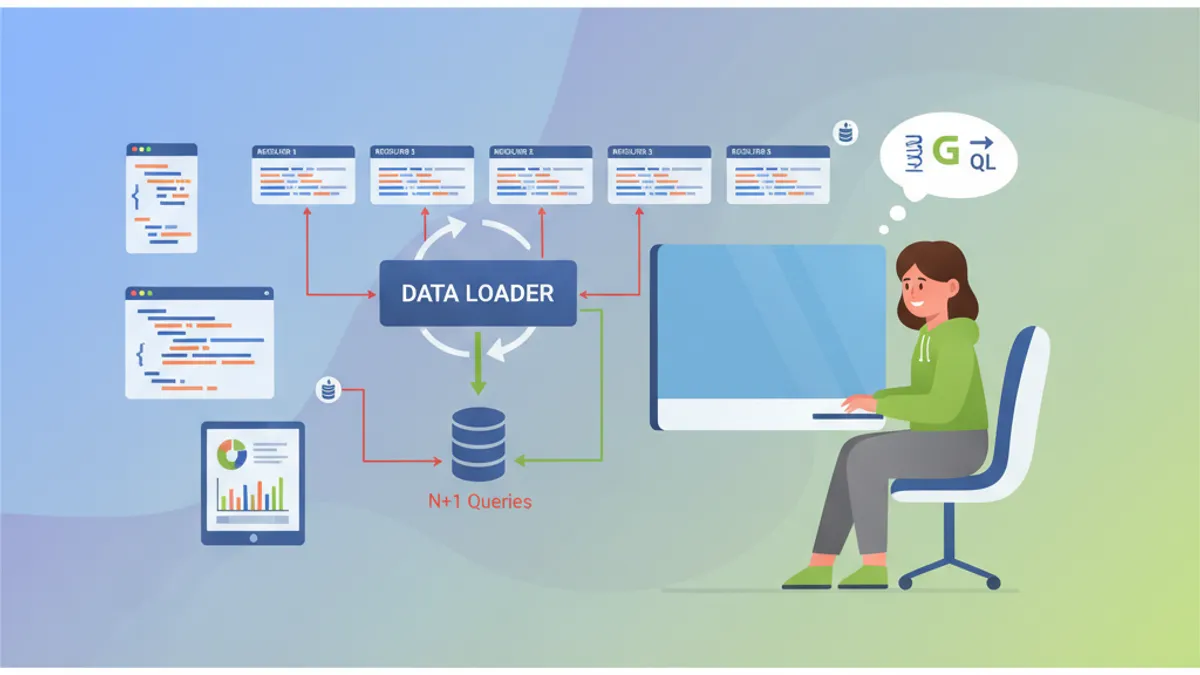
Spring for GraphQL upraszcza integrację GraphQL w aplikacjach Spring Boot. Ta technologia stała się niezbędna dla nowoczesnych API, a pytania rekrutacyjne na ten temat są coraz częstsze. Ten przewodnik obejmuje fundamentalne koncepcje: resolvery, DataLoadery, problem N+1 i zaawansowane wzorce.
Rekruterzy szczególnie sprawdzają zrozumienie problemu N+1 i wykorzystanie DataLoaderów. Te dwa tematy stanowią 60% pytań w rozmowach Spring GraphQL.
Czym jest Spring for GraphQL?
Spring for GraphQL jest oficjalnym następcą GraphQL Java Spring, natywnie zintegrowanym z frameworkiem Spring od wersji 2.7. Ta integracja przynosi kilka korzyści: wsparcie adnotacji Spring, integrację ze Spring Security oraz przezroczyste wykorzystanie WebFlux lub MVC.
Podstawowa konfiguracja wymaga jedynie zależności spring-boot-starter-graphql i schematu GraphQL.
dependencies {
    // Spring GraphQL starter ze Spring MVC
    implementation("org.springframework.boot:spring-boot-starter-graphql")
    implementation("org.springframework.boot:spring-boot-starter-web")

    // Dla testów GraphQL
    testImplementation("org.springframework.graphql:spring-graphql-test")
}
Schemat GraphQL znajduje się w src/main/resources/graphql/ z rozszerzeniem .graphqls.
# schema.graphqls
type Query {
    # Pobierz artykuł po identyfikatorze
    article(id: ID!): Article

    # Stronicowana lista artykułów
    articles(page: Int = 0, size: Int = 10): [Article!]!
}

type Article {
    id: ID!
    title: String!
    content: String!
    # Relacja z autorem
    author: Author!
    # Lista komentarzy
    comments: [Comment!]!
    createdAt: String!
}

type Author {
    id: ID!
    name: String!
    email: String!
    # Artykuły napisane przez tego autora
    articles: [Article!]!
}

type Comment {
    id: ID!
    content: String!
    author: Author!
    createdAt: String!
}
Ta architektura deklaruje typy i ich relacje. GraphQL automatycznie generuje dokumentację i waliduje zapytania po stronie serwera.
Jak działają Resolvery Spring GraphQL?
Resolvery stanowią serce wykonywania GraphQL. Każde pole schematu może mieć dedykowany resolver. Spring używa adnotacji @QueryMapping dla zapytań głównych i @SchemaMapping dla relacji.
@Controller
public class ArticleController {

    private final ArticleRepository articleRepository;
    private final AuthorRepository authorRepository;

    public ArticleController(ArticleRepository articleRepository,
                            AuthorRepository authorRepository) {
        this.articleRepository = articleRepository;
        this.authorRepository = authorRepository;
    }

    // Resolver dla Query.article(id)
    @QueryMapping
    public Article article(@Argument Long id) {
        return articleRepository.findById(id)
            .orElseThrow(() -> new ArticleNotFoundException(id));
    }

    // Resolver dla Query.articles(page, size)
    @QueryMapping
    public List<Article> articles(@Argument int page,
                                  @Argument int size) {
        Pageable pageable = PageRequest.of(page, size);
        return articleRepository.findAll(pageable).getContent();
    }

    // Resolver dla Article.author - wywoływany dla każdego artykułu
    @SchemaMapping(typeName = "Article", field = "author")
    public Author author(Article article) {
        return authorRepository.findById(article.getAuthorId())
            .orElseThrow(() -> new AuthorNotFoundException(article.getAuthorId()));
    }
}
Resolver author wykonuje się dla każdego zwróconego artykułu. Ta elastyczna architektura ładuje dane na żądanie, ale wprowadza problem N+1.
Kandydat, który implementuje resolver @SchemaMapping bez wzmianki o problemie N+1, demonstruje niekompletne zrozumienie GraphQL. Rekruterzy systematycznie oczekują tej analizy.
Czym jest Problem N+1 w GraphQL?
Problem N+1 pojawia się, gdy zapytanie GraphQL wyzwala N dodatkowych zapytań w celu załadowania relacji. Ten destrukcyjny wzorzec występuje systematycznie z podstawowymi resolverami.
Rozważmy zapytanie pobierające 50 artykułów wraz z ich autorami:
# Zapytanie GraphQL
query {
    articles(size: 50) {
        id
        title
        author {
            name
        }
    }
}
Z poprzednim resolverem to zapytanie wykonuje:
- 1 zapytanie dla 50 artykułów
- 50 zapytań do załadowania każdego autora indywidualnie
-- Zapytanie 1: pobranie artykułów
SELECT * FROM articles LIMIT 50

-- Zapytania 2-51: każdy autor indywidualnie
SELECT * FROM authors WHERE id = 1
SELECT * FROM authors WHERE id = 2
SELECT * FROM authors WHERE id = 3
-- ... 47 dodatkowych zapytań
To pomnożenie zapytań drastycznie pogarsza wydajność. Endpoint odpowiadający w 50ms może wzrosnąć do 2 sekund z N+1.
Jak działają DataLoadery?
DataLoadery grupują pojedyncze zapytania w żądania wsadowe. Zamiast ładować każdego autora oddzielnie, DataLoader zbiera wszystkie żądane ID i wykonuje pojedyncze zapytanie.
@Component
public class AuthorBatchLoader {

    private final AuthorRepository authorRepository;

    public AuthorBatchLoader(AuthorRepository authorRepository) {
        this.authorRepository = authorRepository;
    }

    // Metoda ładowania wsadowego
    public Mono<Map<Long, Author>> loadAuthors(Set<Long> authorIds) {
        // Pojedyncze zapytanie dla wszystkich autorów
        List<Author> authors = authorRepository.findAllById(authorIds);

        // Transformacja do Map dla szybkiego wyszukiwania
        Map<Long, Author> authorMap = authors.stream()
            .collect(Collectors.toMap(Author::getId, Function.identity()));

        return Mono.just(authorMap);
    }
}
Rejestracja DataLoadera odbywa się przez BatchLoaderRegistry w dedykowanej konfiguracji.
@Configuration
public class GraphQLConfig {

    @Bean
    public BatchLoaderRegistry batchLoaderRegistry(
            AuthorBatchLoader authorBatchLoader) {

        return registry -> {
            // Rejestracja DataLoadera dla autorów
            registry.forTypePair(Long.class, Author.class)
                .registerMappedBatchLoader((authorIds, env) ->
                    authorBatchLoader.loadAuthors(authorIds));
        };
    }
}
Zmodyfikowany resolver używa teraz DataLoadera zamiast bezpośredniego dostępu:
@Controller
public class ArticleController {

    private final ArticleRepository articleRepository;

    public ArticleController(ArticleRepository articleRepository) {
        this.articleRepository = articleRepository;
    }

    @QueryMapping
    public List<Article> articles(@Argument int page,
                                  @Argument int size) {
        Pageable pageable = PageRequest.of(page, size);
        return articleRepository.findAll(pageable).getContent();
    }

    // Zoptymalizowany resolver z DataLoaderem
    @SchemaMapping(typeName = "Article", field = "author")
    public CompletableFuture<Author> author(
            Article article,
            DataLoader<Long, Author> authorDataLoader) {

        // DataLoader automatycznie grupuje wywołania
        return authorDataLoader.load(article.getAuthorId());
    }
}
Z tym podejściem to samo zapytanie dla 50 artykułów wykonuje tylko 2 zapytania SQL:
-- Zapytanie 1: pobranie artykułów
SELECT * FROM articles LIMIT 50

-- Zapytanie 2: wszyscy autorzy naraz
SELECT * FROM authors WHERE id IN (1, 2, 3, 4, 5, ..., 50)
Gotowy na rozmowy o Spring Boot?
Ćwicz z naszymi interaktywnymi symulatorami, flashcards i testami technicznymi.
Jak zaimplementować DataLoader z kontekstem?
Zaawansowane DataLoadery czasami wymagają dodatkowego kontekstu, takiego jak identyfikator tenanta dla aplikacji multi-tenant lub filtry bezpieczeństwa.
@Component
public class SecuredAuthorBatchLoader {

    private final AuthorRepository authorRepository;
    private final SecurityContextHolder securityContext;

    public SecuredAuthorBatchLoader(AuthorRepository authorRepository,
                                    SecurityContextHolder securityContext) {
        this.authorRepository = authorRepository;
        this.securityContext = securityContext;
    }

    public Mono<Map<Long, Author>> loadAuthorsForTenant(
            Set<Long> authorIds,
            BatchLoaderEnvironment env) {

        // Pobranie kontekstu GraphQL
        GraphQLContext context = env.getContext();
        String tenantId = context.get("tenantId");

        // Zapytanie filtrowane po tenancie
        List<Author> authors = authorRepository
            .findAllByIdInAndTenantId(authorIds, tenantId);

        Map<Long, Author> authorMap = authors.stream()
            .collect(Collectors.toMap(Author::getId, Function.identity()));

        return Mono.just(authorMap);
    }
}
Konfiguracja kontekstu odbywa się przez interceptor WebGraphQL:
@Component
public class TenantInterceptor implements WebGraphQlInterceptor {

    @Override
    public Mono<WebGraphQlResponse> intercept(
            WebGraphQlRequest request,
            Chain chain) {

        // Wyodrębnienie tenanta z nagłówków
        String tenantId = request.getHeaders()
            .getFirst("X-Tenant-ID");

        // Dodanie do kontekstu GraphQL
        request.configureExecutionInput((input, builder) ->
            builder.graphQLContext(ctx ->
                ctx.put("tenantId", tenantId)
            ).build()
        );

        return chain.next(request);
    }
}
Jakie są różnice między @QueryMapping a @SchemaMapping?
To klasyczne pytanie rozmowy weryfikuje zrozumienie hierarchii resolverów.
| Adnotacja | Użycie | Odpowiednik |
|---|---|---|
@QueryMapping | Pola główne typu Query | @SchemaMapping(typeName = "Query") |
@MutationMapping | Pola główne typu Mutation | @SchemaMapping(typeName = "Mutation") |
@SubscriptionMapping | Subskrypcje czasu rzeczywistego | @SchemaMapping(typeName = "Subscription") |
@SchemaMapping | Wszystkie pola dowolnego typu | Forma generyczna |
@Controller
public class EquivalenceDemo {

    // Te dwie deklaracje są równoważne
    @QueryMapping
    public Article article(@Argument Long id) {
        return findArticle(id);
    }

    @SchemaMapping(typeName = "Query", field = "article")
    public Article articleEquivalent(@Argument Long id) {
        return findArticle(id);
    }

    // Dla zagnieżdżonych pól działa tylko @SchemaMapping
    @SchemaMapping(typeName = "Article", field = "author")
    public Author author(Article article) {
        return findAuthor(article.getAuthorId());
    }

    // Alternatywna składnia z typem jako parametrem
    @SchemaMapping
    public Author author(Article article) {
        // Spring wnioskuje typeName = "Article" z parametru
        return findAuthor(article.getAuthorId());
    }
}
Jak obsługiwać mutacje z walidacją?
Mutacje GraphQL modyfikują dane. Spring GraphQL integruje się z Bean Validation do walidacji danych wejściowych.
# schema.graphqls
type Mutation {
    createArticle(input: CreateArticleInput!): Article!
    updateArticle(id: ID!, input: UpdateArticleInput!): Article!
    deleteArticle(id: ID!): Boolean!
}

input CreateArticleInput {
    title: String!
    content: String!
    authorId: ID!
}

input UpdateArticleInput {
    title: String
    content: String
}
Kontroler używa @Valid do uruchomienia walidacji:
@Controller
public class ArticleMutationController {

    private final ArticleService articleService;

    public ArticleMutationController(ArticleService articleService) {
        this.articleService = articleService;
    }

    @MutationMapping
    public Article createArticle(@Argument @Valid CreateArticleInput input) {
        // Walidacja wykonuje się automatycznie
        return articleService.create(input);
    }

    @MutationMapping
    public Article updateArticle(@Argument Long id,
                                 @Argument @Valid UpdateArticleInput input) {
        return articleService.update(id, input);
    }

    @MutationMapping
    public boolean deleteArticle(@Argument Long id) {
        articleService.delete(id);
        return true;
    }
}public record CreateArticleInput(
@NotBlank(message = "Tytuł jest wymagany")
@Size(min = 5, max = 200, message = "Tytuł musi mieć od 5 do 200 znaków")
String title,
@NotBlank(message = "Treść jest wymagana")
@Size(min = 100, message = "Treść musi mieć co najmniej 100 znaków")
String content,
@NotNull(message = "Autor jest wymagany")
Long authorId
) {}Błędy walidacji automatycznie zwracają strukturalny błąd GraphQL ze ścieżką nieprawidłowego pola. Spring GraphQL formatuje te błędy zgodnie ze specyfikacją GraphQL.
Jak optymalizować zapytania z @BatchMapping?
Adnotacja @BatchMapping upraszcza tworzenie DataLoaderów bezpośrednio w kontrolerach. To podejście unika jawnej konfiguracji BatchLoaderRegistry.
@Controller
public class OptimizedArticleController {

    private final ArticleRepository articleRepository;
    private final AuthorRepository authorRepository;
    private final CommentRepository commentRepository;

    public OptimizedArticleController(ArticleRepository articleRepository,
                                      AuthorRepository authorRepository,
                                      CommentRepository commentRepository) {
        this.articleRepository = articleRepository;
        this.authorRepository = authorRepository;
        this.commentRepository = commentRepository;
    }

    @QueryMapping
    public List<Article> articles(@Argument int page,
                                  @Argument int size) {
        return articleRepository.findAll(PageRequest.of(page, size))
            .getContent();
    }

    // BatchMapping dla autorów - przetwarza wszystkie artykuły naraz
    @BatchMapping
    public Map<Article, Author> author(List<Article> articles) {
        // Zbieranie unikalnych ID autorów
        Set<Long> authorIds = articles.stream()
            .map(Article::getAuthorId)
            .collect(Collectors.toSet());

        // Pojedyncze zapytanie dla wszystkich autorów
        Map<Long, Author> authorsById = authorRepository
            .findAllById(authorIds)
            .stream()
            .collect(Collectors.toMap(Author::getId, Function.identity()));

        // Powiązanie artykuł -> autor
        return articles.stream()
            .collect(Collectors.toMap(
                Function.identity(),
                article -> authorsById.get(article.getAuthorId())
            ));
    }

    // BatchMapping dla komentarzy
    @BatchMapping
    public Map<Article, List<Comment>> comments(List<Article> articles) {
        List<Long> articleIds = articles.stream()
            .map(Article::getId)
            .toList();

        // Wsadowe pobranie komentarzy
        List<Comment> allComments = commentRepository
            .findByArticleIdIn(articleIds);

        // Grupowanie po artykule
        Map<Long, List<Comment>> commentsByArticle = allComments.stream()
            .collect(Collectors.groupingBy(Comment::getArticleId));

        return articles.stream()
            .collect(Collectors.toMap(
                Function.identity(),
                article -> commentsByArticle
                    .getOrDefault(article.getId(), List.of())
            ));
    }
}
@BatchMapping oferuje bardziej zwięzłą składnię niż ręczna konfiguracja DataLoaderów, zachowując te same gwarancje wydajności.
Jak testować Resolvery GraphQL?
Spring GraphQL dostarcza GraphQlTester do pisania ekspresyjnych i czytelnych testów.
@SpringBootTest
@AutoConfigureGraphQlTester
class ArticleControllerTest {

    @Autowired
    private GraphQlTester graphQlTester;

    @Test
    void shouldReturnArticleById() {
        // Given: dokument GraphQL
        String query = """
            query {
                article(id: 1) {
                    id
                    title
                    author {
                        name
                    }
                }
            }
            """;

        // When & Then
        graphQlTester.document(query)
            .execute()
            .path("article.id").entity(String.class).isEqualTo("1")
            .path("article.title").entity(String.class).isNotEmpty()
            .path("article.author.name").entity(String.class).isNotEmpty();
    }

    @Test
    void shouldCreateArticle() {
        String mutation = """
            mutation {
                createArticle(input: {
                    title: "Nowy tytuł",
                    content: "Treść testowa wystarczająco długa, aby spełnić ograniczenia walidacji",
                    authorId: 1
                }) {
                    id
                    title
                }
            }
            """;

        graphQlTester.document(mutation)
            .execute()
            .path("createArticle.id").entity(String.class).isNotEmpty()
            .path("createArticle.title").entity(String.class)
                .isEqualTo("Nowy tytuł");
    }

    @Test
    void shouldReturnErrorForInvalidInput() {
        String mutation = """
            mutation {
                createArticle(input: {
                    title: "",
                    content: "krótka",
                    authorId: 1
                }) {
                    id
                }
            }
            """;

        graphQlTester.document(mutation)
            .execute()
            .errors()
            .expect(error -> error.getMessage()
                .contains("Tytuł jest wymagany"));
    }

    @Test
    void shouldHandleVariables() {
        String query = """
            query GetArticle($id: ID!) {
                article(id: $id) {
                    id
                    title
                }
            }
            """;

        graphQlTester.document(query)
            .variable("id", 42)
            .execute()
            .path("article").valueIsNull();
    }
}
Zacznij ćwiczyć!
Sprawdź swoją wiedzę z naszymi symulatorami rozmów i testami technicznymi.
Jak obsługiwać subskrypcje czasu rzeczywistego?
Subskrypcje umożliwiają przesyłanie danych w czasie rzeczywistym do klientów przez WebSocket.
# schema.graphqls
type Subscription {
    articleCreated: Article!
    commentAdded(articleId: ID!): Comment!
}@Controller
public class SubscriptionController {
private final Sinks.Many<Article> articleSink =
Sinks.many().multicast().onBackpressureBuffer();
private final Sinks.Many<Comment> commentSink =
Sinks.many().multicast().onBackpressureBuffer();
@SubscriptionMapping
public Flux<Article> articleCreated() {
return articleSink.asFlux();
}
@SubscriptionMapping
public Flux<Comment> commentAdded(@Argument Long articleId) {
return commentSink.asFlux()
.filter(comment -> comment.getArticleId().equals(articleId));
}
// Metoda wywoływana przy tworzeniu artykułu
public void publishArticle(Article article) {
articleSink.tryEmitNext(article);
}
// Metoda wywoływana przy dodawaniu komentarza
public void publishComment(Comment comment) {
commentSink.tryEmitNext(comment);
}
}Konfiguracja WebSocket wymaga dodatkowej zależności:
dependencies {
    implementation("org.springframework.boot:spring-boot-starter-websocket")
}@Configuration
public class WebSocketConfig {
@Bean
public ServerEndpointExporter serverEndpointExporter() {
return new ServerEndpointExporter();
}
}Jakie są najlepsze praktyki bezpieczeństwa GraphQL?
Bezpieczeństwo GraphQL wymaga wielu warstw ochrony przed atakami denial-of-service i nieautoryzowanym dostępem.
@Configuration
@EnableMethodSecurity
public class SecurityConfig {

    @Bean
    public SecurityFilterChain filterChain(HttpSecurity http) throws Exception {
        return http
            .authorizeHttpRequests(auth -> auth
                // Chroniony endpoint GraphQL
                .requestMatchers("/graphql").authenticated()
                // GraphiQL dostępny tylko w dev
                .requestMatchers("/graphiql").permitAll()
            )
            .oauth2ResourceServer(oauth2 -> oauth2.jwt(Customizer.withDefaults()))
            .build();
    }
}@Controller
public class SecuredArticleController {
private final ArticleRepository articleRepository;
public SecuredArticleController(ArticleRepository articleRepository) {
this.articleRepository = articleRepository;
}
// Dostęp ograniczony do uwierzytelnionych użytkowników
@QueryMapping
@PreAuthorize("isAuthenticated()")
public List<Article> articles(@Argument int page,
@Argument int size) {
return articleRepository.findAll(PageRequest.of(page, size))
.getContent();
}
// Tylko administratorzy mogą usuwać
@MutationMapping
@PreAuthorize("hasRole('ADMIN')")
public boolean deleteArticle(@Argument Long id) {
articleRepository.deleteById(id);
return true;
}
// Drobnoziarnista weryfikacja: tylko autor może modyfikować
@MutationMapping
@PreAuthorize("@articleSecurity.isAuthor(#id, authentication)")
public Article updateArticle(@Argument Long id,
@Argument UpdateArticleInput input) {
return articleRepository.findById(id)
.map(article -> {
article.setTitle(input.title());
article.setContent(input.content());
return articleRepository.save(article);
})
.orElseThrow();
}
}Ochrona przed złożonymi zapytaniami:
# application.yml
spring:
  graphql:
    schema:
      introspection:
        # Wyłączenie introspekcji w produkcji
enabled: false@Component
public class QueryComplexityInstrumentation extends SimplePerformantInstrumentation {
private static final int MAX_COMPLEXITY = 100;
@Override
public InstrumentationState createState(InstrumentationCreateStateParameters parameters) {
return new ComplexityState();
}
@Override
public InstrumentationContext<ExecutionResult> beginExecution(
InstrumentationExecutionParameters parameters,
InstrumentationState state) {
int complexity = calculateComplexity(parameters.getDocument());
if (complexity > MAX_COMPLEXITY) {
throw new GraphQLException(
"Zapytanie zbyt złożone: " + complexity + " (max: " + MAX_COMPLEXITY + ")"
);
}
return super.beginExecution(parameters, state);
}
}Podsumowanie
Spring for GraphQL oferuje eleganckie wprowadzenie GraphQL do ekosystemu Spring. Opanowanie resolverów, DataLoaderów i zarządzania problemem N+1 stanowi podstawę wiedzy oczekiwaną w rozmowach kwalifikacyjnych.
Lista kontrolna rozmowy Spring GraphQL:
- ✅ Wyjaśnić rolę adnotacji
@QueryMapping,@MutationMappingi@SchemaMapping - ✅ Opisać problem N+1 i jego wpływ na wydajność GraphQL
- ✅ Zaimplementować DataLoader z
@BatchMappinglub BatchLoaderRegistry - ✅ Walidować dane wejściowe mutacji za pomocą Bean Validation
- ✅ Zabezpieczyć resolvery za pomocą
@PreAuthorizei Spring Security - ✅ Testować resolvery za pomocą GraphQlTester
- ✅ Skonfigurować subskrypcje dla funkcji czasu rzeczywistego
- ✅ Chronić API przed zbyt złożonymi zapytaniami
Znajdziesz błąd w Spring Boot?
Prawdziwy fragment kodu, ukryty błąd, jedna próba dziennie. Bez konta, żeby spróbować.

Autor:
Anthony Fillion-MailletZałożyciel SharpSkill
Programista fullstack od ponad 10 lat. Prowadzi SharpSkill i odpowiada za wszystko, co się tu ukazuje.
Zaktualizowano 4 maja 2026
Tagi
Udostępnij
Powiązane artykuły

Rozmowa Spring Boot: Propagacja Transakcji
Opanuj propagację transakcji w Spring Boot: REQUIRED, REQUIRES_NEW, NESTED i więcej. 12 pytań rekrutacyjnych z kodem i typowymi pułapkami.

Rozwiązania problemu N+1 w Spring Data JPA: Fetch Join, EntityGraph i Hibernate 7.4
Kompletny przewodnik po wykrywaniu i usuwaniu problemu N+1 w Spring Data JPA. Fetch join, @EntityGraph, batch fetching i strategie wydajności zapytań.
30 Pytań Rekrutacyjnych ze Spring Boot: Kompletny Przewodnik dla Programistów Java
Przygotuj się do rozmów ze Spring Boot dzięki 30 kluczowym pytaniom o auto-konfigurację, startery, Spring Data JPA, bezpieczeństwo i testy. Zaktualizowano dla Spring Boot 4.x.