2026年版 Angular Forms完全ガイド:Reactive Forms、バリデーション、技術面接対策
Angular Reactive Formsの型付きFormBuilder、カスタムバリデーター、非同期バリデーション、FormArrayをマスターしましょう。技術面接でよく出る質問とSignal Formsのプレビューも解説します。
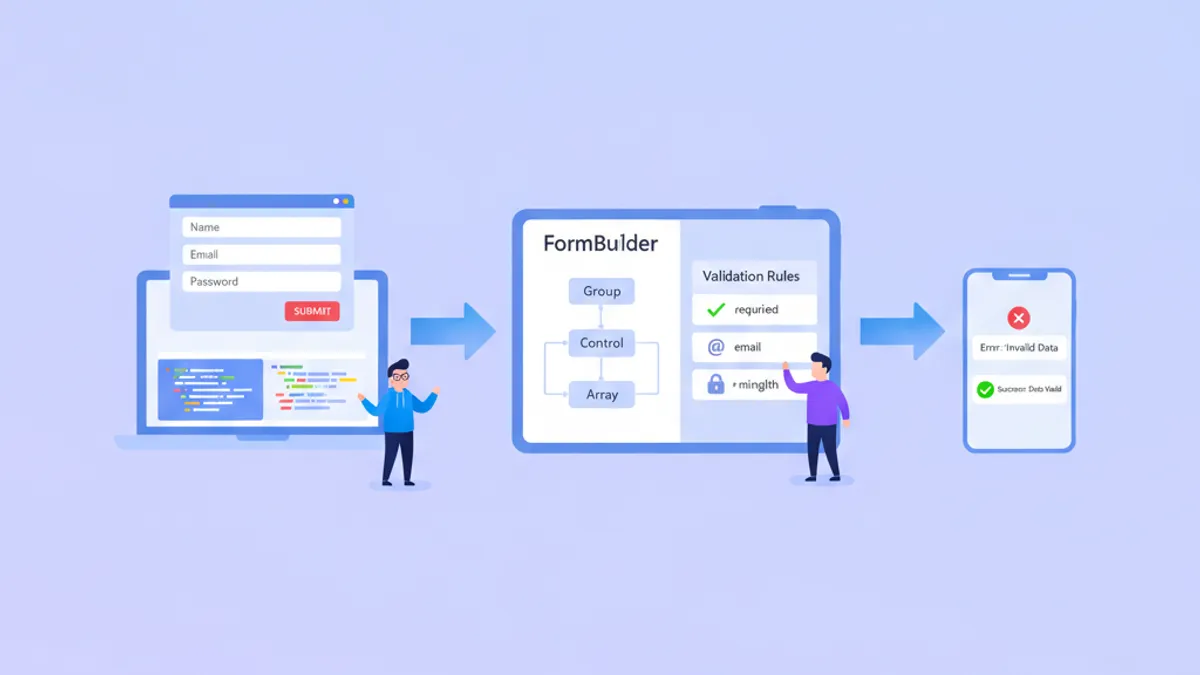
Angular Reactive Formsは2026年においてもエンタープライズフォーム開発の中核を担っており、シンプルなログイン画面から複雑なマルチステップウィザードまで、型安全でテスト可能なフォーム処理を実現しています。Angular 19の洗練されたAPIと開発者プレビュー段階にあるSignal Formsの両方を理解することで、技術面接において大きなアドバンテージを得ることができます。
Reactive Formsはモデル駆動型のアプローチを採用しており、TypeScriptでフォーム構造を定義します。これにより、バリデーションのタイミング、動的なフィールド操作、DOMに依存しない包括的なユニットテストを完全にコントロールできます。
Reactive Formsのアーキテクチャを理解する
Reactive Formsは不変データモデルで動作します。すべての変更は新しい状態オブジェクトを生成するため、フォームの動作が予測可能でデバッグしやすくなります。中核となる構成要素はFormControl、FormGroup、FormArrayであり、すべてFormBuilderサービスを通じて管理されます。
フォームモデル(TypeScript)とテンプレート(HTML)の分離により、バリデーションロジックを独立してテストできます。このアーキテクチャ上の選択により、バックエンドの設定に基づく動的なフォーム生成も可能になります。これはエンタープライズアプリケーションでよく求められる要件です。
import { Component, inject } from '@angular/core';
import { FormBuilder, Validators, ReactiveFormsModule } from '@angular/forms';
import { CommonModule } from '@angular/common';

@Component({
  selector: 'app-user-profile',
  standalone: true,
  imports: [CommonModule, ReactiveFormsModule],
  template: `
    <form [formGroup]="profileForm" (ngSubmit)="onSubmit()">
      <input formControlName="email" placeholder="Email" />
      <input formControlName="name" placeholder="Full Name" />
      <button type="submit" [disabled]="profileForm.invalid">Save</button>
    </form>
  `
})
export class UserProfileComponent {
  private fb = inject(FormBuilder);

  // Typed form with NonNullable configuration
  profileForm = this.fb.nonNullable.group({
    email: ['', [Validators.required, Validators.email]],
    name: ['', [Validators.required, Validators.minLength(2)]]
  });

  onSubmit() {
    // profileForm.getRawValue() returns typed object
    const data = this.profileForm.getRawValue();
    console.log(data.email, data.name); // Both are string, not string | null
  }
}
Angular 14で導入されたnonNullableフォームビルダー設定により、フォーム値からnull許容型が排除されます。これによりコードベース全体でnullチェックが減少し、フォーム処理がより予測可能になります。
複雑なビジネスルールのためのカスタムバリデーター
組み込みバリデーターは一般的なシナリオをカバーしますが、実際のアプリケーションではカスタムバリデーションロジックが必要になります。Angularは同期バリデーターと非同期バリデーターの両方をサポートしており、非同期バリデーターはユーザー名の利用可否など、サーバーサイドのチェックに有用です。
import { AbstractControl, ValidationErrors, ValidatorFn } from '@angular/forms';

// Synchronous validator: password strength
export function strongPassword(): ValidatorFn {
  return (control: AbstractControl): ValidationErrors | null => {
    const value = control.value;
    if (!value) return null;

    const hasUpperCase = /[A-Z]/.test(value);
    const hasLowerCase = /[a-z]/.test(value);
    const hasNumber = /\d/.test(value);
    const hasSpecial = /[!@#$%^&*]/.test(value);
    const isLongEnough = value.length >= 8;

    const valid = hasUpperCase && hasLowerCase && hasNumber && hasSpecial && isLongEnough;

    return valid ? null : {
      strongPassword: {
        hasUpperCase,
        hasLowerCase,
        hasNumber,
        hasSpecial,
        isLongEnough
      }
    };
  };
}

// Cross-field validator: password confirmation
export function passwordMatch(): ValidatorFn {
  return (group: AbstractControl): ValidationErrors | null => {
    const password = group.get('password')?.value;
    const confirm = group.get('confirmPassword')?.value;

    return password === confirm ? null : { passwordMismatch: true };
  };
}
バリデーターから返されるエラーオブジェクトには、どの具体的なチェックが失敗したかについての詳細情報を含めることができます。これにより、「パスワードが無効です」のような汎用的なフィードバックではなく、きめ細かいエラーメッセージを表示できます。
@Component({
  selector: 'app-registration',
  standalone: true,
  imports: [CommonModule, ReactiveFormsModule],
  template: `
    <form [formGroup]="registrationForm" (ngSubmit)="register()">
      <input formControlName="password" type="password" />
      <input formControlName="confirmPassword" type="password" />

      @if (registrationForm.errors?.['passwordMismatch']) {
        <span class="error">Passwords do not match</span>
      }
    </form>
  `
})
export class RegistrationComponent {
  private fb = inject(FormBuilder);

  registrationForm = this.fb.nonNullable.group({
    password: ['', [Validators.required, strongPassword()]],
    confirmPassword: ['', Validators.required]
  }, { validators: passwordMatch() }); // Group-level validator
}グループレベルのバリデーターはFormGroup全体を受け取るため、複数のフィールドにまたがるバリデーションルールが可能になります。このパターンは、日付範囲、条件付き要件、関連フィールドの組み合わせなど、フィールド間ロジックを必要とするあらゆるシナリオに適用できます。
非同期バリデーターとデバウンス処理
非同期バリデーターはUIをブロックせずにサーバーサイドのチェックを実行します。一般的なユースケースには、ユニークなユーザー名の検証、メールアドレスの利用可否の確認、プロモーションコードのAPI検証などがあります。
import { AbstractControl, AsyncValidatorFn, ValidationErrors } from '@angular/forms';
import { Observable, of, timer } from 'rxjs';
import { map, switchMap, catchError } from 'rxjs/operators';
import { inject } from '@angular/core';
import { UserService } from '../services/user.service';

export function uniqueEmailValidator(userService: UserService): AsyncValidatorFn {
  return (control: AbstractControl): Observable<ValidationErrors | null> => {
    if (!control.value) {
      return of(null);
    }

    // Debounce 300ms to avoid excessive API calls
    return timer(300).pipe(
      switchMap(() => userService.checkEmailAvailable(control.value)),
      map(isAvailable => isAvailable ? null : { emailTaken: true }),
      catchError(() => of(null)) // Fail open on network errors
    );
  };
}timerを使用したデバウンスパターンにより、キーストロークごとのAPIリクエストを防止できます。switchMapオペレーターは新しい入力が到着すると保留中のリクエストをキャンセルし、最新の値のみがサーバーチェックをトリガーすることを保証します。
@Component({
  selector: 'app-signup',
  standalone: true,
  imports: [CommonModule, ReactiveFormsModule],
  template: `
    <form [formGroup]="signupForm">
      <input formControlName="email" />
      @if (emailControl.pending) {
        <span>Checking availability...</span>
      }
      @if (emailControl.errors?.['emailTaken']) {
        <span class="error">This email is already registered</span>
      }
    </form>
  `
})
export class SignupComponent {
  private fb = inject(FormBuilder);
  private userService = inject(UserService);

  signupForm = this.fb.nonNullable.group({
    email: ['',
      [Validators.required, Validators.email],
      [uniqueEmailValidator(this.userService)] // Async validator as 3rd argument
    ]
  });

  get emailControl() {
    return this.signupForm.controls.email;
  }
}非同期バリデーターは同期バリデーターが通過した後に実行されるため、不正な入力に対する不要なAPI呼び出しを回避できます。pending状態は進行中のバリデーションを示し、テンプレートでローディングインジケーターを表示できます。
Angularの面接対策はできていますか?
インタラクティブなシミュレーター、flashcards、技術テストで練習しましょう。
FormArrayによる動的フォーム
FormArrayは動的なフォームコントロールのコレクションを可能にします。複数の住所、電話番号、注文明細の追加などのシナリオに不可欠です。配列の各要素は単純なFormControlでもネストしたFormGroupでも構いません。
import { Component, inject } from '@angular/core';
import { FormBuilder, FormArray, ReactiveFormsModule, Validators } from '@angular/forms';
import { CommonModule } from '@angular/common';

@Component({
  selector: 'app-order-form',
  standalone: true,
  imports: [CommonModule, ReactiveFormsModule],
  template: `
    <form [formGroup]="orderForm">
      <div formArrayName="items">
        @for (item of itemsArray.controls; track item; let i = $index) {
          <div [formGroupName]="i" class="item-row">
            <input formControlName="productName" placeholder="Product" />
            <input formControlName="quantity" type="number" />
            <input formControlName="price" type="number" />
            <button type="button" (click)="removeItem(i)">Remove</button>
          </div>
        }
      </div>
      <button type="button" (click)="addItem()">Add Item</button>
      <p>Total: {{ calculateTotal() | currency }}</p>
    </form>
  `
})
export class OrderFormComponent {
  private fb = inject(FormBuilder);

  orderForm = this.fb.group({
    items: this.fb.array<FormGroup>([])
  });

  get itemsArray(): FormArray {
    return this.orderForm.get('items') as FormArray;
  }

  addItem() {
    const itemGroup = this.fb.nonNullable.group({
      productName: ['', Validators.required],
      quantity: [1, [Validators.required, Validators.min(1)]],
      price: [0, [Validators.required, Validators.min(0)]]
    });
    this.itemsArray.push(itemGroup);
  }

  removeItem(index: number) {
    this.itemsArray.removeAt(index);
  }

  calculateTotal(): number {
    return this.itemsArray.controls.reduce((sum, control) => {
      const quantity = control.get('quantity')?.value || 0;
      const price = control.get('price')?.value || 0;
      return sum + (quantity * price);
    }, 0);
  }
}trackを使用した@forブロックにより、Angularはリスト全体を再レンダリングするのではなく、変更されたアイテムのみを効率的に更新します。大規模な配列の場合、この最適化によりパフォーマンスが大幅に向上します。
Signal Forms:Angularのフォーム処理の未来
Angular 20で開発者プレビューとしてSignal Formsが導入され、Reactive Formsに代わるシグナルベースの選択肢が提供されました。Angular 21.2では段階的な移行を可能にするSignalFormControlラッパーが追加され、従来のFormGroups内でシグナルベースのフィールドを使用できるようになりました。
import { Component, signal, computed } from '@angular/core';
import { SignalFormControl } from '@angular/forms';

@Component({
  selector: 'app-signal-form',
  standalone: true,
  template: `
    <input [value]="name()" (input)="name.set($any($event.target).value)" />
    <p>Character count: {{ charCount() }}</p>
    <p>Valid: {{ isValid() }}</p>
  `
})
export class SignalFormExampleComponent {
  // Signal-based form state
  name = signal('');

  // Computed values automatically update
  charCount = computed(() => this.name().length);
  isValid = computed(() => this.name().length >= 3);
}
Signal FormsではvalueChangesのサブスクリプションが不要になります。computedシグナルがバリデーション状態と依存する値を自動的に導出し、Angularのゾーンレス変更検出と統合されます。まだ開発者プレビュー段階ですが、Signal FormsはAngularのフォーム管理が向かう方向性を示しています。
主な違いは、Reactive FormsがRxJS Observablesを状態変更に使用するのに対し、Signal FormsはAngular Signalsを使用する点です。2026年後半以降に開始する新規プロジェクトでは、安定版に達した時点でSignal Formsが推奨されるアプローチになる可能性があります。
Angular Formsに関するよくある面接質問
技術面接ではフォーム処理の知識が頻繁にテストされます。シニアレベルの候補者を区別するパターンを紹介します。
Q: フォーム状態のリセットとフォームコントロールのリセットの違いは何ですか?
// Reset entire form to initial values
this.form.reset(); // All controls become null (or default if nonNullable)

// Reset with specific values
this.form.reset({ email: '', name: 'Guest' });

// Reset single control
this.form.controls.email.reset();

// Mark as pristine without changing values
this.form.markAsPristine();
this.form.markAsUntouched();
Q: setValueとpatchValueの違いは何ですか?
// setValue requires ALL controls - throws if missing any
this.form.setValue({ email: 'a@b.com', name: 'Test' }); // Must include both

// patchValue allows partial updates
this.form.patchValue({ email: 'a@b.com' }); // Name unchanged
Q: 送信時に値を失わずにフォームコントロールを無効化するにはどうすればよいですか?
this.form.controls.email.disable();
console.log(this.form.value); // { name: 'Test' } - email missing

// Use getRawValue() to include disabled controls
console.log(this.form.getRawValue()); // { email: 'a@b.com', name: 'Test' }
これらのニュアンスを理解することで実務経験を示すことができます。面接官は、特に無効化されたコントロールと部分的な更新に関するフォーム状態管理のエッジケースの認識を探ることがよくあります。
Angularフォーム関連の面接質問をより深く練習するには、Reactive Forms面接質問モジュールとTemplate-Driven Formsモジュールを参照してください。
本番環境フォームのベストプラクティス
本番アプリケーションでは基本的なフォーム作成を超えたパターンが必要です。エラー処理、アクセシビリティ、パフォーマンスがスケール時に重要になります。
import { Component, input } from '@angular/core';
import { AbstractControl, ValidationErrors } from '@angular/forms';

@Component({
  selector: 'app-form-errors',
  standalone: true,
  template: `
    @if (control().invalid && (control().dirty || control().touched)) {
      <div class="errors" role="alert">
        @if (control().errors?.['required']) {
          <span>This field is required</span>
        }
        @if (control().errors?.['email']) {
          <span>Enter a valid email address</span>
        }
        @if (control().errors?.['minlength']) {
          <span>Minimum {{ control().errors?.['minlength'].requiredLength }} characters</span>
        }
      </div>
    }
  `
})
export class FormErrorsComponent {
  control = input.required<AbstractControl>();
}role="alert"属性により、スクリーンリーダーがエラーメッセージが表示されたときにそれを読み上げます。dirtyとtouchedの両方をチェックすることで、ユーザー操作前にエラーが表示されるのを防ぎ、フラストレーションを与える早すぎるバリデーションフィードバックを回避します。
クロスフィールドバリデーションや非同期チェックを含む包括的なフォームバリデーションパターンについては、Angular RxJS基礎モジュールでフォーム状態管理の基盤となるObservableパターンを解説しています。
まとめ
- Reactive Formsは複雑なエンタープライズアプリケーションに適した型安全でテスト可能なフォーム処理を提供します
- カスタムバリデーターは同期的なビジネスルールと、組み込みデバウンスを備えた非同期サーバーサイドチェックの両方をサポートします
- FormArrayは
trackによる効率的な変更追跡を備えた動的フォームコレクションを可能にします - Signal Forms(開発者プレビュー)はAngularのゾーンレスな未来に沿ったよりシンプルなリアクティブモデルを提供します
- 本番フォームにはアクセシビリティへの配慮と再利用可能なエラー表示コンポーネントが必要です
setValueとpatchValue、getRawValue()とvalueの違いを理解することでシニア候補者を区別できます
今すぐ練習を始めましょう!
面接シミュレーターと技術テストで知識をテストしましょう。

執筆
Anthony Fillion-Mailletフルスタック開発者、SharpSkill 創業者
10 年以上フルスタック開発に携わっています。SharpSkill を運営し、ここで公開される内容に責任を負っています。
2026年8月17日 更新
共有
関連記事

NgRx Signal Store vs 従来型NgRx:2026年の選択ガイド
NgRx Signal Storeと従来のNgRxを比較し、2026年のAngularプロジェクトに最適な状態管理ソリューションの選択方法を解説します。

Angular 2026のRxJS:演算子・Subject・Signals相互運用
Angular 2026のRxJS:本番で使われる演算子、Subject、Signalsとの相互運用パターンを、面接で最も問われるポイントとあわせて習得します。

Angular @defer 完全ガイド 2026:宣言的遅延読み込みと面接対策
Angular @deferブロックによる宣言的遅延読み込みの仕組み、トリガー種類、プリフェッチ戦略、インクリメンタルハイドレーション、面接質問を詳しく解説します。